In this guide
Google is giving eligible university and college students one free year of Google AI Plus in more than 140 countries outside the US, and US students get a free year of Google AI Pro. You claim it at one.google.com/ai-student (or from gemini.google/students) by verifying that you’re a student and adding a payment method. The offer must be redeemed by 31 December 2026, and after the free year it renews at the normal price unless you cancel.
Everything below comes from Google’s own announcement and student pages as of November 2026. Offers change, so the sign-up page is the final word for your country.
What you get
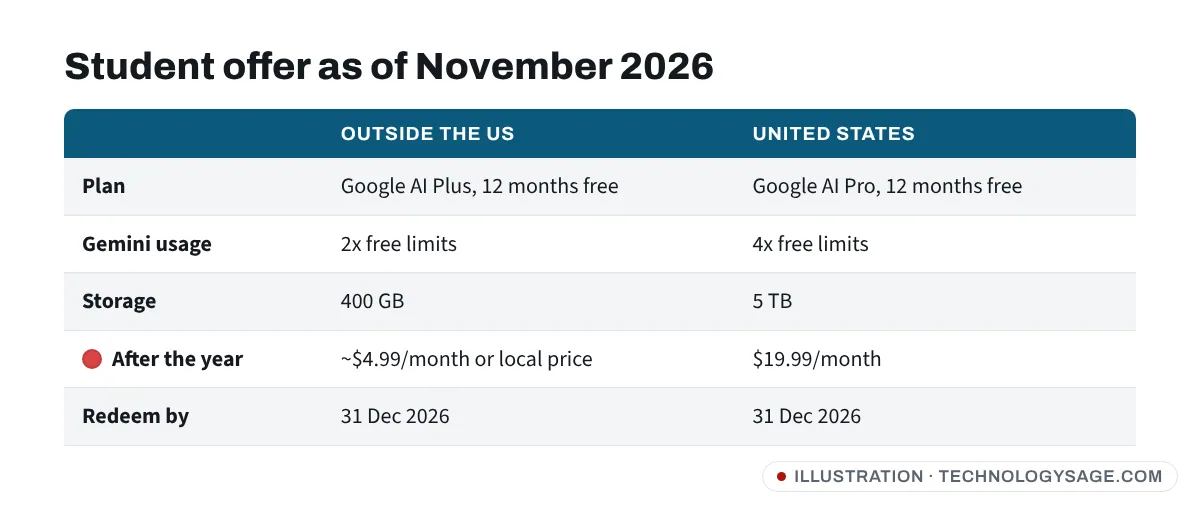
| Outside the US | United States | |
|---|---|---|
| Plan | Google AI Plus, free for 12 months | Google AI Pro, free for 12 months |
| Gemini usage | 2x the free limits | 4x the free limits |
| Storage | 400 GB across Drive, Gmail and Photos | 5 TB |
| After the year | About $4.99/month or local equivalent (e.g. £4.49 in the UK) | $19.99/month |
| Redeem by | 31 December 2026 | 31 December 2026 |
Google’s student pages also mention higher limits for study tools such as Study Notebooks, flashcards, practice quizzes and Deep Research. Some of these study features are rolling out to all Gemini users anyway, so the free year mainly gets you higher limits and more storage.
Which countries are included?
Google says the AI Plus student offer covers eligible students in over 140 markets where Google AI Plus is available, except the US (which gets the AI Pro offer instead), Bolivia, Albania, Canada, Macau, Hong Kong and Tunisia.
- Africa: Google’s Africa blog (20 August 2026) says the offer launched in 27 African countries. Nigeria, Kenya and Ghana are among the countries where Google lists AI Plus as available.
- India: Google India announced a free year of AI Plus for college students in India.
- Pakistan, the Philippines, Bangladesh, Indonesia, Vietnam: Google lists AI Plus as available in these countries, so students there should see the offer if they meet the other rules.
- UK: Google’s UK student page offers the free year of AI Plus.
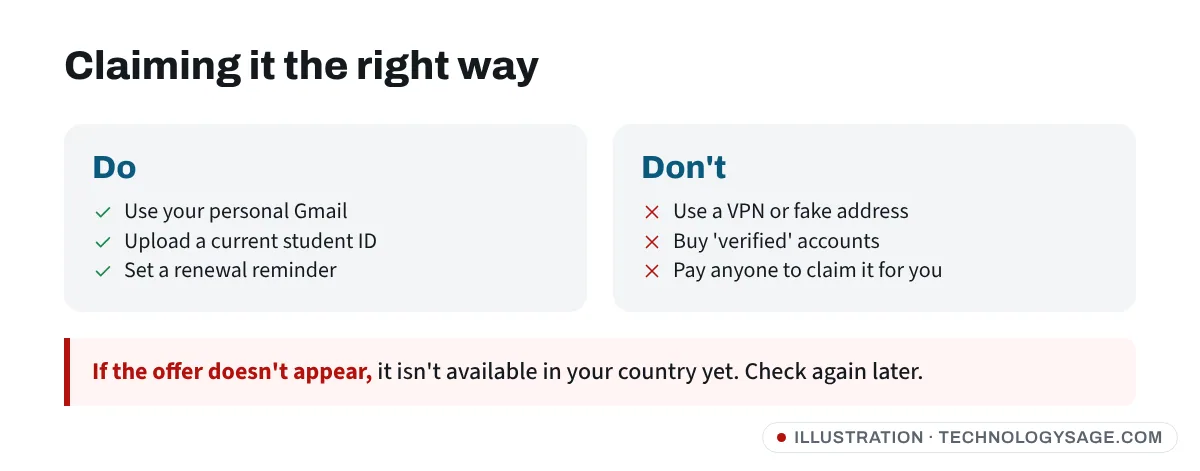
The simplest test: if Google AI Plus is sold in your country, the student offer should appear when you open the claim page while signed in. If it doesn’t appear, the offer isn’t available in your country yet. Don’t use a VPN or a fake address to get it: Google verifies student status and your payment country, and a mismatch can get the offer cancelled or your account restricted.
Who is eligible
- 18 or older.
- Enrolled at an eligible university, college or other higher-education institution. In Nigeria, local coverage of the offer includes universities, polytechnics and colleges of education.
- Using a personal Google Account. School-issued accounts can’t claim it.
- Able to verify student status. Google uses SheerID for verification, and you must re-verify every year to keep student benefits.
- Students who used the 2025 student trial and have since expired can claim again.
How to claim it, step by step
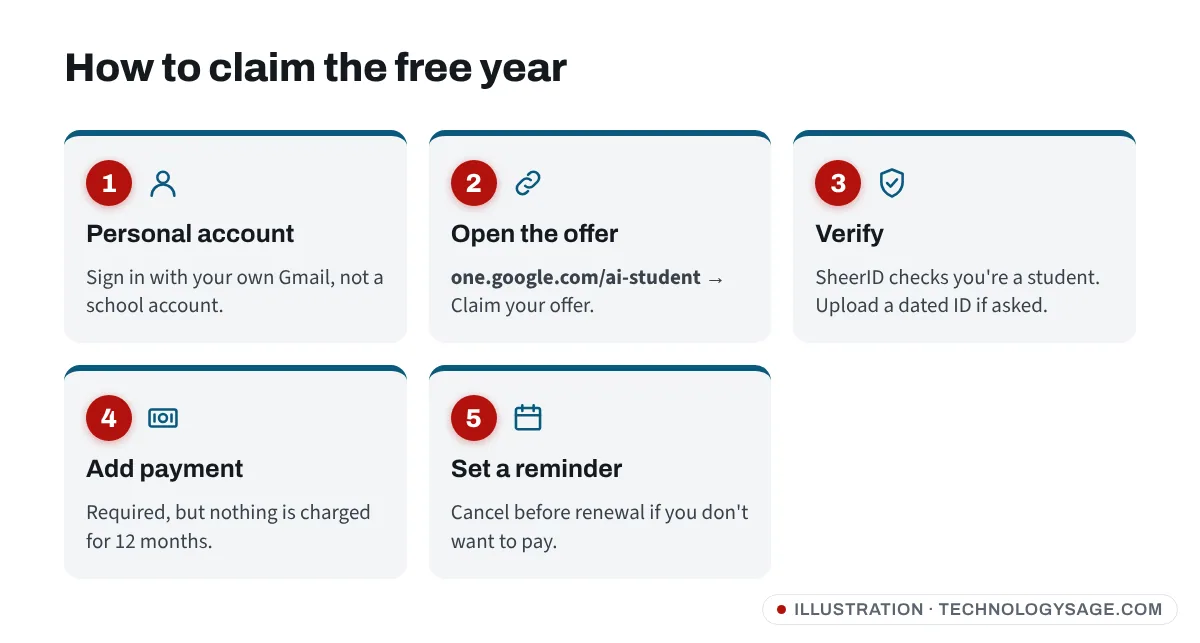
- On your phone or laptop, open one.google.com/ai-student (or gemini.google/students and tap Claim your offer). Sign in with your personal Gmail account.
- Tap Get offer or Claim your offer. You’ll be sent to a SheerID verification page.
- Enter your school name, full name, date of birth and student details exactly as they appear on your student records.
- If SheerID can’t confirm you instantly, it asks for a document, such as your student ID card, admission letter, fee receipt or current timetable showing your name, the school and a current date. Upload a clear photo.
- When you’re verified, add a payment method. Google requires one even though the first year is free.
- Confirm. Open the Gemini app; your plan should show AI Plus (or AI Pro in the US) under your profile picture.
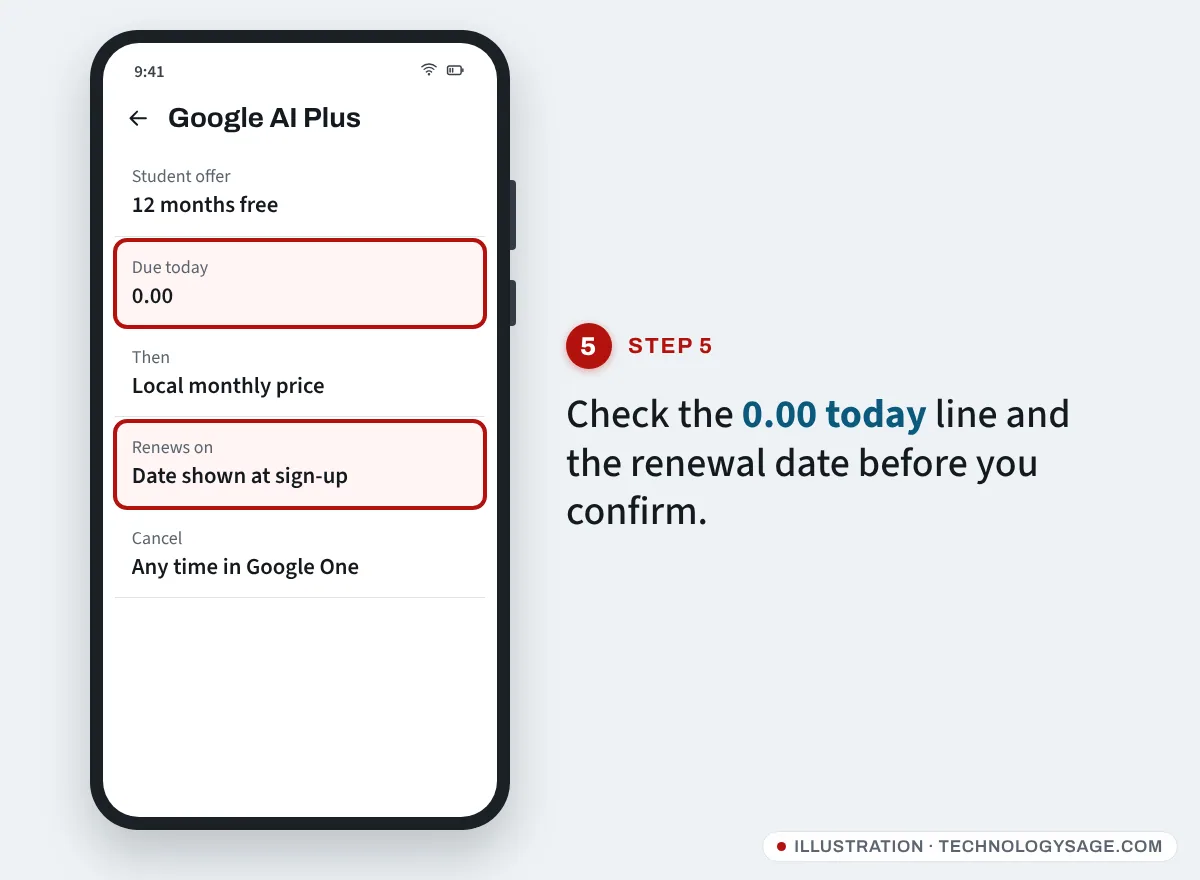
The catch: the card and auto-renewal
The free year renews automatically. Google’s terms say AI Plus then charges $4.99 a month or the local equivalent (AI Pro is $19.99 in the US) unless you cancel. Prices and taxes vary by country.
- Set a reminder a week before the renewal date shown at sign-up.
- Check your card works for online subscriptions. Some debit cards are blocked for international payments; ask your bank before you start rather than trying card after card.
- You can cancel any time. The cancellation screen tells you when your benefits end. Open one.google.com, go to Settings → Manage membership, and choose Cancel membership. If you subscribed through the Play Store, open Play Store → your profile → Payments & subscriptions → Subscriptions.
- Storage after cancelling: if you’ve filled more than the free 15 GB, you won’t lose files, but Gmail and uploads stop working until you’re back under the limit. Clear space before the year ends.
If it doesn’t work
- “This offer isn’t available”: AI Plus may not be sold in your country, or you’re signed in to a school or work account. Switch to your personal Gmail.
- SheerID rejected you: your document must show your name, your institution and a current date (this academic year). Retake the photo in good light with all four corners visible.
- Payment declined: try another card in your name, or ask your bank to allow international online payments. Don’t buy “verified student accounts” or pay strangers on Telegram to claim it for you; that’s a scam and a quick way to lose your Google account.
- Already have a paid Google One plan: read the confirmation screen carefully before accepting, so you know what happens to your current plan and its billing.
Is it worth it? Gemini vs other free AI for students
For most students, yes: higher Gemini limits plus 400 GB of storage is useful for notes, recordings and assignments. The free Gemini app still works without it; see is Gemini free for the differences.
Other options: ChatGPT’s free plan has no cap on everyday text chats (see ChatGPT free plan limits), and GitHub offers verified students free Copilot for coding. Our comparison of the best free AI chatbot covers which suits which job.
Use it honestly. AI is great for explaining a topic, quizzing you or checking your understanding, but submitting AI-written work as your own breaks most universities’ rules. If a detector wrongly flags your own work, see what to do when an AI detector flags your writing. Our older guides on writing a research paper and the consequences of plagiarism are still relevant.
Safety note: Google never asks you to pay a fee to “unlock” the student offer, and never asks for your password or a sign-in code by WhatsApp or phone. Only claim it on one.google.com or gemini.google.
FAQ
Is Gemini free for students in Nigeria, Kenya or India?
Yes, eligible students aged 18+ can claim a free year of Google AI Plus in these countries until 31 December 2026, according to Google’s announcements. You need to verify your student status and add a payment method.
Do I need a credit card for the Gemini student offer?
Google requires a valid payment method at sign-up. A debit card that works for online payments is fine. You aren’t charged during the free year, but you will be after it unless you cancel.
Can I get Google AI Pro free as a student outside the US?
As of November 2026, the free AI Pro year is for US students. Students elsewhere get AI Plus. Some countries also have a discounted AI Pro and YouTube Premium student bundle.
What happens after the free year?
The plan renews at the regular price. If you cancel, you go back to the free Gemini app and 15 GB of storage.
I’m under 18. Can I get it?
No. The offer is for students aged 18 and over.