In this guide
- What’s free and what’s limited
- How to see your limits and when they reset
- “You’ve hit the free plan limit”: what it means now
- “Chat memory full” and “context window full”
- How to get more out of the free plan
- Is it worth upgrading?
- Other things to know about the free plan
- If ChatGPT stops working (not a limit)
- FAQ
As of November 2026, the ChatGPT free plan has no cap on everyday text chats. Since August 2026, free users chat with GPT-5.6 Luna without the old “10 messages every 5 hours” limit, subject only to abuse-prevention safeguards. What is still limited are the heavier tools: image creation, file and image uploads, voice, deep research and data analysis. When you hit one of those, ChatGPT shows when it resets, and you can see your allowance in Settings → Usage.
Many pages still quote 2025 numbers, which no longer apply. OpenAI changes limits often, so treat the details below as a snapshot.
What’s free and what’s limited
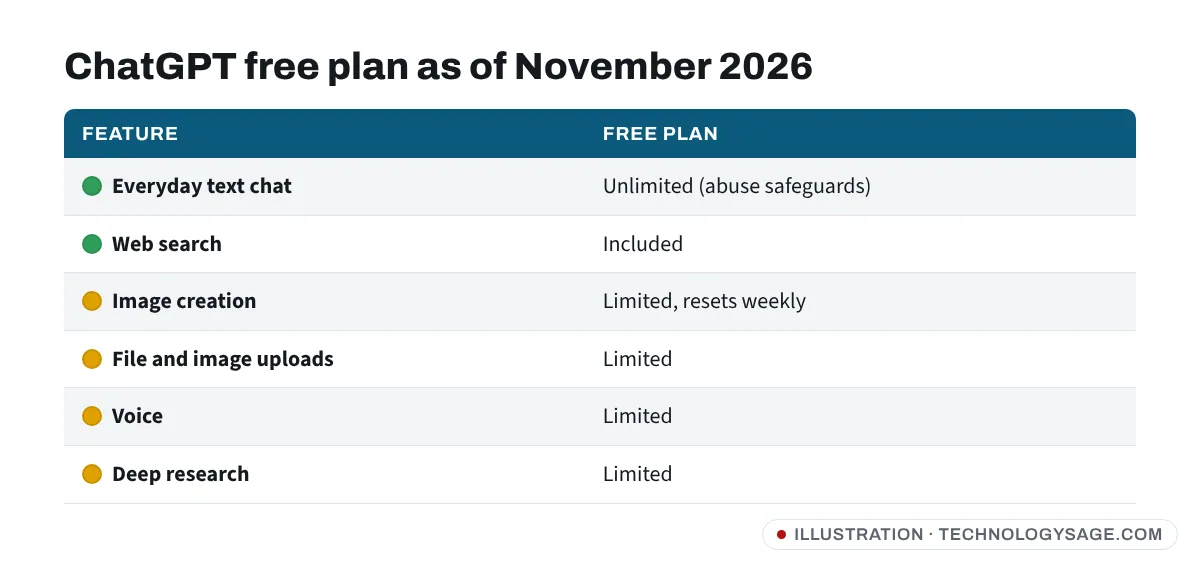
| Feature | Free plan (Nov 2026) |
|---|---|
| Everyday text chat | Unlimited (abuse safeguards apply) |
| Model | GPT-5.6 Luna |
| Think (longer reasoning) | Available: tap + → Think |
| Web search | Included |
| Image creation | Limited, no fixed number published |
| File and image uploads | Limited |
| Voice | Limited |
| Deep research | Limited |
| Library storage | 500 MB |
| Custom GPTs | Can use others’ GPTs, can’t create your own |
OpenAI’s free-tier FAQ says data analysis, uploads, image creation and voice “have their own limits”, and it doesn’t publish exact numbers. The real figure is whatever your app shows.
How to see your limits and when they reset
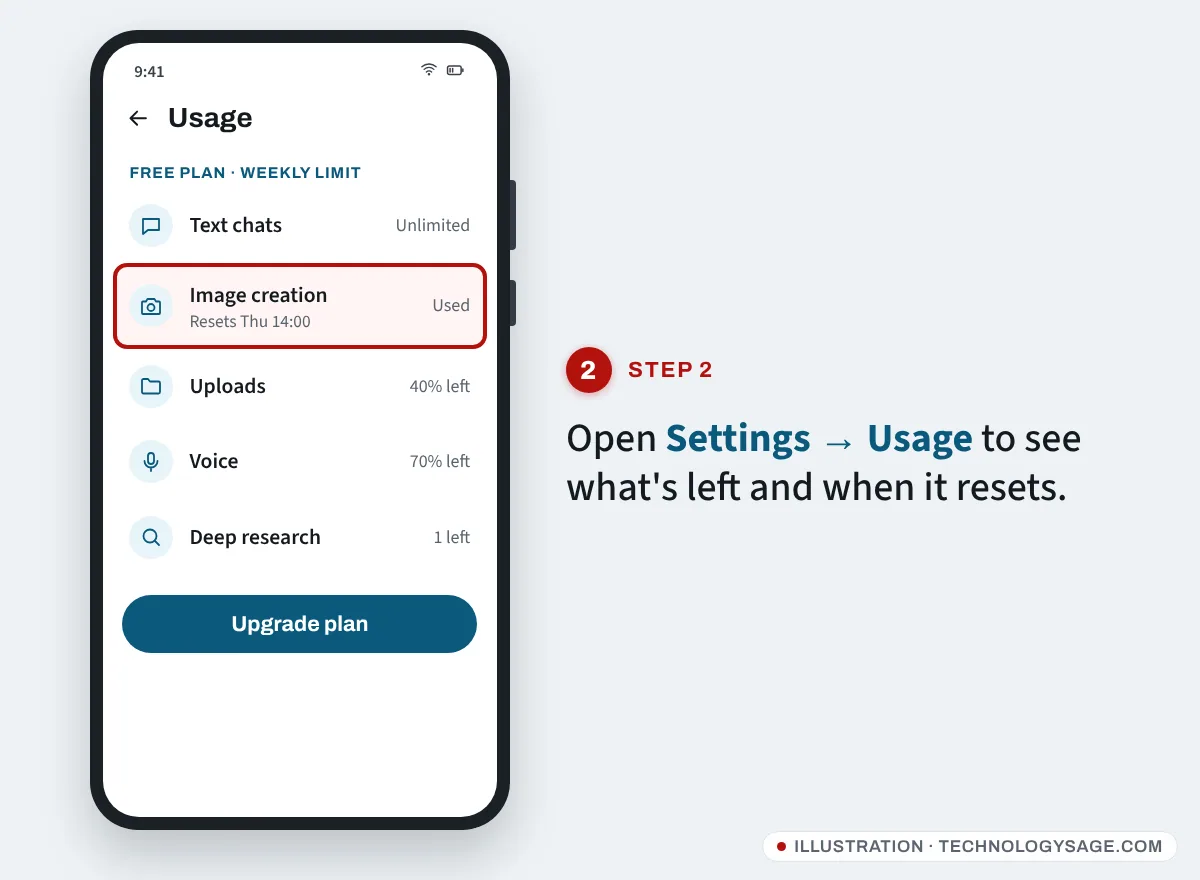
- In the ChatGPT app, tap your profile picture or the menu (two lines), then Settings.
- Open Usage.
- You’ll see how much of your allowance you’ve used for the limited tools and when it resets.
In August 2026, free accounts moved from a rolling five-hour window to a single weekly limit for the heavier tools, according to Engadget’s coverage. The limit message itself also shows a reset time, for example “You’ve reached your limit for image creation. Try again after Thursday 14:00.”
“You’ve hit the free plan limit”: what it means now
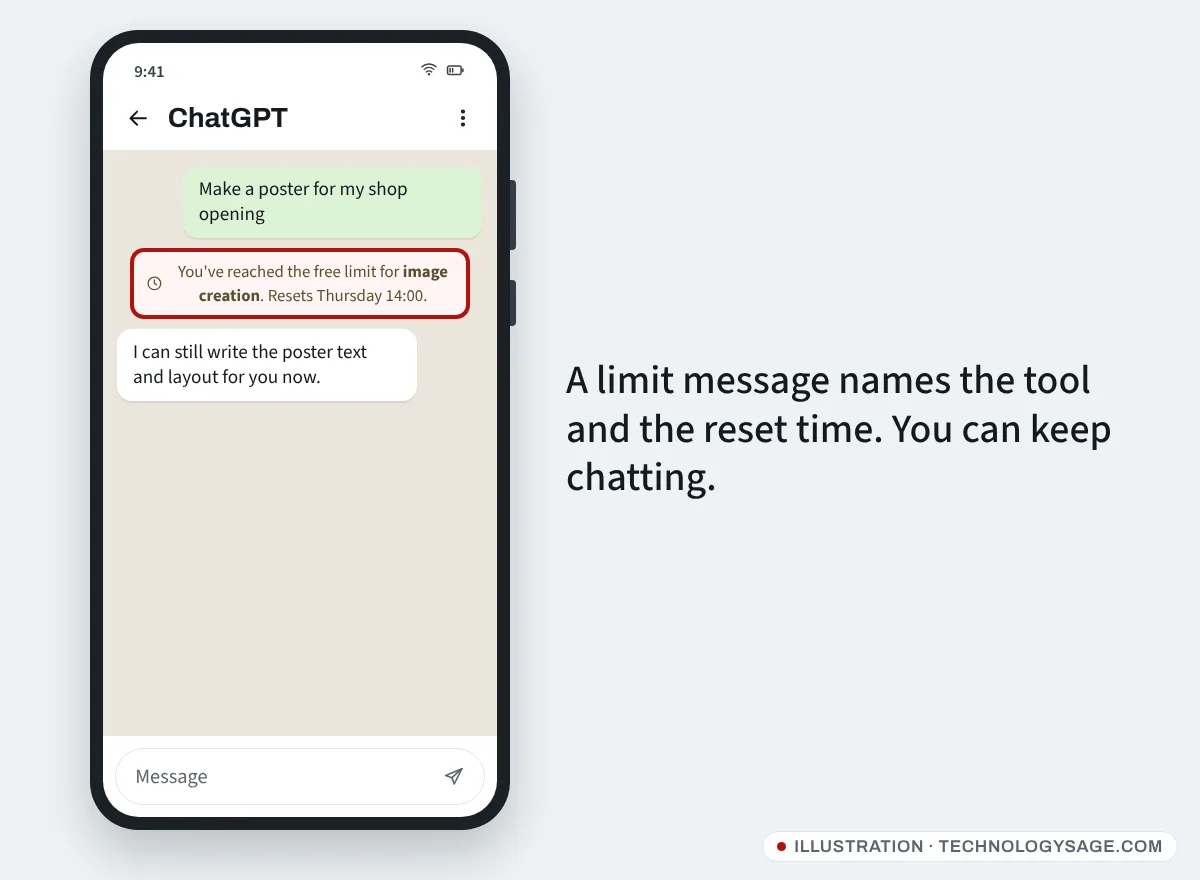
If you see a limit message, it’s almost always about a tool, not plain chatting:
- Image creation limit: you’ve used this week’s image allowance. You can still chat. See ChatGPT image limit for free alternatives.
- Upload limit: you’ve attached too many files or photos. Paste the text instead, or wait for the reset.
- Voice limit: switch to typing until it resets.
- Deep research limit: ask normal questions with web search instead.
- “Too many requests” or “unusual activity”: this is the abuse safeguard. It usually clears after a short break. Turning off VPNs (shared free VPN addresses are often flagged; see are free VPNs safe?) and avoiding automated tools helps.
Upgrading to Go, Plus or a higher plan resets your free limits immediately, according to OpenAI’s FAQ.
“Chat memory full” and “context window full”
These two messages confuse a lot of people:
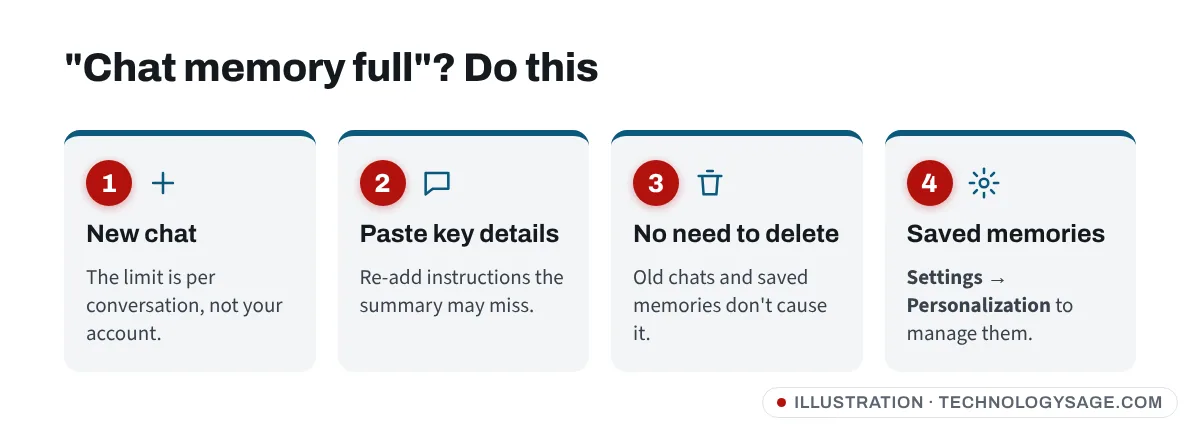
- “Context window full” / “Chat memory full” applies to one conversation. The chat has become too long for the model to keep it all in mind. Start a new chat. ChatGPT may offer a summary to carry over, but the summary can miss earlier instructions, so paste anything important again.
- You don’t need to delete your saved memories or old chats to fix this. OpenAI’s FAQ says this message isn’t about your account’s memory.
- Saved memories (things ChatGPT remembers about you between chats) are separate. Free users get less memory than paid users. To review them, go to Settings → Personalization, then Manage memories and delete ones you don’t need.
How to get more out of the free plan
- Start new chats for new topics. Long chats hit the context limit sooner and get slower.
- Use Think only when needed. Tap + → Think for hard maths, planning or code, and normal mode for everything else.
- Compress files before uploading. Paste the relevant pages of a PDF rather than the whole thing.
- Spread heavy tools across the week if you’re on the weekly limit.
- Use another free assistant for images or long research when ChatGPT’s allowance runs out. Gemini, Copilot and Meta AI all have free tiers; see our best free AI chatbot comparison.
Is it worth upgrading?
As of November 2026, OpenAI lists ChatGPT Go at $8 a month in the US (cheaper local prices in many countries, including India), and Plus at $20 a month. Go gives more uploads, image creation, voice and memory, and may show ads; Plus adds advanced reasoning models, projects and more deep research. See ChatGPT Go vs Plus for a full comparison. Be wary of “free Plus” offers on WhatsApp and Telegram; how to get ChatGPT Plus for free covers the legitimate ways.
Other things to know about the free plan
- Ads: free users in some countries may see sponsored suggestions below answers. OpenAI says they don’t appear on sensitive topics such as health.
- Training: free chats can be used to improve OpenAI’s models. To opt out, go to Settings → Data controls and turn off Improve the model for everyone.
- Save data: text chats use very little mobile data; images, voice and uploads use much more. See how to conserve internet data.
- Don’t share secrets: never paste passwords, OTP codes, bank details or ID numbers into any chatbot.
If ChatGPT stops working (not a limit)
If you see errors without a limit message, the problem may be your connection or OpenAI’s servers. Check ChatGPT not working, and if your connection is the issue, our guide to Wi-Fi connected but no internet helps.
Safety note: OpenAI doesn’t sell “unlimited ChatGPT” through WhatsApp sellers, Telegram channels or shared accounts. Buying a shared login is against OpenAI’s terms and an easy way to lose money or your chat history. Upgrade only inside the app or on chatgpt.com.
FAQ
How many messages can I send on ChatGPT free?
As of November 2026, everyday text chats are unlimited on the free plan, subject to abuse safeguards. Tools such as images, uploads and voice have separate limits.
When does the ChatGPT free limit reset?
ChatGPT shows the exact reset time in the limit message and in Settings → Usage. Since August 2026, free accounts have a weekly limit for heavier tools.
Why do I still see “10 messages every 5 hours”?
That was the GPT-5 launch limit in 2025. OpenAI removed text chat limits for Free and Go accounts in August 2026.
Does deleting chats reset my limit?
No. Limits are tied to your account and time, not the number of saved chats.
Is ChatGPT free on WhatsApp?
OpenAI has offered ChatGPT through WhatsApp in the past; see ChatGPT WhatsApp number for the current status.