In this guide
Yes, Galaxy AI is still free in 2026. Samsung’s original promise only ran “until the end of 2025”, but in early 2026 it changed the wording to: “Galaxy AI basic features provided by Samsung are free.” The same note warns that “enhanced” Samsung AI features and all third-party AI features may cost money. In November 2026, reports say Samsung has started testing a paid Galaxy AI Premium tier, but as of this writing it hasn’t been launched or priced officially.
So if you use features like Live Translate, Note Assist, Photo Assist or Interpreter on your Galaxy phone today, you don’t pay for them, and Samsung says the basic ones will stay free.
What Samsung officially says
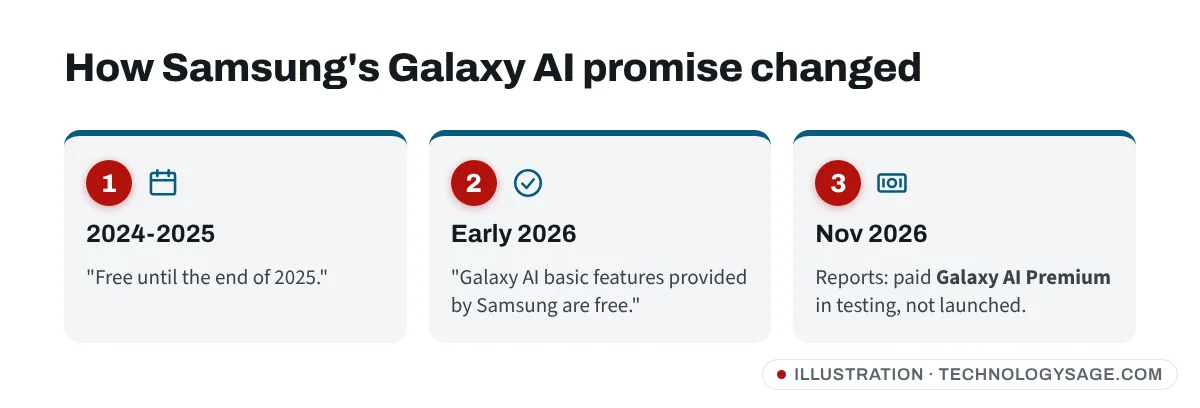
- 2024-2025: Samsung said Galaxy AI features would be free “until the end of 2025”. This caused a lot of worry that a fee would start in January 2026.
- Early 2026: Samsung’s support pages changed to: “Galaxy AI basic features provided by Samsung are free. Any Samsung enhanced AI features and all third party AI features are subject to different terms and may be subject to fees.” The basic features are listed under “Advanced intelligence” in Samsung’s Services Terms and Conditions.
- November 2026: SamMobile and other sites reported that Samsung is testing a paid Galaxy AI Premium subscription, with code pointing to about $4.99 a month or $47.99 a year. Samsung has not announced it, and the reports say testers who pay during the test would be refunded. Prices and features could change before any launch.
You may still find older Samsung country pages that mention the end-2025 date. Those haven’t all been updated; the “basic features are free” wording on Samsung’s current support pages is the one to go by.
Which Galaxy AI features are free?
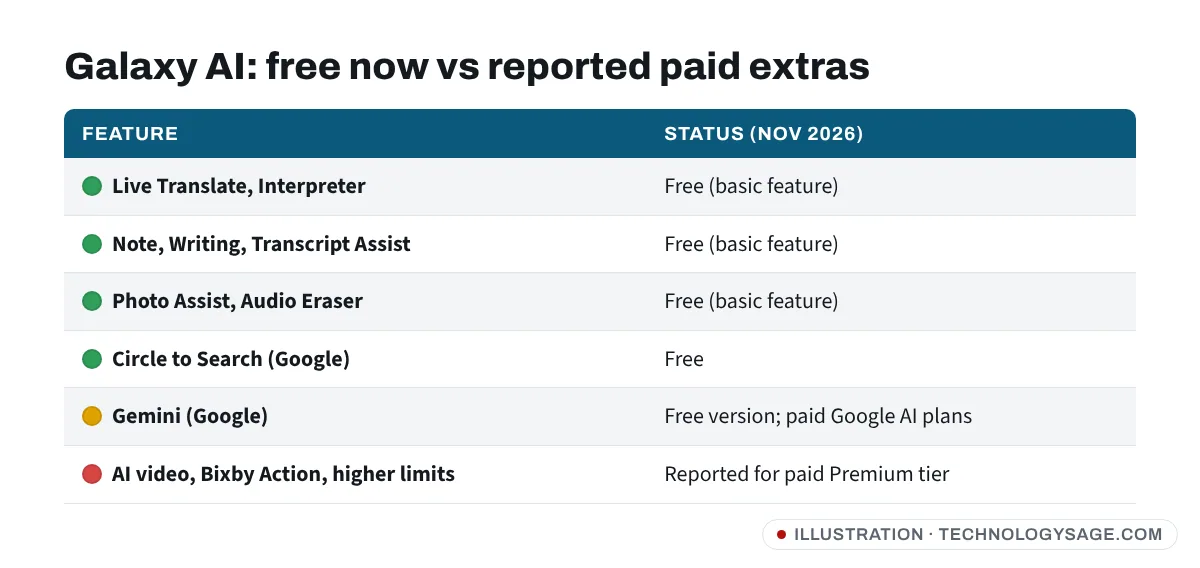
Samsung lists these among Galaxy AI features (availability depends on your model and One UI version):
- Live Translate for phone calls, Interpreter for face-to-face conversations, and Chat Assist for translating and rewording messages.
- Writing Assist and Note Assist in Samsung Notes (summaries, formatting, translation).
- Transcript Assist in Voice Recorder.
- Photo Assist: Generative Edit (move or erase objects), AI edit suggestions, Portrait Studio.
- Audio Eraser for removing background noise from videos.
- Browsing Assist in Samsung Internet (summaries and translation).
- Drawing Assist, Now Brief and Now Bar on newer One UI versions.
Reports on the Premium test say standard features such as Now Brief, Browsing Assist, Photo Assist and Smart Capture stay in the free tier, while things like AI video generation, Bixby Action automation, a Daily Briefing and higher usage limits would be paid. Treat that list as unconfirmed until Samsung announces it.
What already costs extra (or may)
- Third-party AI. Circle to Search and Gemini come from Google, not Samsung. Circle to Search is free. Gemini has a free version, and Google sells Google AI Plus, Pro and Ultra plans for higher limits and features such as video generation. Some Galaxy flagships have come with a Google AI trial; check your phone’s offers or the Gemini app. See is Gemini free for what Google charges.
- Usage limits. Cloud-based features like Generative Edit can have fair-use limits even when free.
- Future “enhanced” features. New Samsung AI tools may launch as paid extras.
Which phones have Galaxy AI?
According to Samsung’s support pages (US list, November 2026), Galaxy AI works on:
- Galaxy S26, S25 and S24 series, including FE models.
- Galaxy Z Fold and Z Flip from the Fold6/Flip6 onwards; older Fold5/Flip5/Fold4/Flip4 got it via software update.
- Galaxy S23 and S22 series (via update, with fewer features).
- Several Galaxy Tab S models and some newer Galaxy A 5G phones and tablets.
Galaxy A phones such as the A56 and A36 get a smaller set of AI features that Samsung sometimes calls Awesome Intelligence. The exact list varies by country and model, so check Settings on your phone. If you’re choosing a new phone partly for AI features, see which Samsung Galaxy A phone to buy. You need One UI 6.1 or later; Now Brief needs One UI 7.
How to see and manage Galaxy AI on your phone
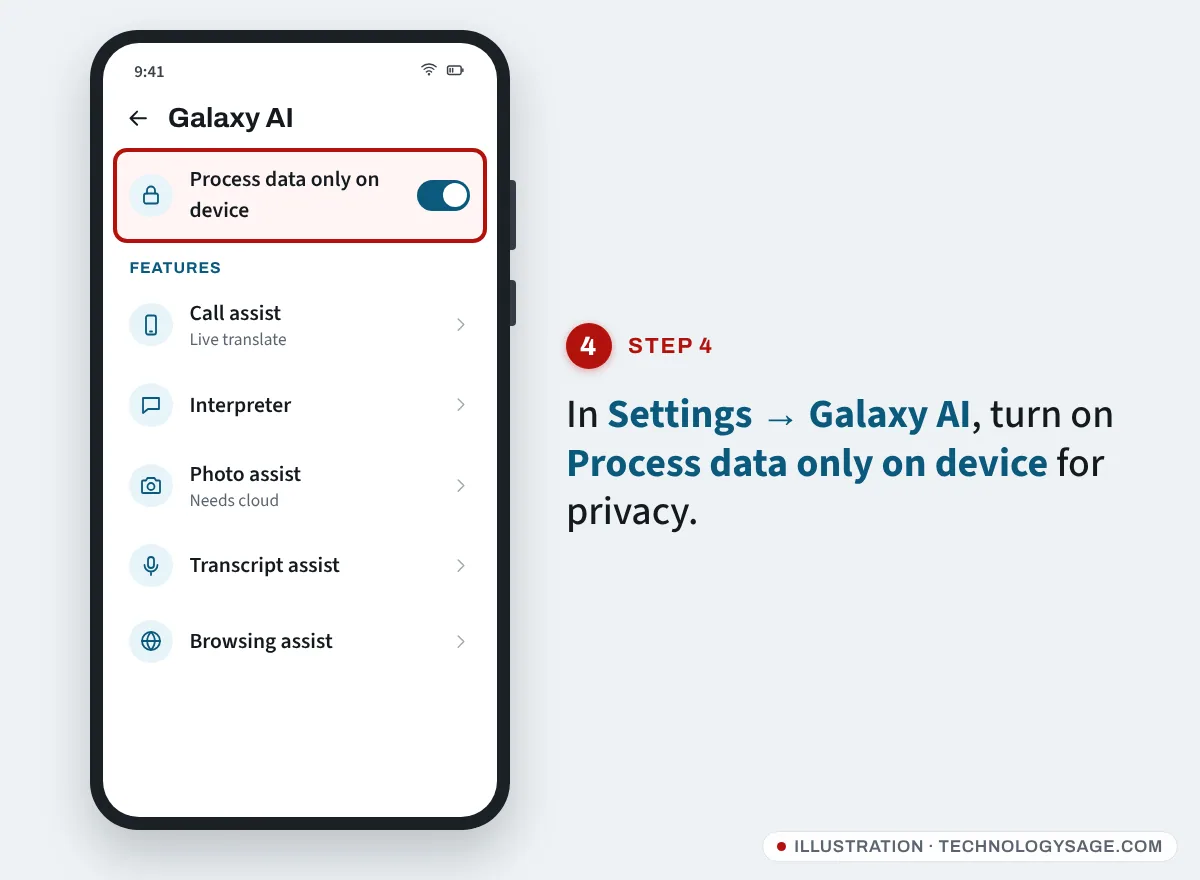
- Open Settings.
- Tap Galaxy AI. On some models it’s under Advanced features → Intelligent features, or called Awesome Intelligence.
- Tap a feature to turn it on or off and change its options.
- For privacy, switch on Process data only on device. Samsung says this stops all cloud processing for Galaxy AI. Features that need the cloud, such as Generative Edit and some summaries, then stop working, while on-device ones like translation keep going.
You need to be signed in to a Samsung account for all features to work. Samsung also recommends a Google account; without either, some AI features may be limited.
If something asks you to pay
- A Galaxy AI feature asks for a subscription: check whether it’s a new “enhanced” feature or a Google feature (Gemini). Read the screen before tapping Subscribe.
- An app called “Galaxy AI Pro” or similar in the Play Store or a website: Samsung’s AI features are built in and updated through Settings and the Galaxy Store. Don’t install third-party “Galaxy AI unlock” APKs.
- Someone calls or messages saying you must pay for Galaxy AI: it’s a scam. Samsung won’t ask for payment by phone, WhatsApp, gift card or airtime.
- A feature is missing: update your phone in Settings → Software update and update apps in Galaxy Store. Some features need a newer One UI version or aren’t offered on your model or in your language.
If you’d rather not use Google’s assistant on your Samsung, see how to turn off Gemini. And if AI downloads and photo edits are filling up your phone, see Samsung internal storage full. For more ways to improve photos with apps you already have, see apps to enhance picture and video quality.
FAQ
Will Samsung charge for Galaxy AI in 2026?
Not for the basic features. Samsung’s current wording says basic Galaxy AI features are free. A paid Galaxy AI Premium tier is reportedly being tested for extra features, but it hasn’t launched as of November 2026.
How much is Galaxy AI Premium?
There’s no official price. Leaked code reported in November 2026 suggests $4.99 a month or $47.99 a year, which may change.
Is Galaxy AI free on Galaxy A phones?
Yes, the AI features Samsung includes on A-series phones are free. A-series phones get fewer features than the S and Z series.
Is Circle to Search part of Galaxy AI?
It appears in Galaxy AI menus, but it’s a Google feature. It’s free.
Can I turn Galaxy AI off?
Yes. Go to Settings → Galaxy AI and turn off individual features, or turn on Process data only on device to stop cloud processing.