
In this guide
If YouTube has no sound, the video is usually muted in one of four places: the YouTube player itself, the browser tab, the device’s volume mixer, or a Bluetooth or HDMI device that’s quietly taking the audio. Check the speaker icon on the video, right-click the browser tab and choose Unmute site, raise the browser in the volume mixer, and disconnect any earbuds or soundbar to test. On a phone, press the volume-up button while the video is playing so you raise media volume, not the ringer.
The sections below go through each device: Windows and Mac computers, Android and iPhone, and smart TVs.
First: is it one video or every video?
- Play a different YouTube video, such as a music video. Some uploads simply have no audio track, or the uploader muted parts of it.
- Play a sound from somewhere else on the same device (another website, a music app). If nothing makes sound, the problem is your device’s audio, not YouTube.
- If only YouTube is silent, carry on.
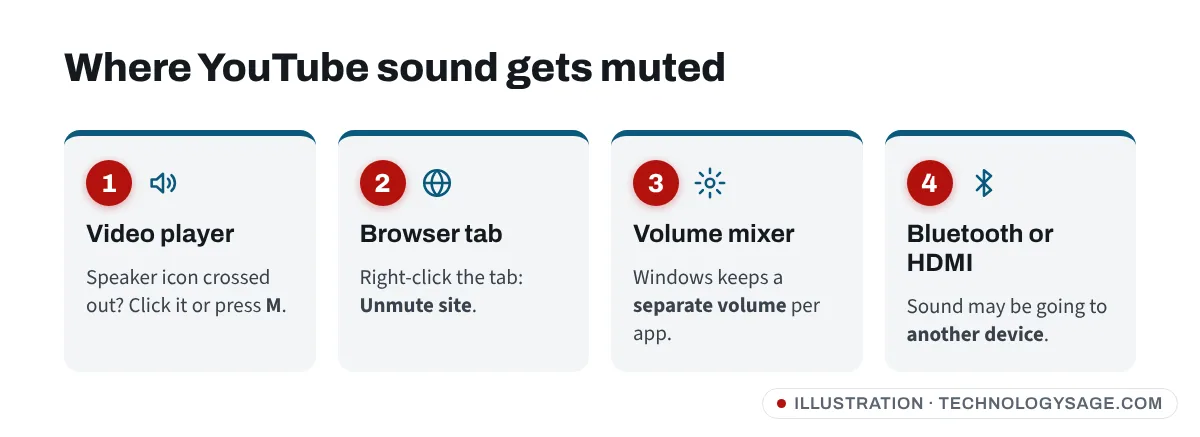
Fix YouTube no sound on a computer
1. Unmute the player
- Look at the speaker icon at the bottom-left of the video. If it has a line through it, click it, or press M on the keyboard (it toggles mute).
- Hover over the speaker icon and drag the volume slider to the right. The slider can be at zero without the icon looking muted.
2. Unmute the browser tab or site
- Chrome and Edge: right-click the YouTube tab and choose Unmute site (Chrome) or Unmute tab (Edge). If you see Mute site instead, it’s not muted.
- Chrome site settings: open Settings → Privacy and security → Site settings → Additional content settings → Sound and make sure youtube.com is not listed under Not allowed to play sound.
- Firefox: a crossed-out speaker on the tab means it’s muted. Click it, or right-click the tab and choose Unmute Tab.
- Safari: if a tab is muted, a speaker icon appears in the address bar or on the tab. Click it to turn sound back on.
3. Check the Windows volume mixer
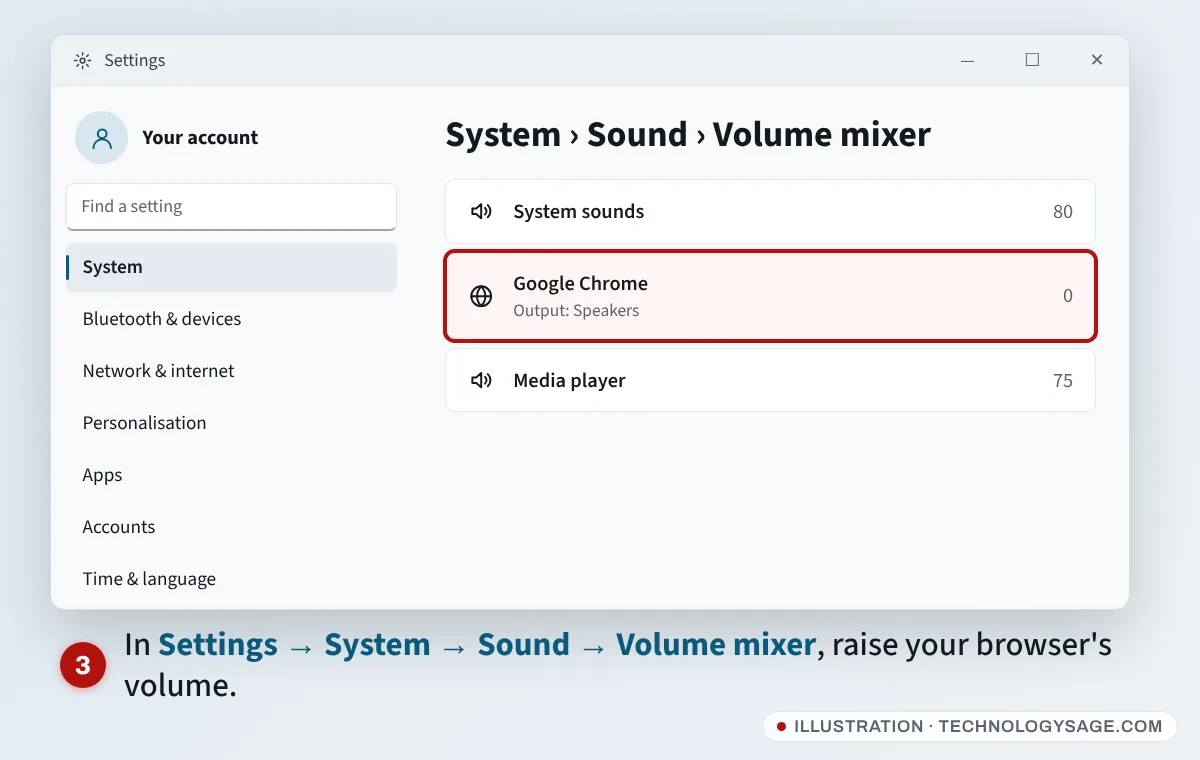
Windows remembers a separate volume for each app, and the browser can be at zero while everything else is fine.
- Play a YouTube video so the browser appears in the list.
- Open Settings → System → Sound → Volume mixer (on Windows 10, right-click the speaker icon in the taskbar and choose Open Volume mixer).
- Raise your browser’s slider and make sure it’s not muted.
- Under Output device, check that the browser is sending sound to the speakers or headphones you’re actually using.
4. Pick the right output device
If you’ve ever used a TV over HDMI, a monitor with speakers or Bluetooth earbuds, Windows or macOS may still be sending sound there.
- Windows: select the speaker icon in the taskbar, then the > arrow next to the volume slider, and choose your speakers or headphones.
- Mac: open System Settings → Sound → Output and select the right device.
5. Restart the browser and update it
Close every browser window, then open it again. Update the browser (Chrome: Settings → About Chrome). Try YouTube in a private window: if it has sound there, an extension is the likely cause. Turn off extensions one by one, especially audio “boosters”, equalisers and ad blockers.
6. Run the Windows audio troubleshooter and check drivers
If no app on the PC has sound, open Settings → System → Sound and scroll down to Troubleshoot common sound problems (Output devices). On Windows 11, this opens the Get Help troubleshooter. If it doesn’t help, update or reinstall the audio driver from Device Manager or your laptop maker’s support site. Our guide to a microphone not working on Windows 11 walks through the same sound settings and driver steps.
Fix YouTube no sound on Android
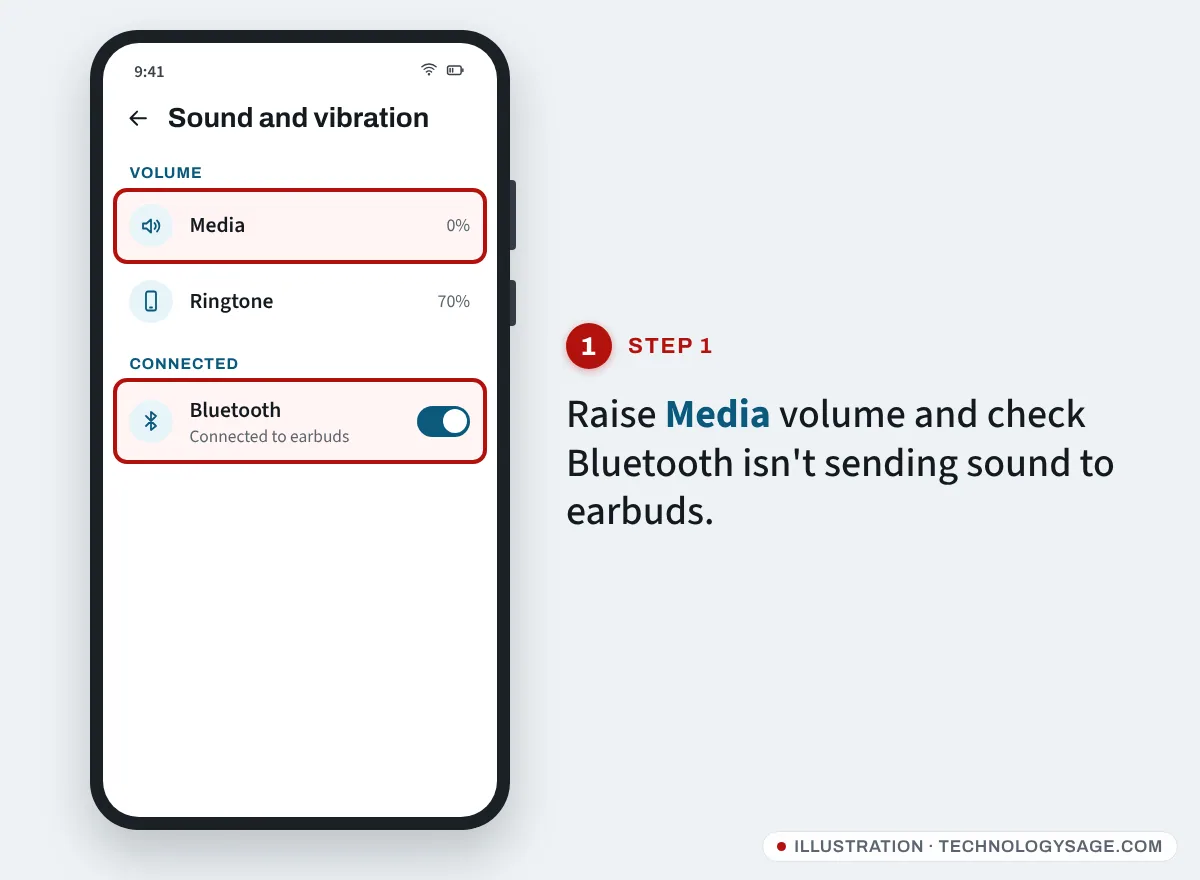
- Raise media volume: start the video, then press the volume-up button. Or open the volume panel, tap the three dots or arrow and raise Media volume.
- Check Bluetooth: pull down quick settings and switch Bluetooth off. Your phone may be playing YouTube through earbuds or a speaker in another room.
- Restart the app: close YouTube from recent apps and open it again.
- Clear the app cache: Settings → Apps → YouTube → Storage → Clear cache.
- Check Do Not Disturb or modes: some phones’ focus or bedtime modes mute media. Turn them off to test.
- Restart the phone, and update YouTube from the Play Store.
If the phone speaker sounds crackly or silent in every app, it may be blocked by dust or water, or need a repair.
Fix YouTube no sound on iPhone and iPad
- Start the video, then press the volume-up button on the side of the phone.
- Open Control Centre and check where audio is going (the AirPlay icon on the music tile). Choose iPhone if it’s sending to AirPods, a speaker or a TV.
- Switch Bluetooth off briefly to test.
- Close and reopen YouTube, update it from the App Store, then restart the iPhone.
Fix YouTube no sound on a smart TV
- Press Mute on the remote, then press it again. Then raise the volume.
- If you use a soundbar or receiver (HDMI ARC/eARC or optical), make sure it’s on and set to the right input. Try switching the TV’s sound output to TV Speaker to test.
- In the TV’s sound settings, look for Digital audio output or Digital output audio format and try PCM instead of Auto, Bitstream or Dolby. Some soundbars can’t decode every format, so YouTube plays silently.
- Cold boot the TV (unplug it for 60 seconds) and reopen YouTube.
- If the YouTube app itself misbehaves, follow our guide to YouTube not working on TV.
If there’s still no sound
- Video freezes or won’t load as well: see YouTube videos not playing or loading.
- Sound is out of sync rather than missing: reload the video, lower the quality, and on TVs check the soundbar’s audio delay or lip-sync setting.
- Sound only in one ear: check Mono audio and the balance setting in your device’s accessibility settings.
- No sound anywhere on a laptop: the laptop’s own mute key (usually on F1-F12) may be on. Press it, or Fn plus that key.
FAQ
Why is there no sound on YouTube but other sites work?
YouTube is probably muted inside the player, in the tab (Unmute site), or in the Windows volume mixer. Check all three, then try a private window to rule out an extension.
How do I unmute YouTube in Chrome?
Right-click the YouTube tab and choose Unmute site. Also check Settings → Privacy and security → Site settings → Additional content settings → Sound to make sure YouTube isn’t blocked.
Why does YouTube have no sound on my phone?
Usually media volume is at zero or the sound is going to Bluetooth earbuds. Press volume up while the video plays and turn Bluetooth off to test.
Why does my TV play YouTube without sound through the soundbar?
The soundbar may not support the audio format the TV sends. Set the TV’s digital audio output to PCM, check the soundbar’s input, and cold boot both.
Does the M key mute YouTube?
Yes. On a computer, pressing M while the video player is selected mutes and unmutes the video. Press it again to bring sound back.