
In this guide
To set up voicemail on almost any phone, open the Phone app, press and hold the 1 key, and follow the voice prompts to choose a PIN and record a greeting. On an iPhone you can also go to Phone → Voicemail → Set Up Now, and on many Android phones the Phone app has a Voicemail setting that turns on visual voicemail. Voicemail itself is run by your mobile carrier, not by Apple, Google or Samsung, so the exact prompts and numbers depend on your network.
This guide works for any carrier in any country. Where a step differs between iPhone, Samsung, Google Pixel and other Android phones, it says so.
How voicemail works (and why your carrier matters)
When someone calls and you don’t answer, are busy, or your phone is off, the network forwards the call to a mailbox on the carrier’s system. Your phone only does two things: it dials into that mailbox for you, and (with visual voicemail) it downloads the messages so you can play them like a list.
That has three practical consequences:
- The voicemail number belongs to your carrier. It is different on every network, and sometimes different for prepaid and contract lines.
- Some carriers charge for voicemail, or don’t offer it on every plan. If nothing happens when you hold 1, the service may not be active on your line.
- Visual voicemail is only available with some carriers in some countries. Apple and Google both say this in their own help pages. If your network doesn’t support it, you can still use classic dial-in voicemail.
How to set up voicemail on any phone (the hold-1 method)
This method works on iPhones, Android phones and most basic phones, because almost every carrier links the 1 key to voicemail.
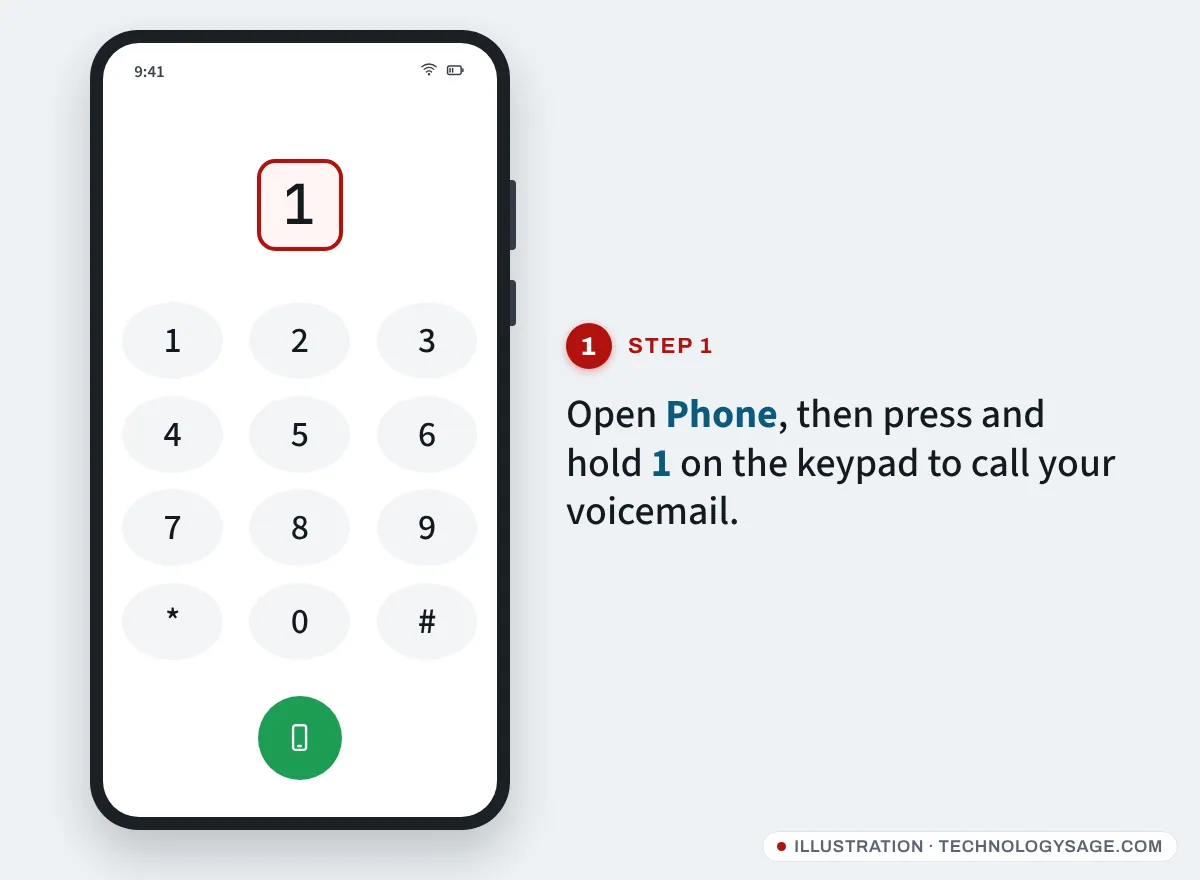
- Open the Phone app and go to the Keypad.
- Press and hold 1 until the phone starts calling. (On some phones the screen shows “Voicemail” as it dials.)
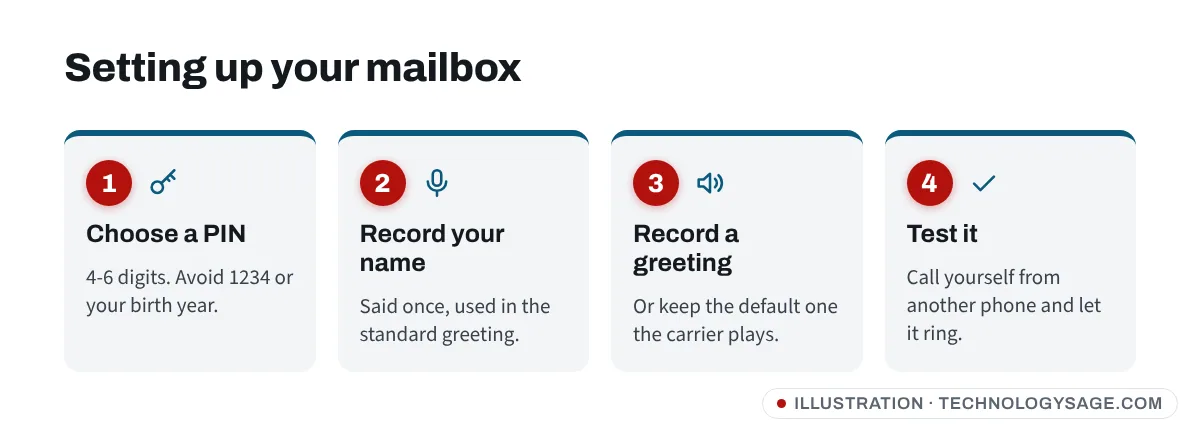
- The first time you call, the system usually starts a setup tutorial. Follow the prompts to:
- choose a voicemail PIN (often 4 to 6 digits),
- record your name,
- record a greeting, or pick the standard one.
- Hang up when it says setup is complete.
If you hear “enter your password” instead of a tutorial, the mailbox already exists. Try the default PIN your carrier uses for new lines (often printed on the SIM pack or welcome letter), or ask the carrier to reset it. Never guess repeatedly: some systems lock the mailbox after a few wrong tries.
How to set up voicemail on iPhone
If your carrier supports visual voicemail on iPhone:
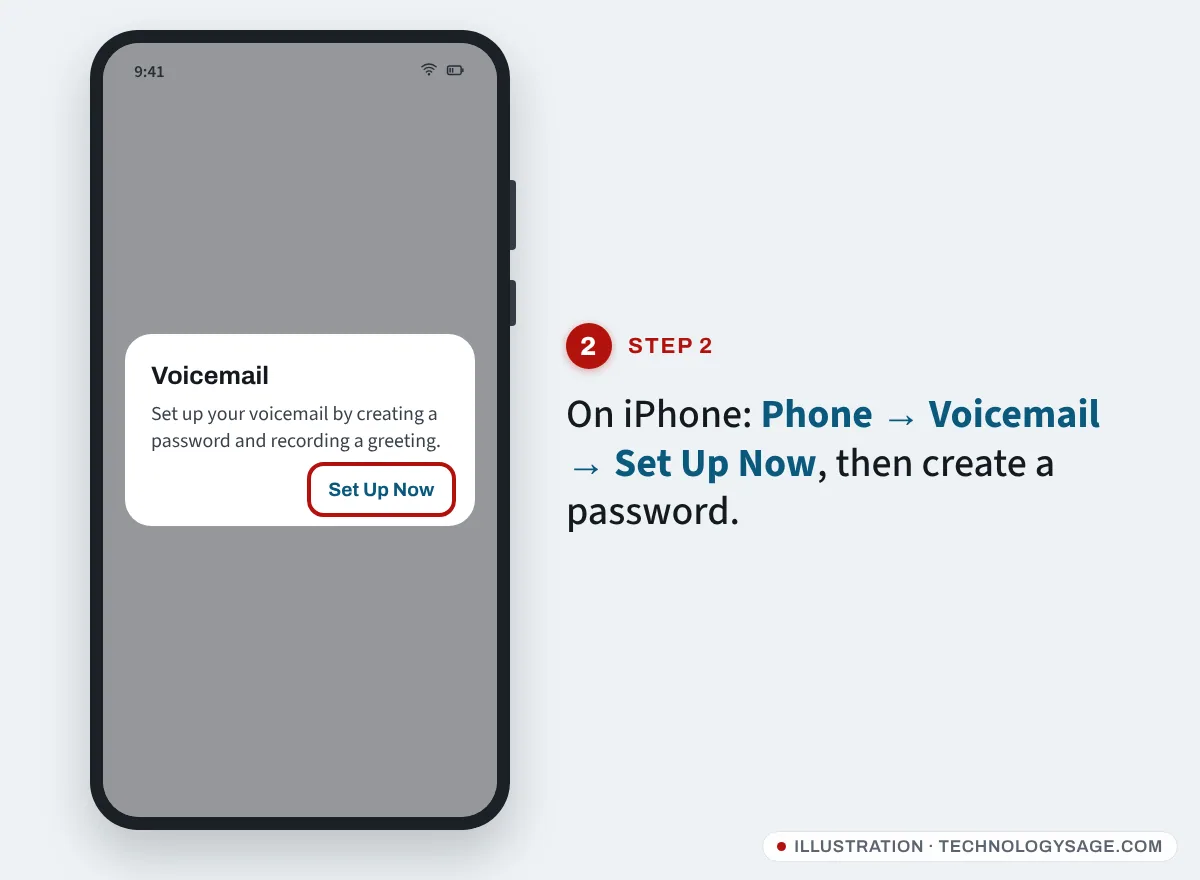
- Open the Phone app and tap the Voicemail tab (bottom right; on newer iOS versions it may sit in the Phone app’s menu or filter list).
- Tap Set Up Now.
- Create a voicemail password and tap Done, then enter it again to confirm.
- Choose Default or Custom greeting. For a custom one, tap Record, speak, tap Stop, then Save.
If you don’t see Set Up Now and the tab shows Call Voicemail instead, your carrier doesn’t offer visual voicemail on your plan. Tap Call Voicemail and set it up with the voice prompts, exactly like the hold-1 method.
A few iPhone-specific points:
- Turn off Wi-Fi Calling during setup if it fails. AT&T, for example, notes that voicemail setup does not work over Wi-Fi Calling. Use mobile signal, then switch Wi-Fi Calling back on.
- Changed carrier recently? You may need to set up voicemail again with the new network before the Voicemail tab works.
- To change the password later, go to Settings → Apps → Phone → Change Voicemail Password. On older iOS versions it is under Settings → Phone.
How to set up voicemail on Android
Android phones use either the Google Phone app (Pixel, Motorola, Nokia, many Xiaomi and others), Samsung’s Phone app, or a maker’s own dialer (Tecno, Infinix, itel, Oppo and others). The steps are similar.
Google Phone app (Pixel and many other phones)
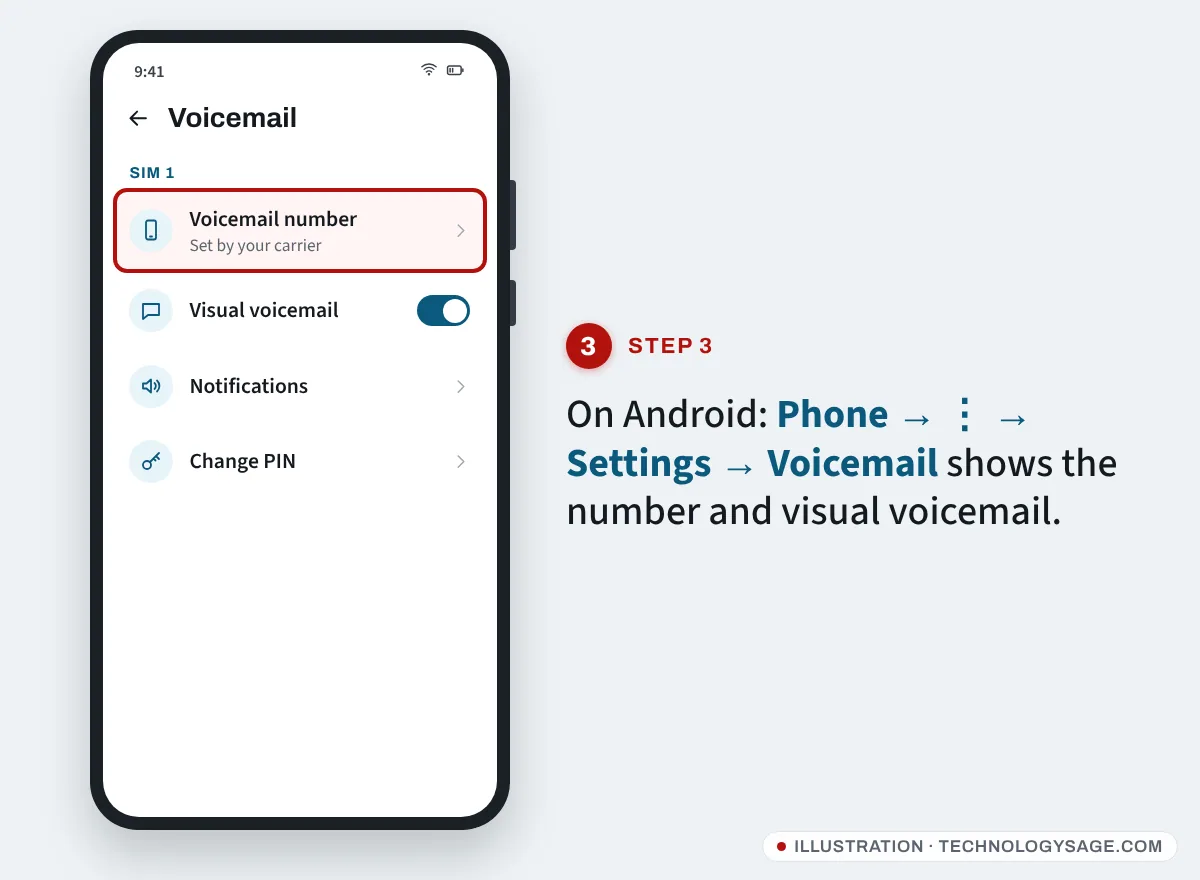
- Open Phone and tap the three dots (⋮) at the top right.
- Tap Settings → Voicemail.
- If your carrier supports it, turn on Visual voicemail. Some carriers also offer Voicemail transcription.
- Check that Voicemail number (under Advanced settings or the SIM name on some versions) is filled in.
- Go back to the keypad, press and hold 1, and complete the PIN and greeting setup.
Samsung Galaxy
- Open Phone and tap ⋮ → Settings → Voicemail.
- On dual-SIM phones, choose the SIM you want to set up.
- Tap Voicemail number and make sure the carrier’s number is there.
- Hold 1 on the keypad and follow the prompts.
Some Samsung phones sold by carriers come with the carrier’s own Visual Voicemail app instead. If you have one, open it and follow its setup screens. Google notes that when a carrier’s voicemail app is in use, the visual voicemail switch in the Phone app turns itself off to avoid a conflict.
Tecno, Infinix, itel, Xiaomi and other Android phones
Open the Phone or Dialer app, go to its Settings, then look for Voicemail, Call settings → Voicemail, or a setting under your SIM name. The fields are the same: a voicemail number and sometimes a notification setting. Once the number is in, hold 1 and follow the prompts.
How to find your voicemail number
If holding 1 says “Voicemail number not set” or “No voicemail number on SIM card”, you need to add your carrier’s number. Here is how to find it without guessing:
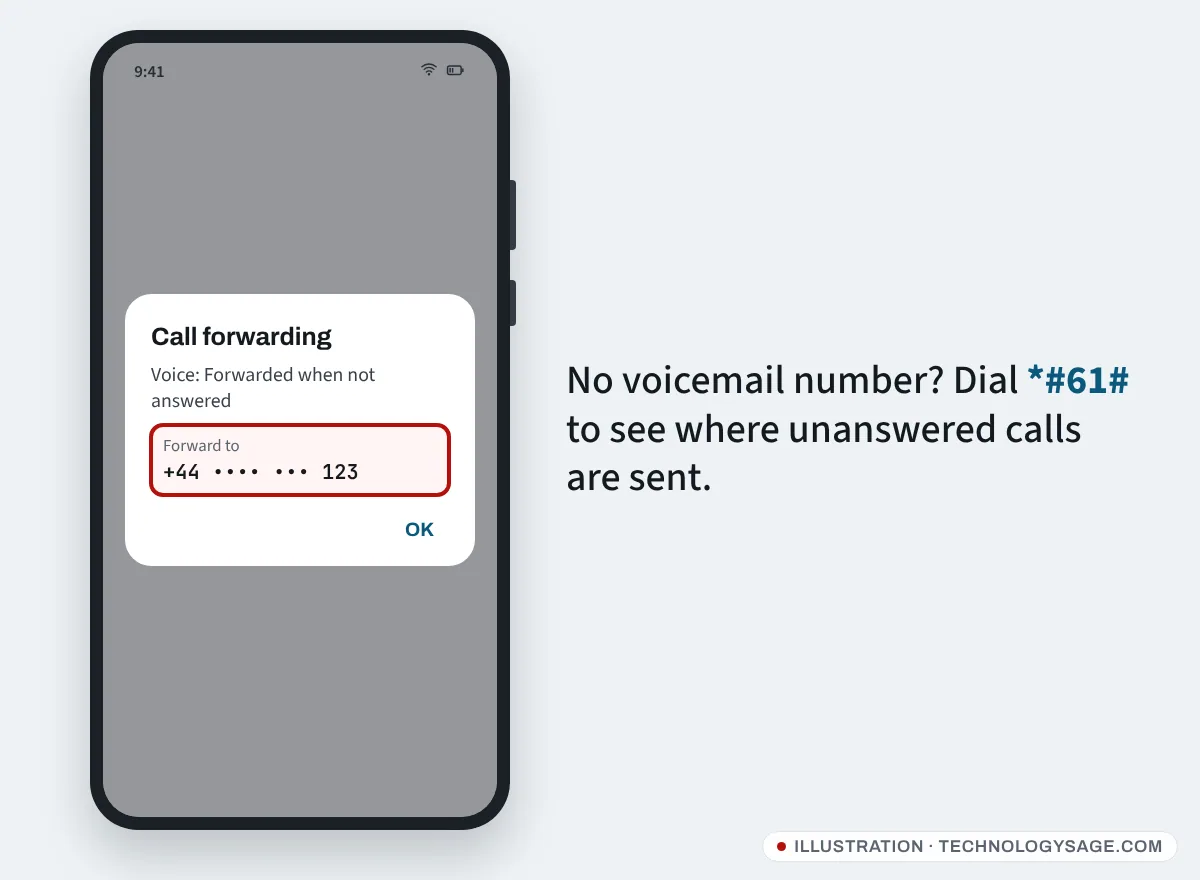
- Dial
*#61#and press call. On most GSM, 4G and 5G networks this shows the number your unanswered calls are forwarded to, which is normally your voicemail number.*#67#(busy) and*#62#(unreachable) usually show the same number. - Look at the SIM card pack or welcome letter. Many carriers print the voicemail number there.
- Check your carrier’s app or website. Search their help pages for “voicemail number”.
- Ask your carrier’s support line from their official website or app.
Then add it under Voicemail number in the Phone app settings (Android). On iPhone you can’t type a voicemail number; the carrier settings provide it, so contact the carrier if the Voicemail tab won’t work.
If voicemail setup doesn’t work
- “Voicemail number not set” or “not available”. Add the number as shown above. If
*#61#shows nothing, voicemail may be switched off on your line; ask the carrier to turn it on. - The call connects and hangs up straight away. Your plan may not include voicemail, or your prepaid balance may be too low if the carrier charges for it.
- It asks for a password you never set. The mailbox was created before (perhaps for the previous owner of the number). Ask the carrier to reset the PIN; they will check your identity first.
- Setup fails on iPhone. Restart, check Settings → General → About for a carrier settings update, turn off Wi-Fi Calling, and try again.
- Visual voicemail is missing on Android. Your carrier may not support it, or it only works on one SIM. Google points out that if you change your data SIM, you may have to turn visual voicemail on again.
- Callers say they hear “this number is unavailable”. Your phone may forward calls elsewhere. See why calls go straight to voicemail for how to check every kind of forwarding.
Safety: keep your voicemail PIN private
Voicemail is a quiet way into your accounts. Some services read one-time codes aloud by phone call, and if a call goes to voicemail the code lands in your mailbox.
- Use a PIN that isn’t
0000,1234, your birth year or the last digits of your number. - Your carrier, bank, WhatsApp or anyone else will never ask you to read out your voicemail PIN or a one-time code.
- If someone calls asking you to “confirm” a code, hang up. This is a common trick behind WhatsApp verification code scams.
FAQ
How do I set up voicemail on my phone for the first time?
Open the Phone app, press and hold 1, and follow the voice prompts to choose a PIN and record a greeting. On iPhone you can also tap Phone → Voicemail → Set Up Now if your carrier supports visual voicemail.
Why does my phone say there is no voicemail number?
The phone doesn’t know your carrier’s voicemail number. Dial *#61# to see where unanswered calls go, then add that number in the Phone app’s Voicemail settings, or ask your carrier for it.
Is voicemail free?
It depends on the carrier and plan. Many include basic voicemail; some charge per call to the mailbox or for visual voicemail. Check your plan details.
How do I check my voicemail after setting it up?
Tap the Voicemail tab on iPhone or hold 1 on any phone. To listen from someone else’s phone, see how to check voicemail.
Can I turn voicemail off again later?
Yes. You can cancel the call forwarding that sends calls to voicemail, or ask your carrier to remove it. Our guide on how to turn off voicemail covers every method.