In this guide
- 1. Check silent mode and ring volume
- 2. Turn off Do Not Disturb, Focus or Modes
- 3. Check Bluetooth earbuds, watches and cars
- 4. Check gestures that silence calls
- 5. Set a working ringtone
- 6. Check call forwarding
- 7. Check call blocking and spam filters
- 8. Check the signal, Airplane mode and Wi-Fi Calling
- 9. Restart and update the phone
- 10. Reset network settings, then contact your carrier
- If only one person’s calls don’t ring
- FAQ
If your phone is not ringing when someone calls, the cause is almost always a setting: the phone is on silent or vibrate, Do Not Disturb (Focus or Modes) is on, the call is ringing on a Bluetooth device, or calls are being forwarded, filtered or blocked. Less often, a weak signal or a SIM problem stops calls reaching the phone at all. Work through the fixes below in order; most people find the answer in the first three.
First, a quick test that tells you which group of fixes you need: ask someone to call you while you watch the screen.
- The screen lights up but there’s no sound: it’s a sound, Do Not Disturb or Bluetooth problem (fixes 1-5).
- Nothing appears, and you get a missed-call alert or voicemail later: the call isn’t reaching the phone (fixes 6-10).
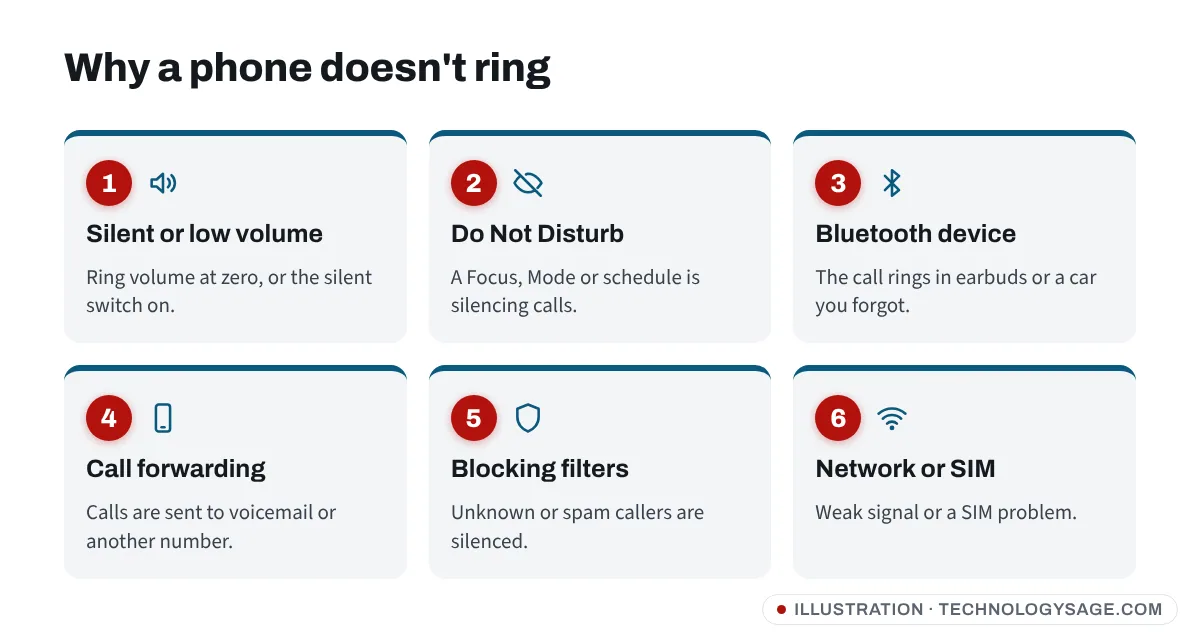
1. Check silent mode and ring volume
iPhone: On iPhones with a Ring/Silent switch on the left side, push it towards the screen so no orange line shows. On newer iPhones with an Action button instead, silent mode is turned off from Control Centre or by pressing and holding the Action button (if it’s set to Silent Mode). Then go to Settings → Sounds & Haptics and drag the Ringtone and Alerts slider up.
Android: Press a volume button and tap the bell or settings icon that appears, then raise the Ring (or Ringtone) slider. On Samsung, go to Settings → Sounds and vibration and make sure Sound mode is set to Sound, not Vibrate or Mute. On Pixel and most other phones it’s Settings → Sound & vibration.
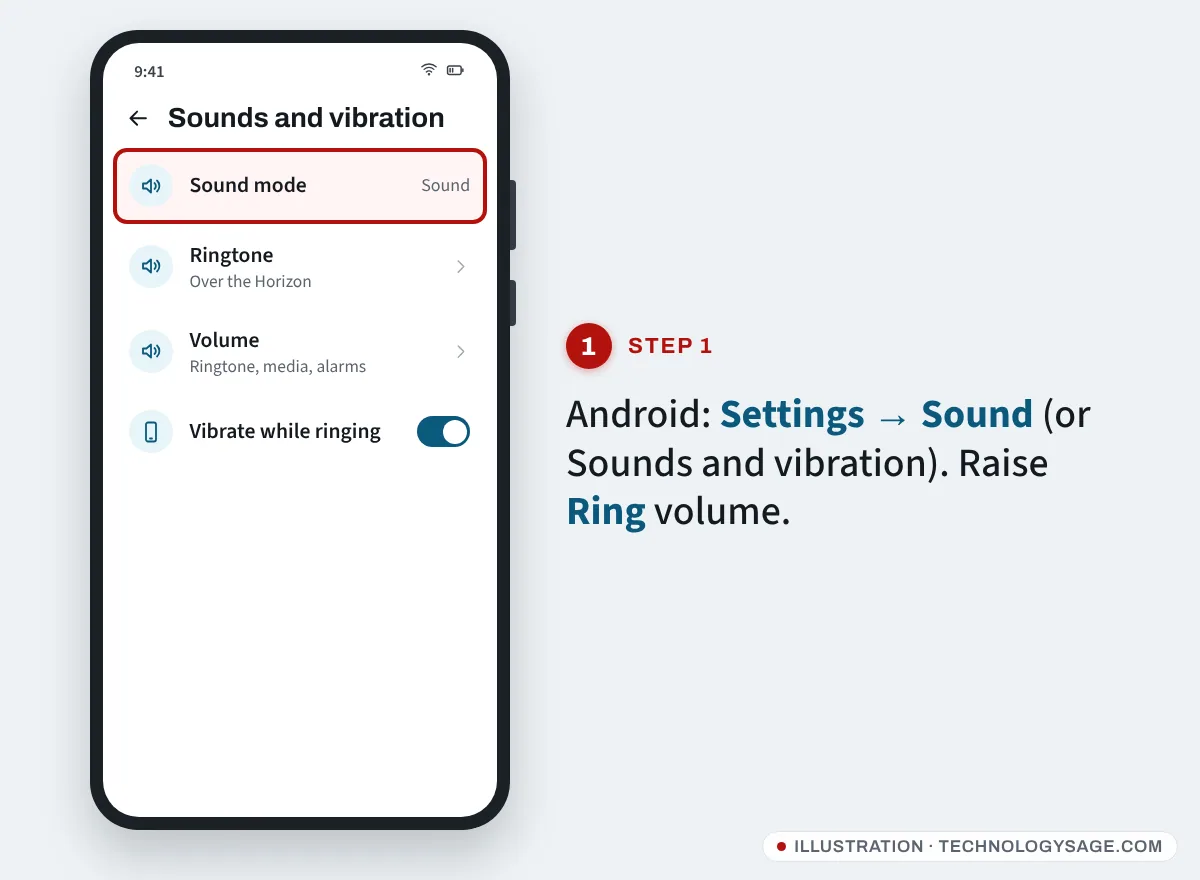
Ring volume and media volume are separate. Turning a video up doesn’t make your ringtone louder.
2. Turn off Do Not Disturb, Focus or Modes
Do Not Disturb silences calls, often on a schedule you’ve forgotten about, such as a bedtime mode that starts at 10pm.
- iPhone: Open Control Centre and tap Focus to turn it off. Then check Settings → Focus for schedules (Sleep, Work, Driving) that turn on by themselves.
- Pixel and Android 15 or later: Swipe down, tap Modes or Do Not Disturb, and turn it off. Check Settings → Modes for schedules like Bedtime.
- Samsung: Swipe down and tap Do not disturb to turn it off. Check Settings → Modes and Routines (older: Settings → Notifications → Do not disturb) for schedules.
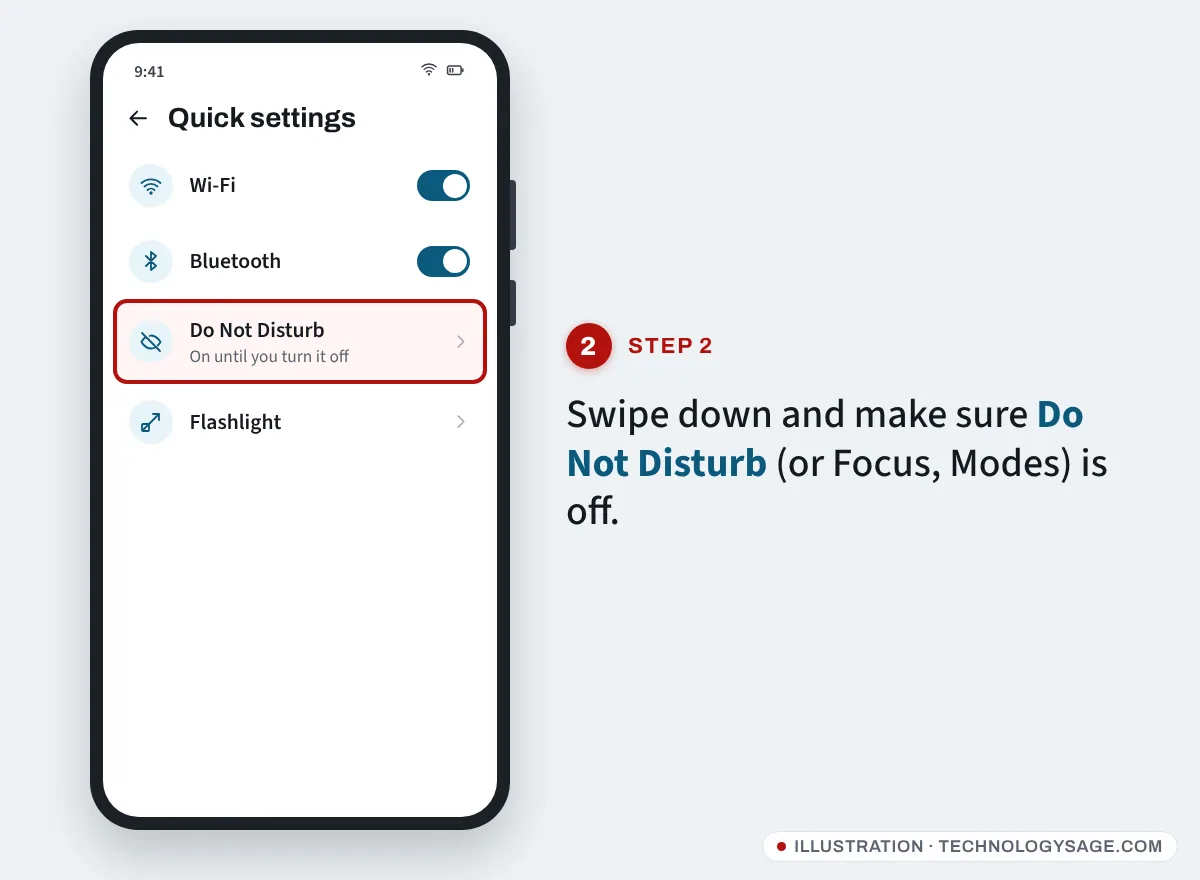
If you want Do Not Disturb on but still need calls from family, add them as allowed or starred contacts, or allow repeated callers so a second call within a few minutes rings.
3. Check Bluetooth earbuds, watches and cars
When your phone is connected to Bluetooth earbuds, a speaker or a car, the call may ring there instead. A smartwatch can also take over the alert.
- Swipe down (Android) or open Control Centre (iPhone) and turn Bluetooth off.
- Ask someone to call you.
- If it rings now, a forgotten device was taking the call. Remove it under Settings → Bluetooth (or Connections → Bluetooth on Samsung) or keep it disconnected when not in use.
4. Check gestures that silence calls
Some phones silence calls when you turn them face down or pick them up:
- Pixel: Flip to Shhh turns on Do Not Disturb when the phone is face down.
- Samsung: Settings → Advanced features → Motions and gestures → Mute with gestures silences calls when the phone is turned over or covered.
- Other brands (Tecno, Infinix, Xiaomi and others) have similar options under Gestures or Smart motion.
Turn these off if your phone lives face down on a desk.
5. Set a working ringtone
If you picked a custom song as your ringtone and later deleted it or moved it to an SD card, some Android phones fall back to silence. Go to Settings → Sound (or Sounds and vibration) → Ringtone and pick one of the built-in tones. Also check individual contacts: a contact can have its own ringtone set to None.
6. Check call forwarding
If calls never appear on the screen and go to voicemail or another number, check call forwarding. Open the Phone app and dial:
*#21#: shows whether all calls are forwarded (this one stops your phone ringing completely).*#61#,*#62#,*#67#: show forwarding when unanswered, unreachable and busy.
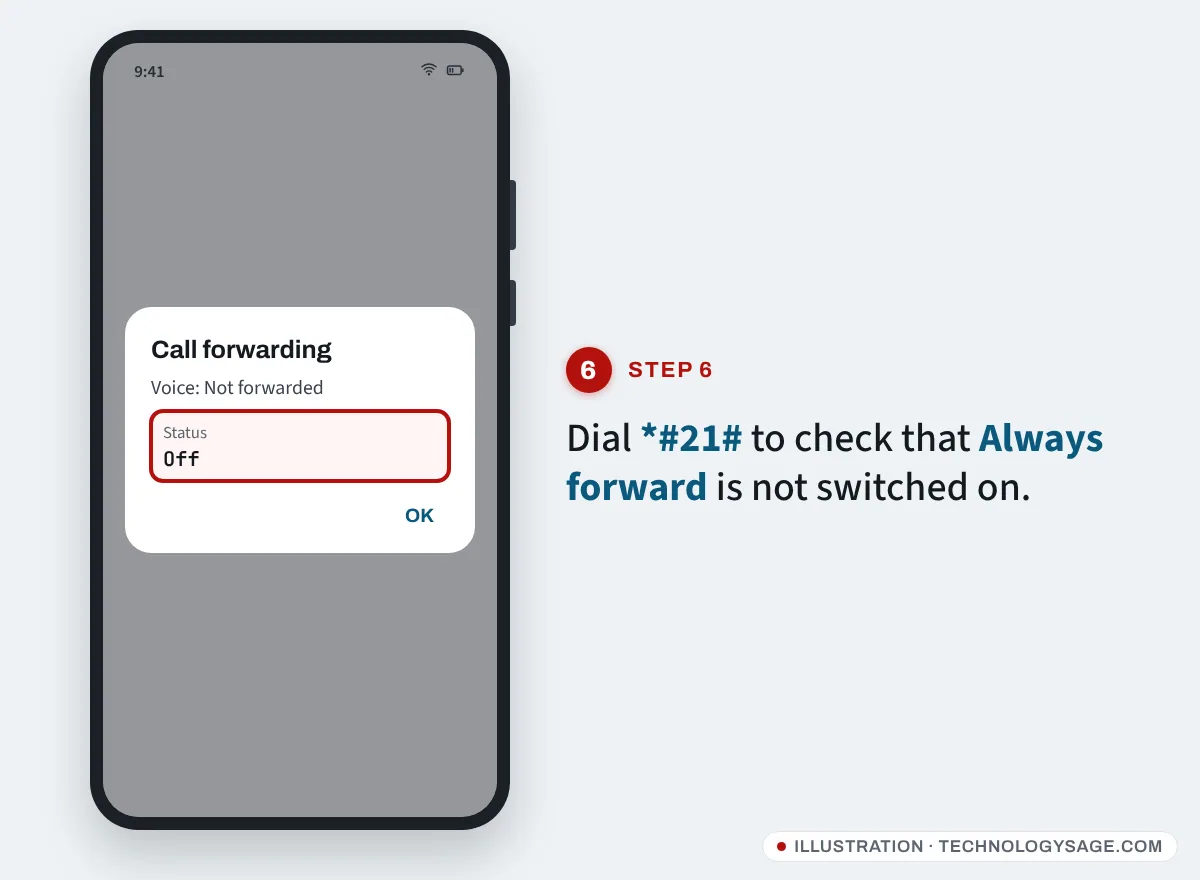
To switch off “always forward”, dial ##21#, or turn it off in the menu: iPhone: Settings → Apps → Phone → Call Forwarding; Samsung: Phone → ⋮ → Settings → Supplementary services → Call forwarding; Google Phone: ⋮ → Settings → Calling accounts → your SIM → Call forwarding. Keep the “when unanswered” forward if you want voicemail.
7. Check call blocking and spam filters
- iPhone: Settings → Apps → Phone → Silence Unknown Callers sends callers who aren’t in your contacts straight to voicemail. Turn it off, or save the caller as a contact. Also check Blocked Contacts in the same menu.
- Samsung: Phone → ⋮ → Settings → Block numbers. Make sure the caller isn’t listed and Block unknown/private numbers is off if you’re expecting calls from withheld numbers.
- Google Phone: ⋮ → Settings → Blocked numbers, and Caller ID & spam, where filtering spam calls can stop them ringing.
- Call-blocking apps (Truecaller and similar) can block numbers too. Check their block lists, or see our list of call blocking apps to understand how they work.
8. Check the signal, Airplane mode and Wi-Fi Calling
- No bars, an X, “No service”, “SOS” or Emergency calls only means calls can’t reach you. See Emergency calls only: what it means and fixes.
- Make sure Airplane mode is off.
- If you get calls only on Wi-Fi or only on mobile signal, turn Wi-Fi Calling off and on (iPhone: Settings → Apps → Phone → Wi-Fi Calling; Android: usually under Phone → Settings or Settings → Connections).
- On dual-SIM phones, check that the SIM people are calling is turned on under SIM manager or SIMs. While you’re on a call on one SIM, the other SIM usually can’t receive calls.
9. Restart and update the phone
Restart the phone fully, then install any system update (iPhone: Settings → General → Software Update; Android: Settings → System → Software update or Settings → Software update). On iPhone, also check Settings → General → About; a carrier settings update offer appears there if one is waiting.
10. Reset network settings, then contact your carrier
If calls still don’t reach the phone:
- iPhone: Settings → General → Transfer or Reset iPhone → Reset → Reset Network Settings.
- Samsung: Settings → General management → Reset → Reset mobile network settings (or Reset network settings on some models).
- Pixel: Settings → System → Reset options → Reset Mobile Network Settings.
This clears saved network settings (and on some phones Wi-Fi passwords and Bluetooth pairings), not your photos or apps. If it still doesn’t help, test your SIM in another phone. If the problem follows the SIM, ask your carrier to check your line and replace the SIM.
If only one person’s calls don’t ring
Then the problem is specific to that contact: they’re blocked, they have a custom ringtone set to None, they’re filtered as spam, or they’re calling with a withheld number that you block. Check fixes 5 and 7 for that contact.
FAQ
Why does my phone not ring when someone calls, but I get a missed call notification?
The call reached your phone, but something silenced it: silent mode, Do Not Disturb, a Bluetooth device, a silencing gesture, or a spam filter. Fixes 1 to 5 and 7 cover these.
Why do my calls go straight to voicemail without ringing?
Usually call forwarding, Do Not Disturb, Silence Unknown Callers, a blocked number or no signal. Our full guide on calls going straight to voicemail explains each one.
Why does my phone vibrate but not ring?
Your phone is set to vibrate (Android Sound mode: Vibrate, or iPhone silent mode), or the ring volume is at zero while vibration is on.
Can a phone case or screen protector stop it ringing?
Not by itself, though a thick case can muffle the speaker so the ring is easy to miss. If the sound is very quiet even at full volume, test with the case off and clean the speaker grille gently with a soft, dry brush.
Should I set up voicemail so I don’t miss calls?
Yes, voicemail catches calls you can’t answer. See how to set up voicemail.