In this guide
- Why there’s no simple “turn off voicemail” button
- Step 1: Note your voicemail number first
- Step 2: Turn off voicemail with ##004#
- Turn off voicemail on Android from the Phone app
- Turn off voicemail on iPhone
- Turn off voicemail through your carrier
- How to turn voicemail back on
- If voicemail won’t turn off
- What callers hear when voicemail is off
- FAQ
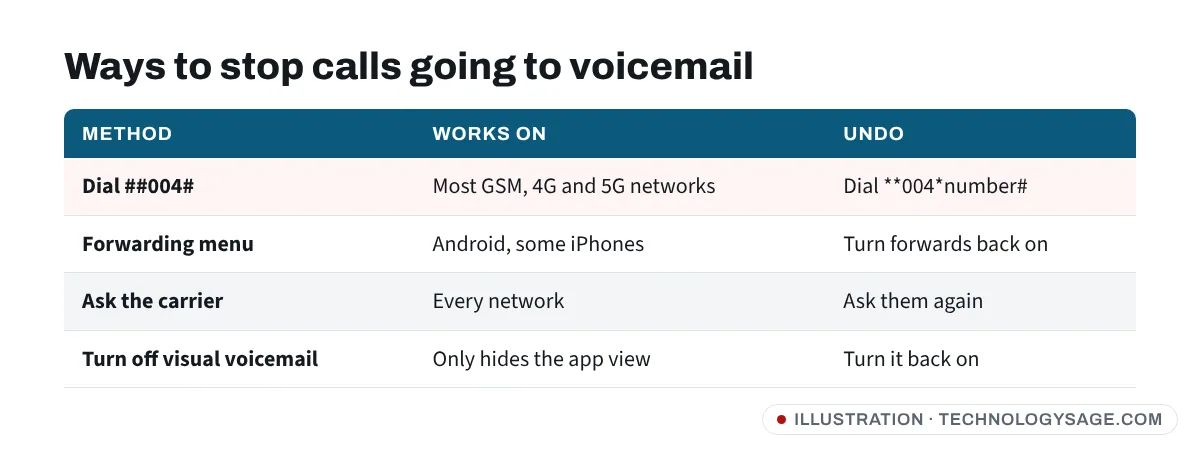
To turn off voicemail on most phones, open the Phone app, dial ##004# and press call: on most GSM, 4G and 5G networks this cancels the conditional call forwarding that sends unanswered, busy and unreachable calls to your mailbox. On Android you can also switch off each forward in the Phone app’s Call forwarding menu. There is no single “voicemail off” switch on iPhone, so iPhone users use the code or ask their carrier to remove voicemail from the line.
Before you start, write down your voicemail number (step 1 below). You will need it if you ever want voicemail back.
Why there’s no simple “turn off voicemail” button
Voicemail isn’t an app on your phone. It is a mailbox on your carrier’s network, and calls reach it through call forwarding:
- Forward when unanswered (no reply)
- Forward when busy (you’re on another call or decline it)
- Forward when unreachable (phone off, no signal, Airplane mode)
Your carrier sets these three forwards to the voicemail number when your line is created. Turning off voicemail really means cancelling those forwards, or asking the carrier to remove the mailbox. Turning off visual voicemail in the Phone app only hides the list of messages; callers still reach your mailbox.
Step 1: Note your voicemail number first
- Open the Phone app.
- Dial
*#61#and press call. - A message shows the number unanswered calls go to. Write it down or take a screenshot.
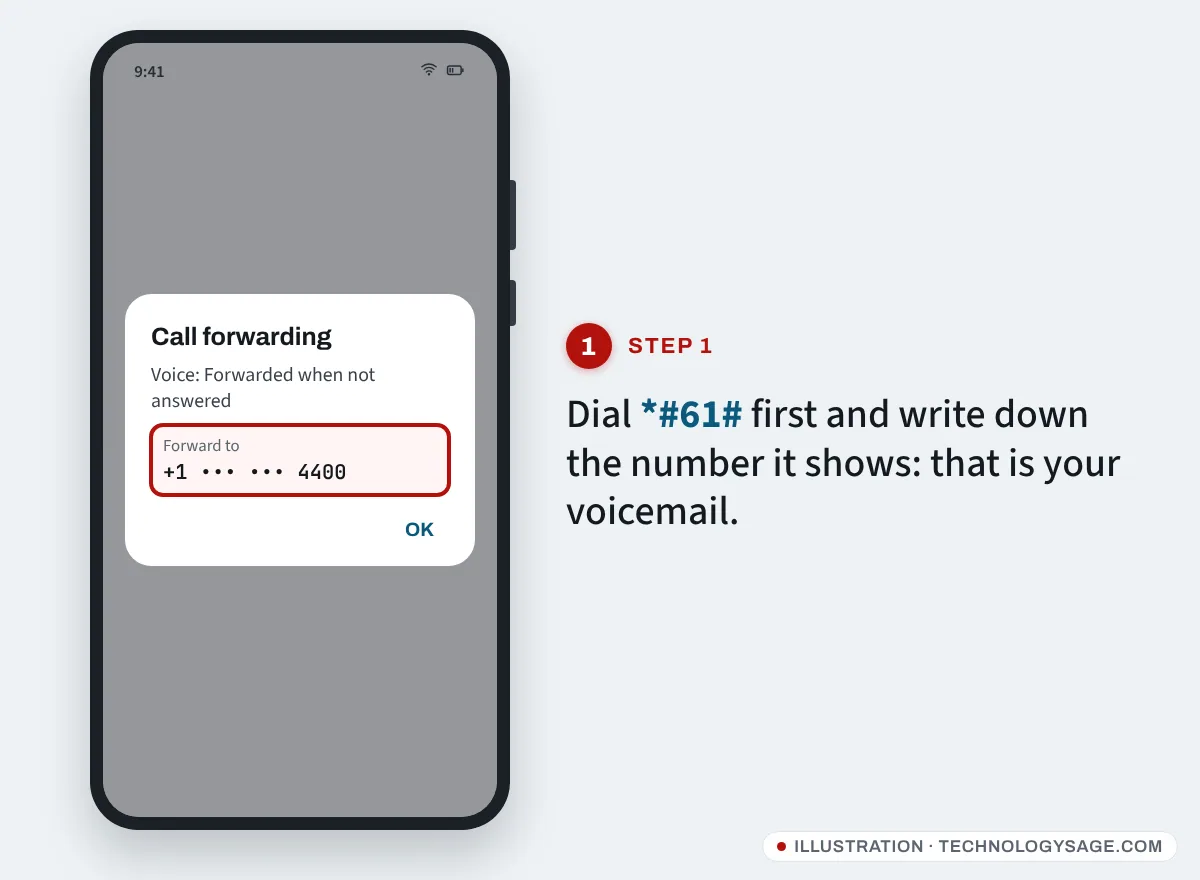
If it says “not forwarded”, unanswered calls already don’t go to voicemail. Try *#67# (busy) and *#62# (unreachable) as well, because they can be set separately.
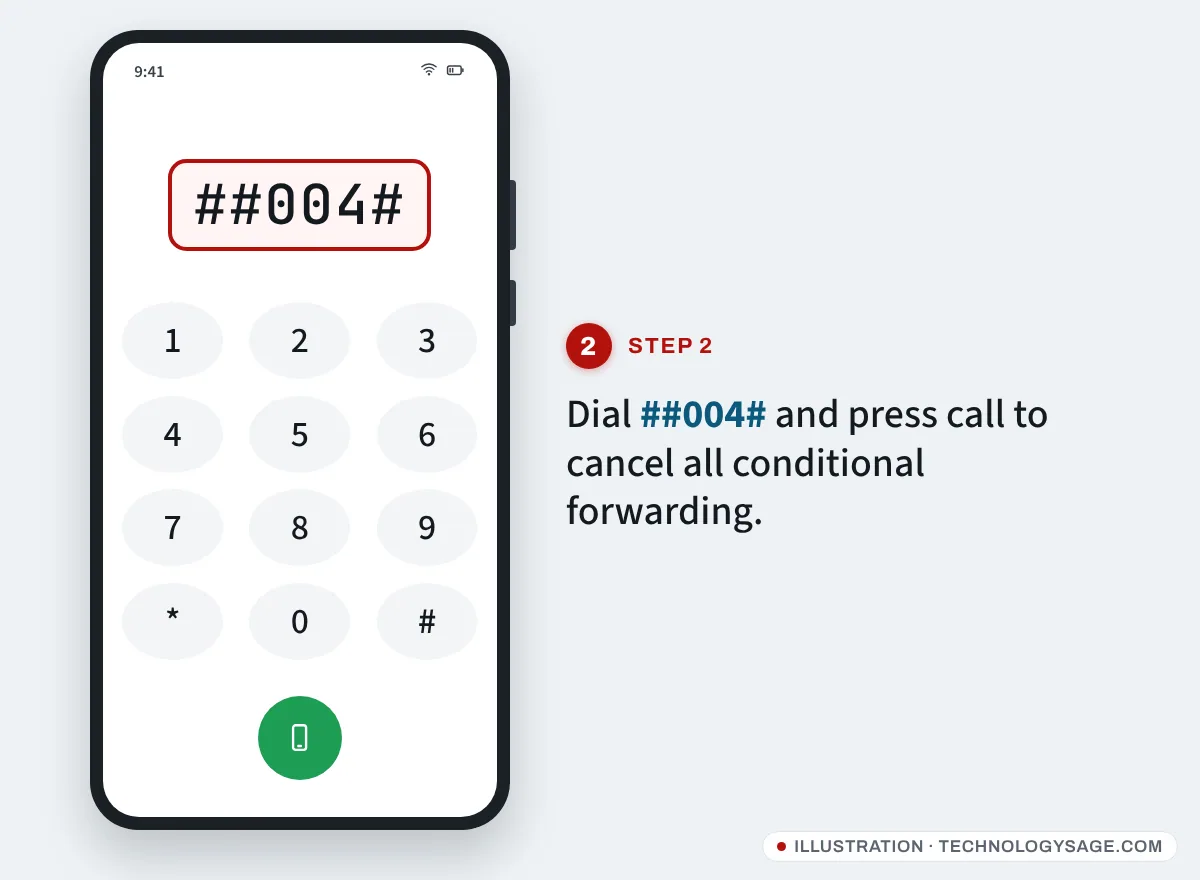
Step 2: Turn off voicemail with ##004#
- Open the Phone app and go to the keypad.
- Dial
##004#and press the call button. - Wait for the confirmation, usually “Erasure was successful”, “Call forwarding deactivated” or similar.
- Dial
*#61#again to check. It should now say the service is not active.
What the related codes do:
| Code | What it does |
|---|---|
##004# |
Cancels all conditional forwards (no answer, busy, unreachable). This is the usual “voicemail off” code. |
##002# |
Cancels all forwarding, including “always forward”. |
*#21# |
Checks whether “always forward” (unconditional) is on. |
*#61#, *#62#, *#67# |
Check no-answer, unreachable and busy forwarding. |
These are standard GSM codes used by carriers around the world, but a few networks handle them differently or reset them. Community reports on some UK networks, for example, say ##004# can put the carrier’s default forwards back instead of clearing them. Always check with *#61# afterwards, and if voicemail comes back, use the carrier method below.
Turn off voicemail on Android from the Phone app
Samsung Galaxy
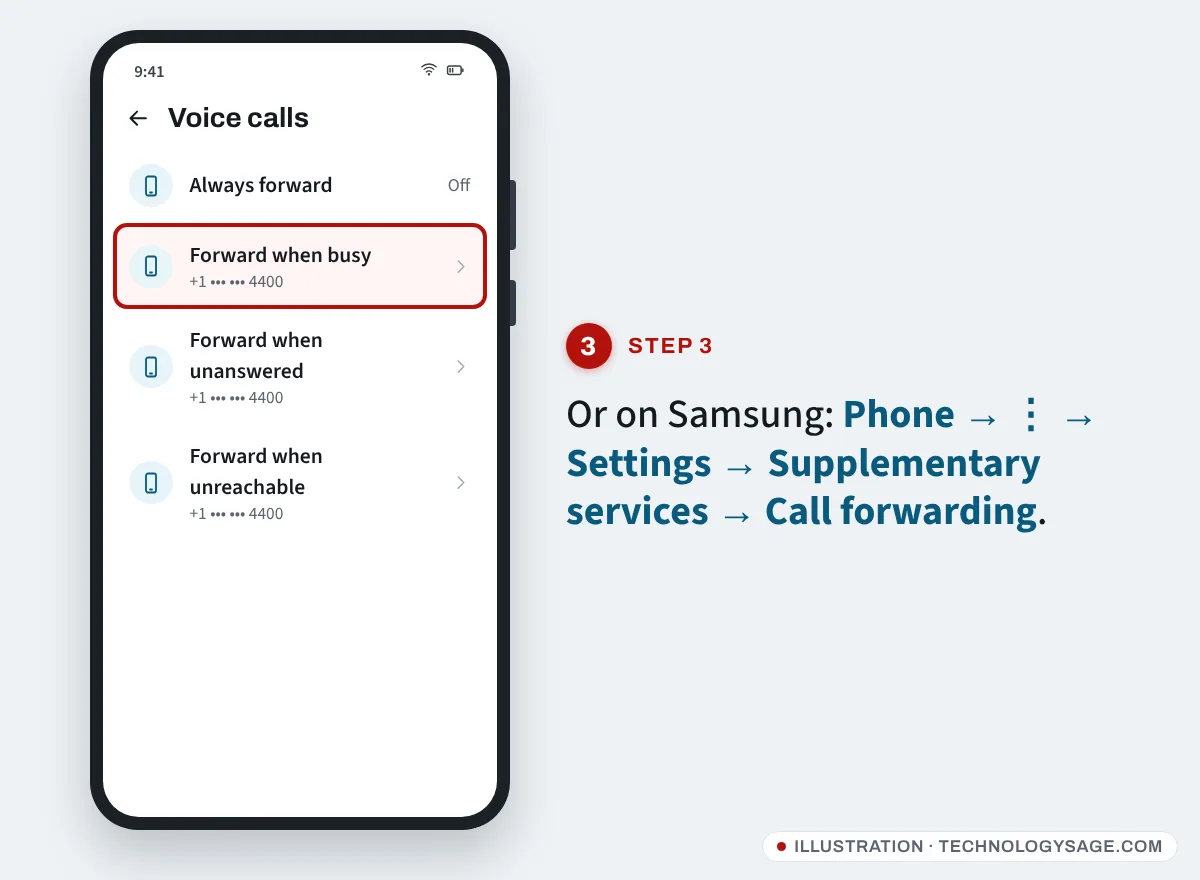
- Open Phone, tap ⋮ → Settings.
- Tap Supplementary services (called More settings or Complementary services on some regional models) → Call forwarding.
- On dual-SIM phones, pick SIM 1 or SIM 2.
- Tap Voice calls.
- Open Forward when busy, Forward when unanswered and Forward when unreachable one by one and tap Disable (or Turn off).
Google Pixel and phones using the Google Phone app
- Open Phone, tap ⋮ → Settings → Calling accounts.
- Tap your SIM or carrier name, then Call forwarding.
- Tap When busy, When unanswered and When unreachable and choose Turn off for each.
Tecno, Infinix, itel, Xiaomi, Oppo and others
Open Phone → Settings (or Call settings) and look for Call forwarding, sometimes under Supplementary services, SIM card settings or your SIM’s name. The same three forwards are there. If the menu shows “Network or SIM card error”, the network may not allow changes from the menu; use ##004# or ask the carrier.
Turn off voicemail on iPhone
iPhone has no voicemail switch, and Settings → Apps → Phone → Call Forwarding only controls “always forward”. To stop missed calls going to voicemail:
- Dial
##004#from the Phone keypad, as in step 2, and confirm with*#61#. - If the code doesn’t work on your network, ask your carrier to remove voicemail or turn off conditional call forwarding on your line.
Turning off visual voicemail isn’t possible from iPhone settings either; deleting messages or leaving the Voicemail tab alone won’t stop new ones.
Turn off voicemail through your carrier
This is the only method that works on every network, including CDMA-based or VoLTE-only lines where the codes may not apply:
- Use the carrier’s app or online account and look for voicemail under services, features or add-ons.
- Or contact the carrier through the support number on its official website. Ask them to “remove voicemail” or “disable call forwarding to voicemail”.
- Some carriers let you turn voicemail off temporarily or permanently; AT&T, for example, has a help page for both.
Safety note: only use support contacts from your carrier’s own website or app. Fake “carrier support” accounts on social media and search ads ask for your PIN, one-time codes or payment by airtime or gift card. Your real carrier will never ask for those.
How to turn voicemail back on
- Easiest: ask your carrier to restore it.
- With a code: dial
**004*followed by the voicemail number you wrote down and#, then press call. For example,**004*+15550001234#(use your own number in full international format). This re-creates all three conditional forwards. - From the menu (Android): open each forward in Call forwarding and enter the voicemail number.
- On iPhone, also check Phone → Voicemail; you may need to tap Set Up Now again. Our guide on how to set up voicemail walks through it.
If voicemail won’t turn off
- “Connection problem or invalid MMI code”. Check you typed
##004#exactly, use the keypad (not a contact), and try with Wi-Fi Calling off. If it still fails, your carrier doesn’t support the code; ask them. - It turned off but came back. Some carriers restore default forwarding after a restart, SIM swap or plan change. Repeat the code, or ask the carrier to remove voicemail from the account.
- Calls still go “straight to voicemail”. Something else is forwarding or blocking calls: Do Not Disturb, Focus, an “always forward” rule or a blocked number. See why calls go straight to voicemail.
- Dual SIM. Forwarding is set per SIM. Repeat the steps for the other SIM.
What callers hear when voicemail is off
With voicemail removed, a caller you don’t answer usually hears the phone ring until the network gives up, then a recorded message such as “the person you are calling is not available”. If your phone is off or out of coverage, they hear the network’s “unreachable” message. Nobody can leave a message, so make sure people have another way to reach you, such as text or a messaging app.
FAQ
How do I deactivate voicemail?
Dial ##004# from your Phone app to cancel the forwarding that sends calls to voicemail, check with *#61#, and ask your carrier to remove voicemail if the code doesn’t work on your network.
Can I turn off voicemail on iPhone in Settings?
No. iPhone settings don’t have a voicemail off switch. Use the ##004# code or ask your carrier to remove voicemail from your line.
Will turning off voicemail delete my old messages?
Cancelling forwarding doesn’t delete the mailbox, so old messages usually stay until the carrier removes voicemail from the line or they expire. Listen to anything important first: see how to check voicemail.
Does ##004# cost anything?
No. It is a free network instruction, not a call. Nobody answers and you aren’t charged.
Why does my phone still ring for only a few seconds?
That is normal network behaviour when there is no voicemail. If calls never ring at all, see why your phone is not ringing.