
In this guide
To transfer your phone number to a new phone on the same carrier, you just move the SIM: swap the physical SIM card into the new phone, or follow the eSIM transfer prompt when you set the new phone up. To move your number to a new carrier, don’t cancel your old plan: get a number transfer PIN (port-out PIN) and your account number from your current carrier, then give them to the new carrier when you sign up, and they pull the number across for you.
Which route you need depends on one question: are you keeping your carrier or leaving it? The rest of this guide covers both, plus the UK, Canada and Australia, where the process is a little different.
Before you start: two checks that save trouble
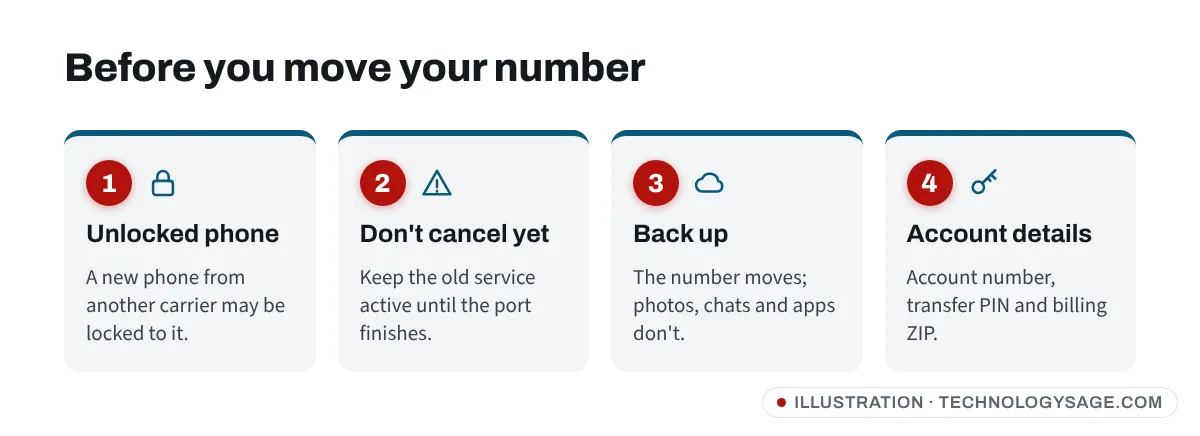
- Is the new phone unlocked or from your carrier? A phone bought from another carrier may be locked to it. On iPhone, look in Settings → General → About → Carrier Lock: “No SIM restrictions” means unlocked. On Android, try a SIM from another network or ask your carrier.
- Don’t cancel your old service. If you’re porting to a new carrier, the old account must stay active until the transfer finishes. The port itself closes the old line for that number. AT&T’s own transfer page warns that if you disconnect first, the number may have to be reactivated before it can move.
Back up the old phone too (iCloud, Google, or Samsung Smart Switch), because moving the number doesn’t move your photos, chats or apps.
How to transfer your number to a new phone on the same carrier
This is a SIM move, not a port. Nothing changes on your account except which device the number is on.
If you use a physical SIM card
- Turn off the old phone.
- Open the SIM tray with the eject tool (or a straightened paper clip) and take the SIM out.
- Put it in the new phone’s tray and turn the new phone on.
- Make a test call and send a text. If you see “No SIM” or “Invalid SIM”, see the troubleshooting section below.
If the new phone uses a different size of SIM, or only takes eSIM, your carrier can issue a new SIM or eSIM for the same number, in a store, in its app, or through its support chat.
If you use an eSIM (iPhone)
Apple’s setup assistant can move your number for you.
- Keep the old iPhone nearby, unlocked, with Bluetooth on, signed in to the same Apple Account as the new one.
- Set up the new iPhone. When it asks to Transfer Your Number (or transfer your SIM), follow the prompts.
- If you skipped that step, go to Settings → Cellular → Set Up Cellular (or Add eSIM) on the new iPhone and choose Transfer From Nearby iPhone, or pick the number from the list.
- Confirm on the old iPhone if asked. The old phone loses service once the new one activates.
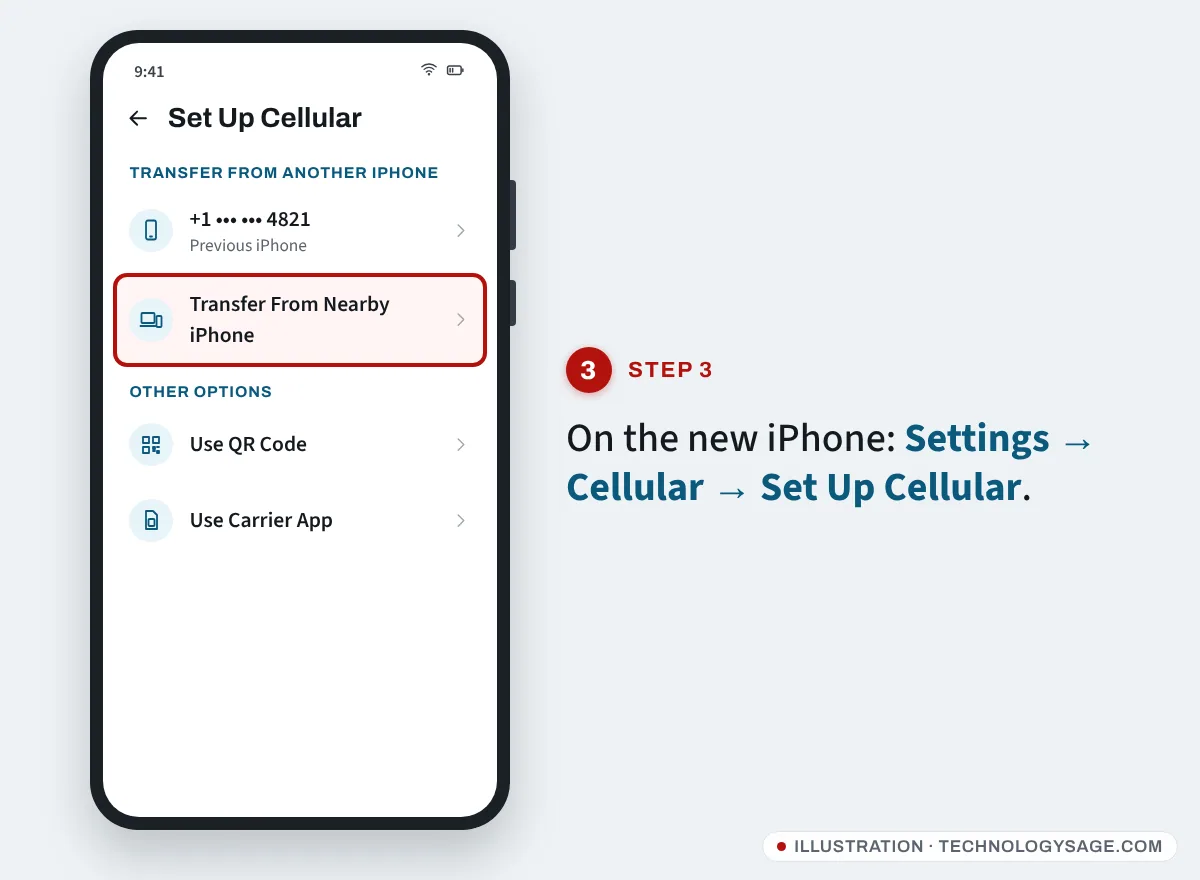
Apple calls the carrier-supported version eSIM Quick Transfer. If your carrier doesn’t support it, the screen tells you to contact the carrier, or to use the carrier’s app. Apple’s Set up eSIM on iPhone page has the full list of options.
If you use an eSIM (Android)
Recent Pixel and Samsung Galaxy phones can copy an eSIM from your old Android phone during setup, when the carrier supports it. Look for a “copy your SIM” or “transfer SIM” step in setup, or in Settings → Network & internet → SIMs (Pixel) or Settings → Connections → SIM manager (Samsung) afterwards. Otherwise, add the eSIM with a QR code or the carrier’s app. Our eSIM activation guide for Android walks through the QR-code route.
Using the carrier’s own app or website
AT&T, Verizon and T-Mobile all let you switch your line to a new device from their app or online account (often called “activate a device” or “change device”). You’ll usually be asked for the new phone’s IMEI, which you can see by dialling *#06#. This route is handy when you bought the phone elsewhere.
How to transfer your number to a new carrier (porting)
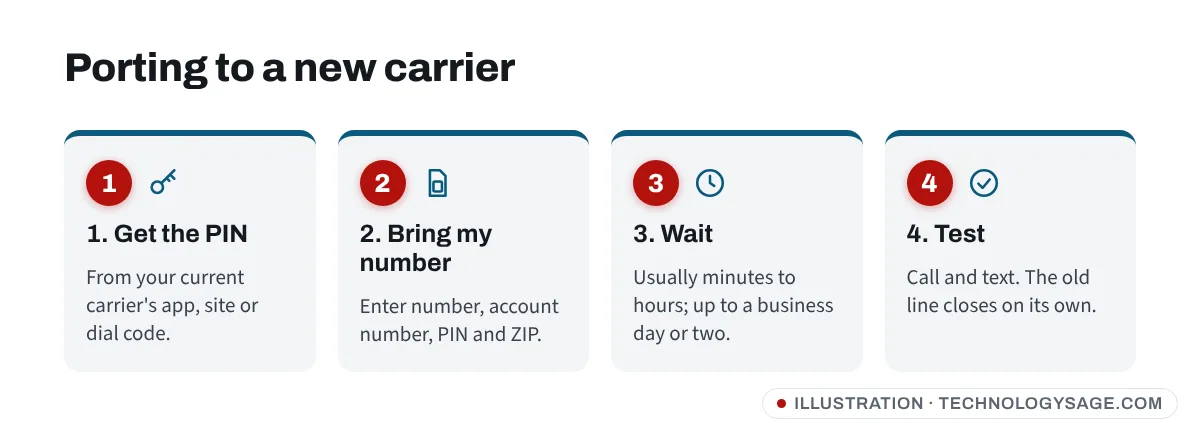
In the US, you keep your number when switching carriers by law; the process is called porting. The new carrier does the work. You supply three things from the old carrier:
- your account number (on your bill or in the carrier’s app),
- your number transfer PIN (also called a port-out PIN; some carriers use your account PIN or passcode instead),
- the name and billing ZIP code on the account.
AT&T
According to AT&T’s number transfer PIN page:
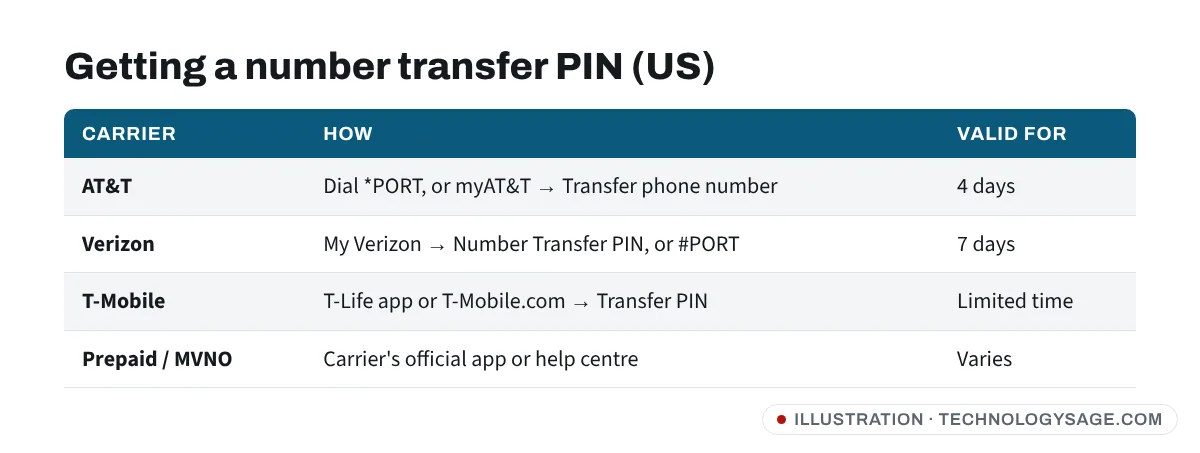
- From your AT&T phone, dial *PORT (*7678), follow the prompts and have your account passcode ready; the PIN arrives by text.
- Or, in the myAT&T app or online, go to your profile Settings, scroll to Transfer phone number and choose Request new PIN.
- Only the person with primary online access can request it. The PIN expires after 4 days (14 for business accounts) and works for every number on the account.
- Turn off Wireless Account Lock first, or the transfer fails.
AT&T’s transfer your number page covers moving a number to AT&T. There’s more detail in our AT&T transfer PIN guide.
Verizon
In the My Verizon app or website, go to your profile settings and find Number Transfer PIN, then choose Generate PIN. You can also dial #PORT from the Verizon phone to get a link. You must be the account owner or an account manager, and the PIN is valid for 7 days. If Number Lock is on, turn it off first in My Verizon. Verizon’s port-out FAQs cover the details.
T-Mobile
T-Mobile calls it a Transfer PIN (Temporary Port Out PIN). The Primary Account Holder creates it in the T-Life app or on T-Mobile.com, under the account’s permissions and controls. If you added Port Out Protection, the Primary Account Holder has to remove it before the port can go through.
Prepaid and smaller carriers
Prepaid brands and MVNOs (Mint, Cricket, Visible, Boost, Metro and others) each have their own page or app option for the PIN. Search your carrier’s official help centre for “transfer PIN” or “port out”, and check the account number format the new carrier expects. Use only the official site: copycat “porting help” pages often list fake phone numbers.
Then sign up with the new carrier
- Choose Bring my number (or “transfer my number”) when you order.
- Enter the number, account number, PIN and billing ZIP exactly as the old carrier shows them.
- Insert the new SIM or install the eSIM when told to. Most ports complete in minutes to a few hours; some take a business day or two.
- When the new phone can call and text, the old line closes automatically. Pay any final bill and device balance on the old account.
Transferring your number in the UK, Canada and Australia
- UK: text PAC to 65075 from the phone to get a Porting Authorisation Code (valid 30 days), then give it to the new provider, which must complete the switch within one working day. Family or multi-line accounts may need to request it online or by phone. This is set out in Ofcom’s switching mobile phone provider guidance.
- Canada: there’s usually no transfer PIN. The new carrier asks for your current account number and sometimes the phone’s IMEI, then starts the port.
- Australia and New Zealand: the new provider starts the port; you confirm with details from the old account (account number, or date of birth on prepaid) and a code texted to your number.
- Ireland: you give the new operator your number and account details, and they handle the switch.
Protect your number while you switch
A transfer PIN is effectively the key to your phone number. Anyone who has it, plus your account number, can try to move your number to their phone and receive your bank texts and 2FA codes (a SIM-swap or port-out scam).
- Never share a transfer PIN or account PIN with anyone except the new carrier, at the moment you sign up.
- Carriers never phone or text to ask you to “confirm” a PIN. If you get a PIN text you didn’t request, contact your carrier through its app straight away.
- Only port your own number, or one you’re the account holder for.
- After the move, turn on your new carrier’s account PIN and port-out protection.
If the number transfer isn’t working
- “Transfer PIN invalid” or “account number doesn’t match”: request a fresh PIN (old ones expire), and copy the account number exactly. Some carriers use a different account number for porting than the one on the bill.
- Port rejected: a lock feature (Wireless Account Lock, Number Lock, Port Out Protection) is still on, or the billing ZIP is wrong.
- New phone says “SIM not provisioned”: the carrier hasn’t finished activating it. Restart, wait an hour, then see our SIM not provisioned fixes.
- “Invalid SIM” or no signal after a same-carrier swap: the phone may be carrier-locked; try our invalid SIM guide.
- Calls go to the old phone, or straight to voicemail: the port is still in progress. Give it a few hours; if it’s been more than a business day, contact the new carrier through its app or website. See also why calls go straight to voicemail.
FAQ
Can I transfer my phone number to a new phone myself?
Yes. On the same carrier, moving the SIM card or using the eSIM transfer in setup is all it takes. For a new carrier, you request the PIN and the new carrier does the porting.
How long does it take to transfer a phone number?
Same-carrier SIM moves are instant. Ports between carriers usually take minutes to a few hours, and occasionally up to a couple of business days. UK switches must be done within one working day of giving the PAC.
Do I lose my texts and contacts when I transfer my number?
The number carries no data. Contacts, photos and chats come across only if you back up and restore them, for example with iCloud, your Google account or Samsung Smart Switch.
Is there a fee to transfer my phone number?
US carriers generally don’t charge to port a number out, and UK providers can’t charge for the PAC. You may still owe a final bill, early termination fees or a device balance on the old account.
Can I transfer my number if my phone is lost or broken?
Yes. Ask your carrier for a replacement SIM or eSIM for the same number on the new phone. For a carrier switch, you can usually get the PIN from the old carrier’s website or app instead of dialling from the phone.