In this guide
To create an invoice for free, open a ready-made invoice template in Word (File → New, search “invoice”), Excel (same search, with totals that calculate themselves) or Google Sheets (Template gallery → Invoice), then fill in your details, the customer’s details, a unique invoice number, the date, each item with its price, the total and your payment terms. Save it as a PDF and email it. You don’t need accounting software to make an invoice that looks professional.
This guide covers what has to be on the invoice, then the steps in each program.
What to include on an invoice
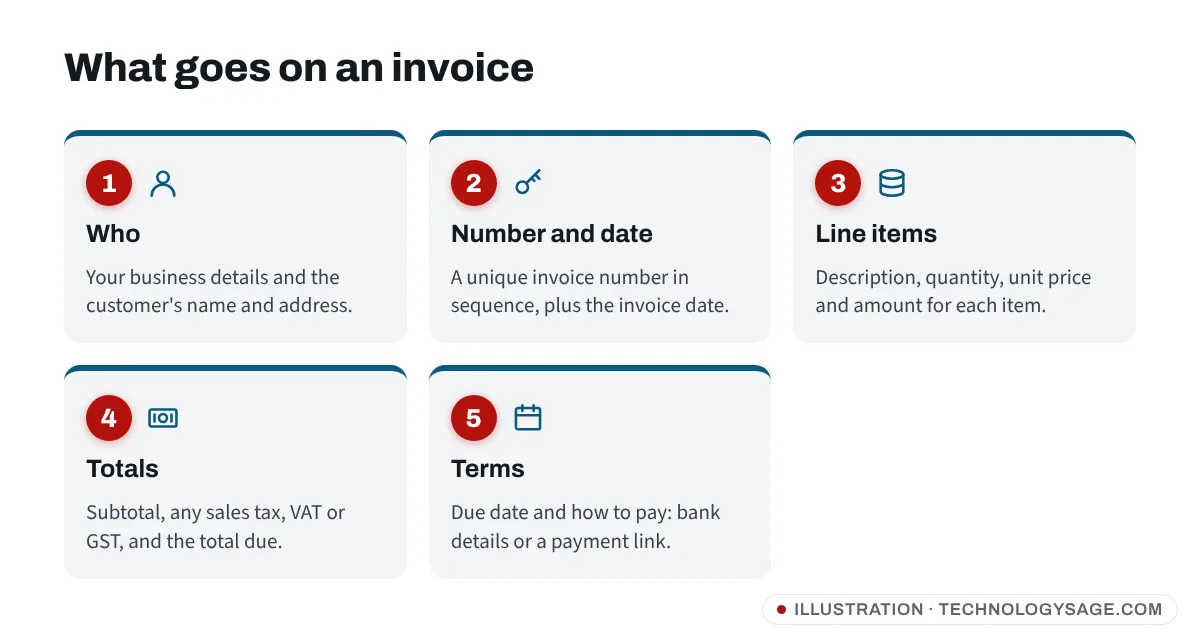
Whatever program you use, a clear invoice has these parts:
- The word “Invoice” at the top (or “Tax invoice” where your tax rules require it, see below).
- Your business name, address and contact email, plus your tax or registration number if you have one.
- The customer’s name and address (a company name and contact person for business clients).
- A unique invoice number. Number invoices in order (for example 2026-001, 2026-002) and never reuse a number.
- The invoice date and, ideally, the date the work was done or goods delivered.
- Line items: a short description of each product or service, the quantity or hours, the unit price and the line total.
- Subtotal, tax and total due, with the currency stated.
- Payment terms and due date, for example “Due within 14 days” or “Due on receipt”.
- How to pay: bank transfer details, a payment link, or who to make a check out to.
Tax rules differ by country
- United States: there’s no single federal invoice format. The IRS lists invoices among the documents that support your income and expenses, so keep a copy of every invoice you send. Its page What kind of records should I keep explains the rest. Sales tax is set by your state.
- United Kingdom: if you’re VAT-registered, a VAT invoice must show extra details such as your VAT number, the VAT rate and the VAT amount. HMRC’s manual lists them in VATREC5010.
- Canada: GST/HST registrants must show certain details so business customers can claim input tax credits. The CRA explains it under receipts and invoices; more details are needed as the sale amount goes up.
- Australia: a GST-registered business issues a tax invoice with its ABN, and sales of $1,000 or more must also show the buyer’s identity or ABN. See the ATO’s tax invoices page.
If you’re unsure which tax applies to you, check with an accountant or your tax agency before you send your first invoice.
How to create an invoice in Microsoft Word
Word is a good choice for a simple invoice with a few lines. It can’t calculate totals on its own, so double-check your sums.
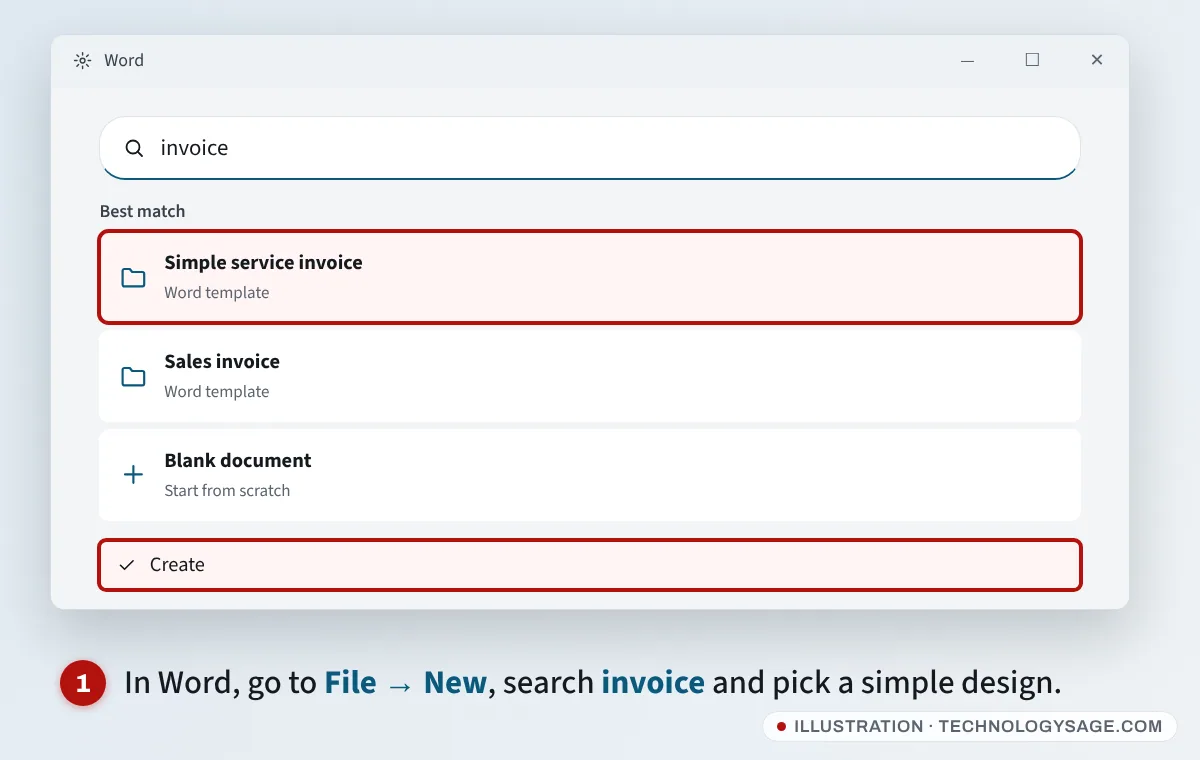
- Open Word and select File → New.
- In the search box, type invoice and press Enter. Microsoft’s online templates appear (you need an internet connection).
- Pick a simple design and select Create.
- Click each placeholder and replace it: your business name, address, the customer, invoice number and date.
- Fill in the item table. To add rows, click in the last row, right-click and choose Insert → Insert Rows Below.
- Work out each line total, the subtotal, tax and total, and type them in.
- Add your payment terms and payment details at the bottom.
- Save a Word copy (for example
Invoice-2026-001.docx) as your template for next time.
Microsoft also offers editable invoice designs on its Microsoft Create site and describes using them in Create estimates and invoices.
How to make an invoice in Excel (with automatic totals)
Excel is better when an invoice has many lines, because it adds everything up for you.
-
Open Excel, select File → New, search for invoice and open a template, or start from a blank workbook.
-
If you start blank, put your business details in the top rows, the customer’s details below them, and the invoice number and date on the right.
-
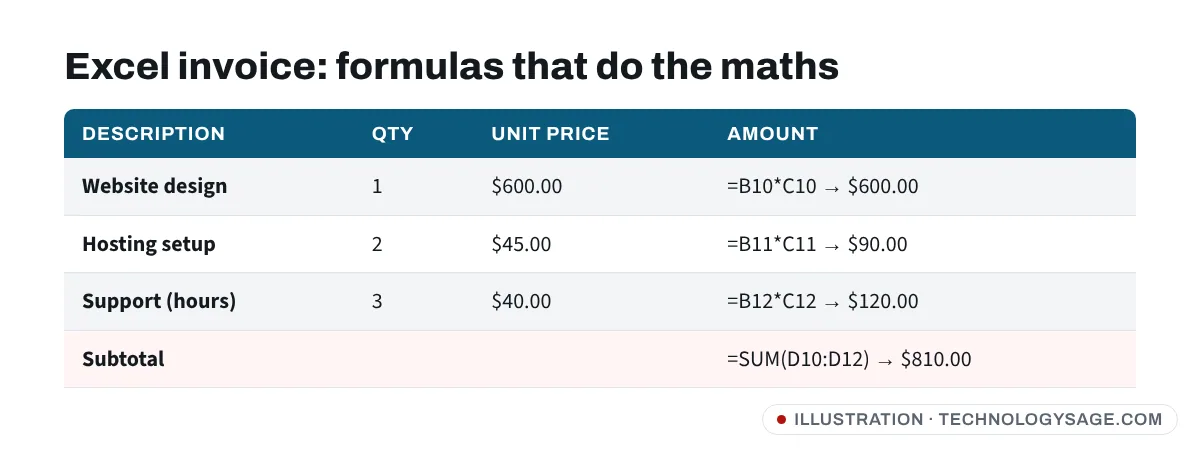
Make a table with the headings Description, Qty, Unit price and Amount.
-
In the first Amount cell (say D10), type a formula that multiplies quantity by price:
=B10*C10Then drag the cell’s corner down to copy it to the other rows.
-
Under the table, add the subtotal, tax and total:
Subtotal:  =SUM(D10:D20)
Tax (8%):  =D21*0.08
Total:     =D21+D22
Change the cell references and the tax rate to match your sheet and your local rate. If you don’t charge tax, leave the tax line out.
-
Format the money cells: select them, then Home → Number format → Currency.
-
Add terms and payment details, then save it as your master invoice.
How to create an invoice in Google Docs or Google Sheets
Google’s tools are free with any Google account and work in a browser, so they’re handy if you don’t have Microsoft Office.
Google Sheets (calculates totals):
- Go to Google Sheets and open the Template gallery at the top of the home screen.
- Under the work templates, choose Invoice. If you don’t see it, start a blank spreadsheet and follow the Excel steps above: the same
=B10*C10and=SUM()formulas work in Sheets. - Replace the sample details with your own and fill in the items.
Google Docs (simple layout):
- Open a blank document.
- Type your header details, then select Insert → Table and make a table with four columns (Description, Qty, Unit price, Amount).
- Type the totals by hand under the table, and add your terms.
Name the file clearly (for example “Invoice 2026-001 - Customer name”) so you can find it later in Google Drive.
Save the invoice as a PDF and send it
Always send a PDF, not the editable file. It looks the same on every device and is harder to change by mistake.
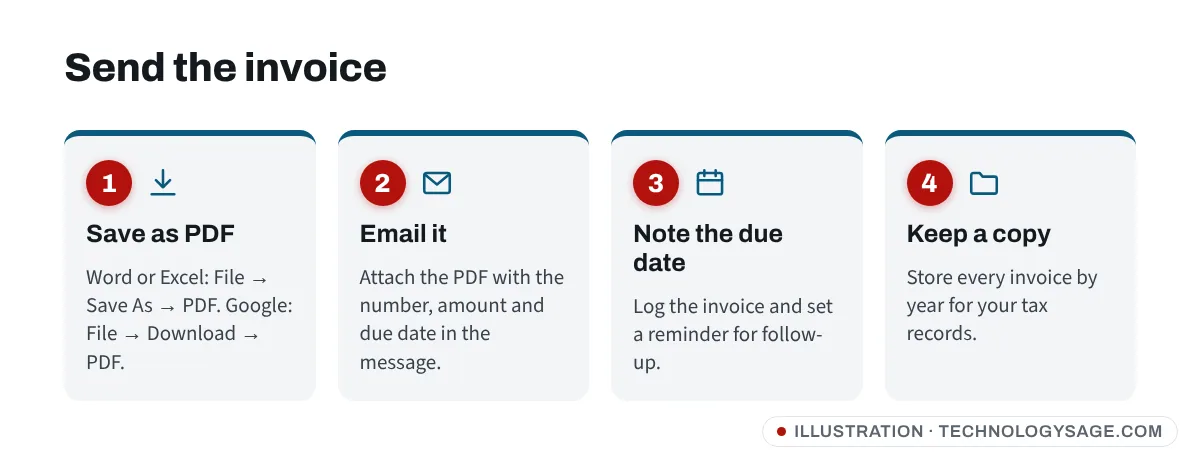
- Word: File → Save As, choose PDF as the file type. (Or File → Export → Create PDF/XPS.)
- Excel: File → Save As → PDF. Check the preview first so the invoice fits on one page.
- Google Docs or Sheets: File → Download → PDF document (.pdf).
Then attach the PDF to an email. A short message works: the invoice number, the amount, the due date and a thank-you. A professional email signature with your business details helps; see how to add a signature in Outlook.
Tips to get paid faster
- Invoice promptly, as soon as the job is done.
- Set a clear due date rather than “net 30” alone, so the customer sees the actual date.
- Make paying easy: give your bank details or a payment link. If you accept card payments online, the link can go straight on the invoice.
- Keep a simple log (a spreadsheet with number, customer, amount, date sent, date paid) so you know who still owes you.
- Follow up politely a few days before and on the due date.
When invoicing becomes a daily job, invoicing or accounting software saves time with reminders and payment tracking, but a template is enough for most freelancers and small businesses starting out. If you already use QuickBooks and run into errors, our QuickBooks Tool Hub guide can help.
Stay safe with invoices
Invoice fraud is common. Never change the bank details you pay to because of an email alone; call the supplier on a number you already have. Protect your own customers by telling them your bank details won’t change by email. If you send sensitive files, you can also password-protect a PDF.
If something doesn’t work
- Templates don’t appear in Word or Excel: online templates need an internet connection and, in some work accounts, may be turned off by your IT admin. Start from a blank document instead.
- Excel shows #VALUE!: a cell in the formula contains text, such as “$50” typed as text or a space. Retype the number without symbols and apply the Currency format.
- The PDF spills onto two pages: in Excel, use Page Layout → Scale to Fit and set width and height to 1 page.
- Totals look wrong in Word: Word doesn’t recalculate. Do the sums in a calculator or move the invoice to Excel or Sheets.
FAQ
Can I make an invoice for free?
Yes. Word and Excel templates are included with Microsoft 365, and Google Docs and Sheets are free with a Google account. You can also find free invoice generators online; see our notes on using an invoice generator.
What’s the difference between an invoice and a receipt?
An invoice asks for payment and is sent before the customer pays. A receipt confirms that payment has been received. Many businesses mark a paid invoice “Paid” with the date and send it back as a receipt.
How do I number my invoices?
Use a simple sequence and never repeat a number, for example 001, 002, 003, or a year prefix such as 2026-001. Some people add a customer code. Gaps and duplicates make your records harder to follow.
Do I need to charge sales tax or VAT on my invoices?
It depends on where you are, what you sell and whether you’re registered. In the US it’s set by your state; in the UK, Canada and Australia it depends on VAT, GST/HST or GST registration. Check with your tax agency or an accountant.
Can I create an invoice on my phone?
Yes. The Microsoft Word and Excel apps and the Google Docs and Sheets apps let you open and edit an invoice template on a phone, then share it as a PDF. Editing tables is easier on a computer, though.