In this guide
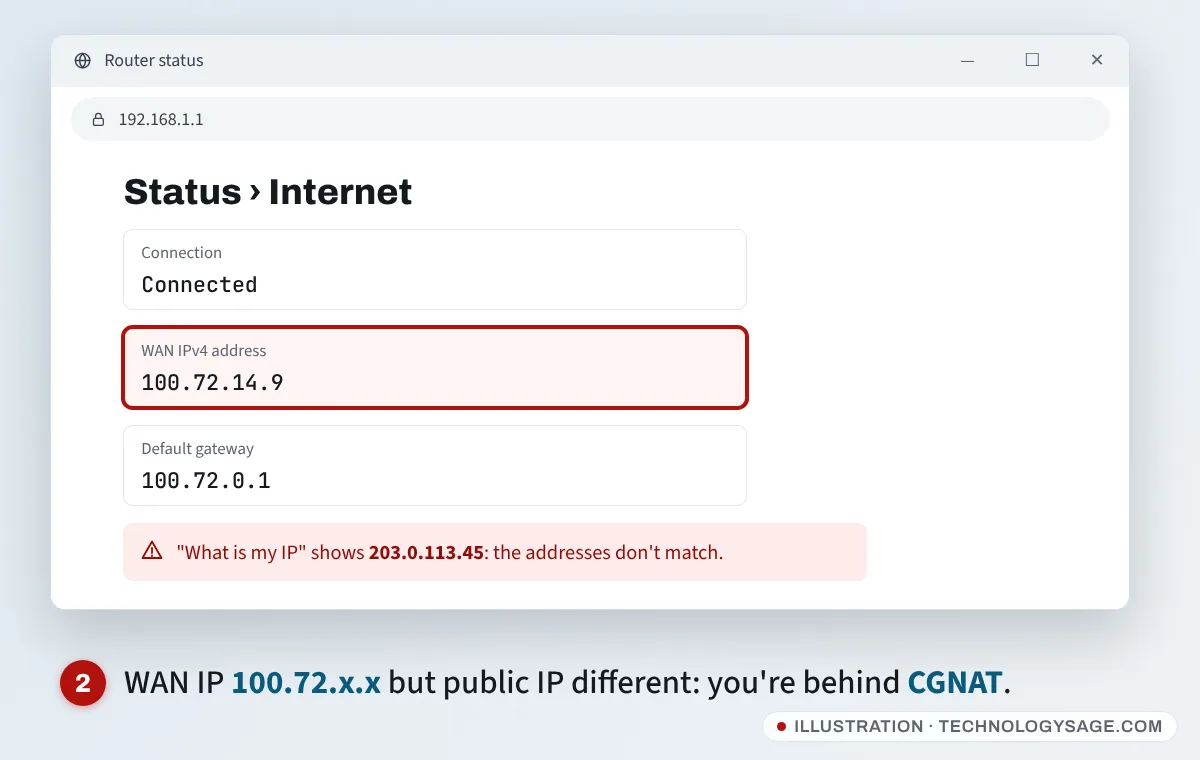
CGNAT (carrier-grade NAT) means your internet provider shares one public IPv4 address between many customers, so your router doesn’t get a public address of its own. To check if your ISP uses CGNAT, compare the WAN IP shown in your router with the IP a “what is my IP” website shows: if they’re different — especially if the router’s WAN IP starts with 100.64 to 100.127 — you’re behind CGNAT.
For browsing, streaming, calls and most games, CGNAT makes no visible difference. It matters when you need incoming connections: port forwarding, hosting a game server, reaching a home camera recorder or media server from outside, or getting an Open NAT type. This guide shows how to test for it and the real options, from asking your ISP to free self-hosted tunnels.
What is CGNAT and why do ISPs use it?
Every device on the public internet needs an IP address. The old system, IPv4, has about 4.3 billion addresses, and they ran out years ago. ISPs adding customers — especially mobile networks, fixed-wireless, satellite and fast-growing fibre providers — can’t get enough of them.
Your home router already does NAT: it shares one address among your phones and laptops. CGNAT adds a second NAT inside the ISP’s network, sharing one public address among many households.
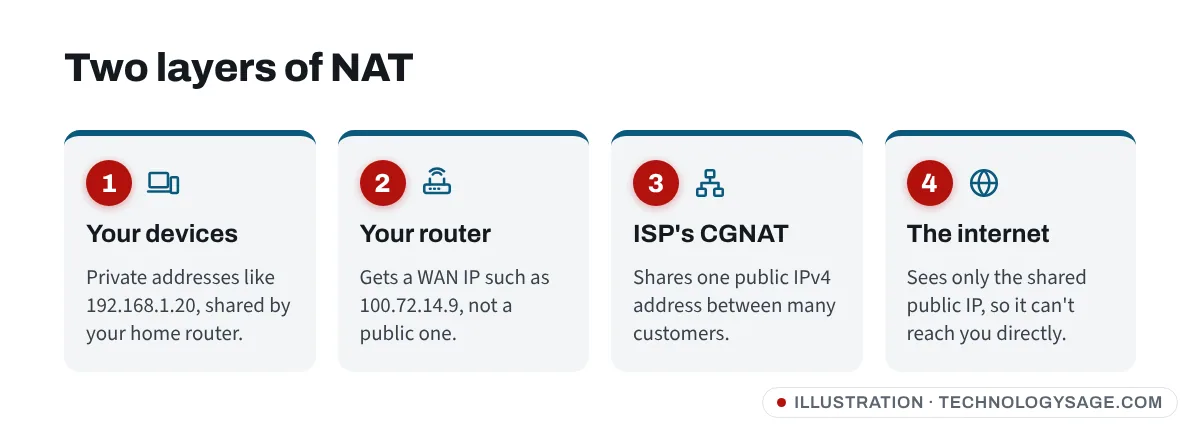
To keep this tidy, the internet standards body set aside a special block for the link between the ISP’s CGNAT equipment and customers’ routers: 100.64.0.0/10 (100.64.0.0 to 100.127.255.255), defined in RFC 6598. It isn’t routable on the public internet, so seeing it on your router’s WAN side is the clearest sign of CGNAT.
CGNAT is very common on:
- Mobile data and 4G/5G home internet — almost always
- Fixed-wireless and satellite services
- Newer fibre and cable ISPs in regions with few IPv4 addresses, and budget plans everywhere
How to check if your ISP uses CGNAT
This takes about two minutes and doesn’t change any settings.
- Find your public IP. On a device connected to your home Wi-Fi (not mobile data), search “what is my IP” in your browser; most search engines show it at the top. Write the address down.
- Find your router’s WAN IP. Sign in to your router (the address is on its label or in your phone’s Wi-Fi details as the gateway, often
192.168.0.1or192.168.1.1). Look on the Status, Internet, WAN or Network map page for WAN IP, Internet IP or IPv4 address. Many router apps show it under internet details. - Compare them:
| Router WAN IP | Means |
|---|---|
| Same as “what is my IP” | No CGNAT. Port forwarding can work. |
| 100.64.x.x – 100.127.x.x | CGNAT (RFC 6598 shared space) |
| 10.x.x.x, 172.16-31.x.x or 192.168.x.x | Another NAT above you: your ISP’s CGNAT, or a second router in your home (double NAT) |
| Different public-looking address | Usually CGNAT using other address space; ask your ISP |
Extra check with traceroute (Windows)
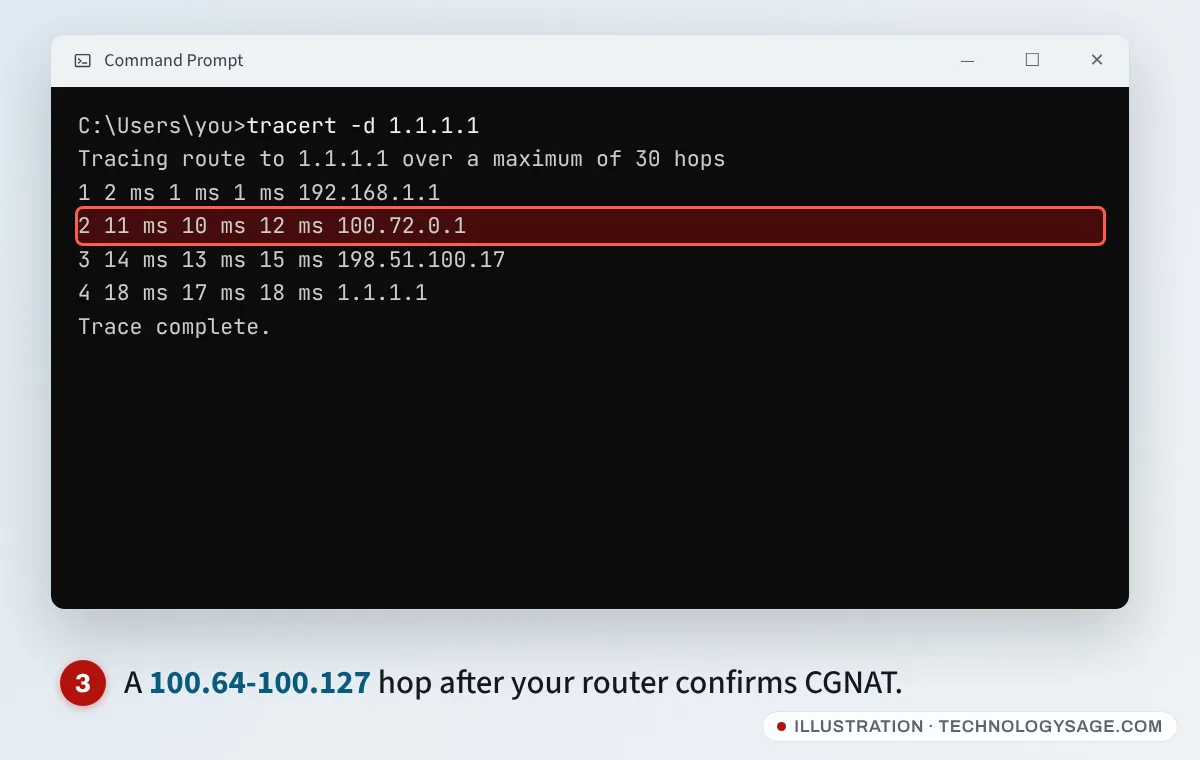
Open Command Prompt and run:
tracert -d 1.1.1.1Look at the first few hops. Hop 1 is your router. If hop 2 or 3 is a 100.64–100.127 address, that is your ISP’s CGNAT gateway. On Mac or Linux, the command is traceroute -n 1.1.1.1.
Rule out double NAT first
If the WAN IP is a private address like 192.168.1.x, check whether you have two routers: an ISP modem-router plus your own Wi-Fi router or mesh system. That’s double NAT, and it’s fixable at home: put the ISP box in bridge or modem-only mode (the name varies by maker), or set your own router as the ISP box’s DMZ host. Then test again.
What CGNAT breaks (and what it doesn’t)
Works normally behind CGNAT: web, YouTube and Netflix, video calls, WhatsApp, online banking, most online games, cloud-connected cameras and smart-home apps (they connect outward to the maker’s servers).
Can break or get worse:
- Port forwarding and UPnP — the rules you set on your router never see the traffic, because the ISP’s NAT drops it first. See our guide on whether to turn UPnP on or off.
- Strict or Moderate NAT on consoles, and trouble hosting matches
- Hosting a Minecraft or other game server, a website, or a file server at home
- Remote access to a home NVR/DVR, NAS or PC by IP address
- Shared reputation — because you share an IP, you may see more CAPTCHAs, or get caught up in a block aimed at someone else on the same address
How to get around CGNAT: your options
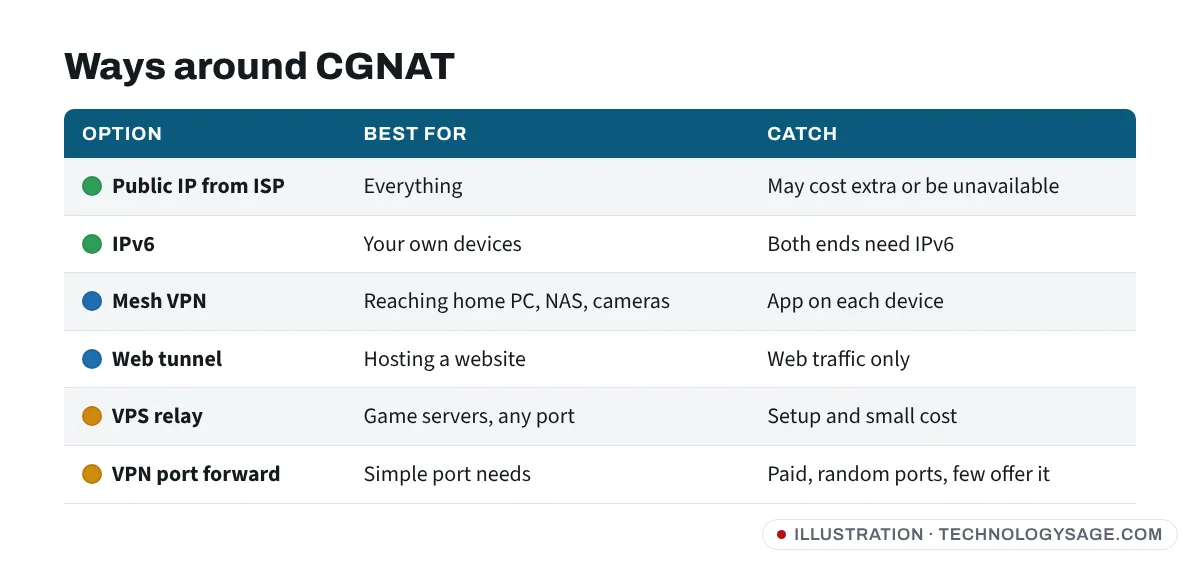
There’s no single fix, and a VPN is only one of several approaches. Pick by what you need.
1. Ask your ISP for a public IPv4 address
This is the cleanest fix. Contact support and ask: “Is my connection behind CGNAT, and can I have a public IPv4 address?” Outcomes vary by provider: some switch you for free on request, some charge for a “static IP” add-on, some only offer it on business plans, and some (especially mobile networks) don’t offer it at all. Ask what it costs before agreeing.
2. Use IPv6
Many ISPs that use CGNAT for IPv4 also give every customer real, public IPv6 addresses, which don’t need NAT at all. If your router shows an IPv6 WAN address, devices can be reachable directly — but you must allow the traffic in the router’s IPv6 firewall, and the person connecting to you must have IPv6 too. It works well for some uses (reaching your own NAS from a phone on an IPv6 mobile network) and not for others (friends joining your game server from IPv4-only connections).
3. Use a mesh VPN to reach your own devices
If you just want to reach your own things — your home PC, NAS or camera recorder — from your phone or laptop, a mesh/overlay VPN such as Tailscale, ZeroTier or a self-hosted WireGuard setup is often the simplest answer. Each device runs a small app and connects outward, so CGNAT doesn’t matter. Nothing is exposed to the public internet. Our guide to accessing a computer remotely from Android covers remote-desktop options that work the same way.
4. Use a tunnel for web services
To publish a website or web app from home, tunnel services (for example Cloudflare Tunnel) run a small connector on your machine that connects outward and serves your site through the provider’s network. Good for web traffic; not suitable for most game servers, which use UDP.
5. Rent a small server and forward through it
A low-cost cloud VPS has its own public IP. You connect your home machine to it with WireGuard and forward the ports you need from the VPS to home. This handles games and any protocol, but it takes some setup and adds a little latency.
6. A VPN service that offers port forwarding
A few commercial VPN providers let you open a forwarded port on their server. It works, but the port is often random and can change, it adds latency, it’s a paid subscription, and many providers don’t offer it at all. Check the specific provider’s documentation before paying — and see our view on whether free VPNs are safe.
Is CGNAT bad for security?
Not really. A side effect of CGNAT is that unsolicited incoming connections never reach your router, which blocks a lot of internet background scanning. It doesn’t replace keeping your router and devices updated, and it doesn’t hide your activity from your ISP. The real downsides are the lost ability to accept incoming connections and the shared IP reputation.
For a refresher on how addresses work, read what IP addresses are and static vs dynamic IP addresses.
FAQ
How do I know if I’m behind CGNAT?
Compare your router’s WAN IP with the IP a “what is my IP” site shows. If they differ, and especially if the WAN IP is between 100.64.0.0 and 100.127.255.255, you’re behind CGNAT. A tracert showing a 100.64-range hop confirms it.
Can I port forward with CGNAT?
Not on your own router alone — the ISP’s NAT drops the incoming traffic before it reaches you. You need a public IP from the ISP, IPv6, or a workaround that connects outward, such as a mesh VPN, tunnel, VPS relay or a VPN with port forwarding.
Does CGNAT affect gaming?
Usually only a little. Most games work, but you may see Strict or Moderate NAT, find it harder to host lobbies, or have trouble with peer-to-peer voice chat. It doesn’t change your speed or, by itself, your ping.
Is a static IP the same as a public IP?
Not exactly. A public IP is reachable from the internet; a static one doesn’t change. Many ISPs bundle the two as a “static IP” add-on, which is the usual way to escape CGNAT, but some give a dynamic public IP for free on request.
Does Starlink or 4G/5G home internet use CGNAT?
Mobile networks and 4G/5G home internet almost always use CGNAT for IPv4. Satellite services commonly do too on standard plans, with IPv6 available on many. Check your router’s WAN IP using the test above to be sure for your connection.