In this guide
“XINPUT1_3.dll is missing” means the game you’re starting was built for an older part of DirectX that Windows 10 and 11 don’t include out of the box. Your graphics card and DirectX 12 are fine; the game just needs Microsoft’s legacy DirectX add-ons. The fix is to install the DirectX End-User Runtime from Microsoft’s website (the June 2010 package or the small web installer), restart, and launch the game again.
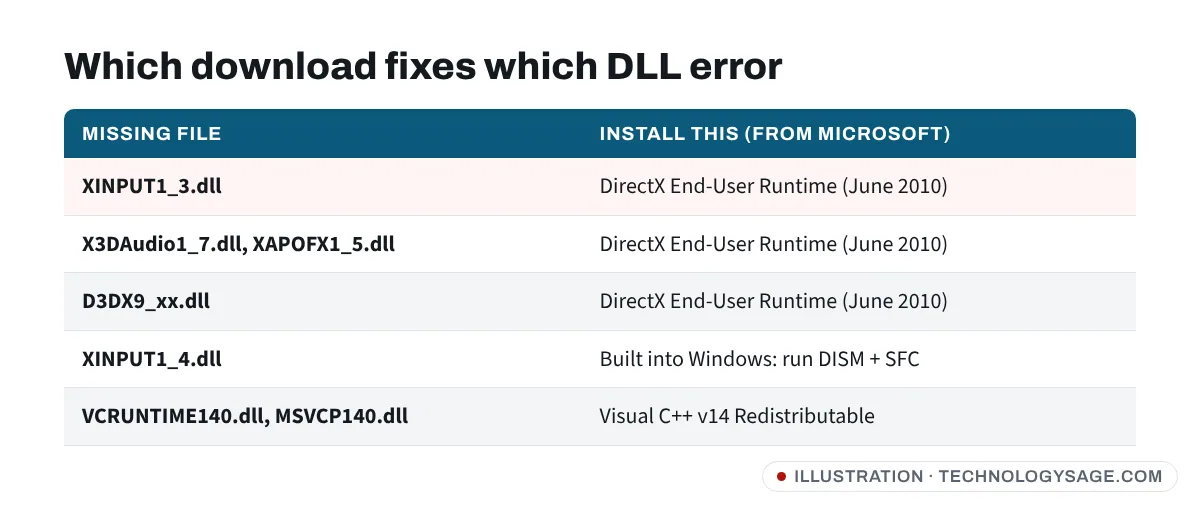
The same fix clears the related X3DAudio1_7.dll, XAPOFX1_5.dll and D3DX9_xx.dll errors, which come from the same package.
What does “XINPUT1_3.dll is missing” mean?
The message usually looks like one of these:
- “The code execution cannot proceed because XINPUT1_3.dll was not found. Reinstalling the program may fix this problem.”
- “The program can’t start because XINPUT1_3.dll is missing from your computer. Try reinstalling the program to fix this problem.”
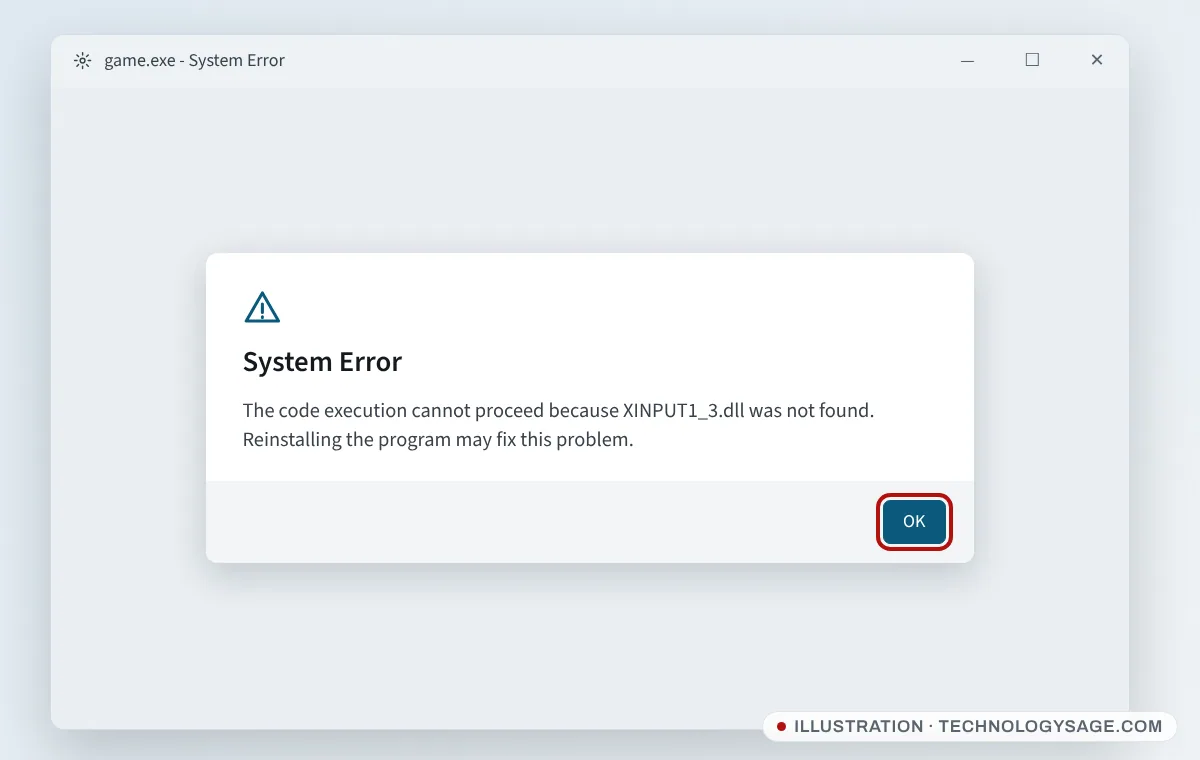
XInput is the part of DirectX that handles game controllers. Version 1.3 shipped with the old DirectX SDK and was never built into Windows itself, so games that use it expect to install it alongside the game. Microsoft’s download page says its DirectX End-User Runtime installs the legacy libraries for games that use D3DX9, D3DX10, D3DX11, XAudio 2.7, XInput 1.3, XACT and Managed DirectX 1.1, and that it doesn’t change the DirectX version already in Windows.
You’ll typically see the error:
- On a new PC or after reinstalling Windows.
- With older games (roughly the Xbox 360 era) and with emulators, mods or game launchers that use XInput 1.3.
- When a game was copied from another PC instead of installed, so its setup never ran the DirectX step.
 Photo: Alexey Savchenko on Unsplash
Quick fixes
1. Install the DirectX End-User Runtime (June 2010)
This is the standalone, full package. It works offline once downloaded, so it’s handy on slow or metered connections too.
- Go to Microsoft’s DirectX End-User Runtimes (June 2010) page and select Download. The file is directx_Jun2010_redist.exe (about 96 MB).
- Make an empty folder, for example
C:\DXtemp. - Run directx_Jun2010_redist.exe, accept the licence and, when asked where to put the extracted files, choose that folder.
- Open the folder and run DXSETUP.exe. Accept the agreement and select Next until it finishes.
- Restart your PC and start the game.
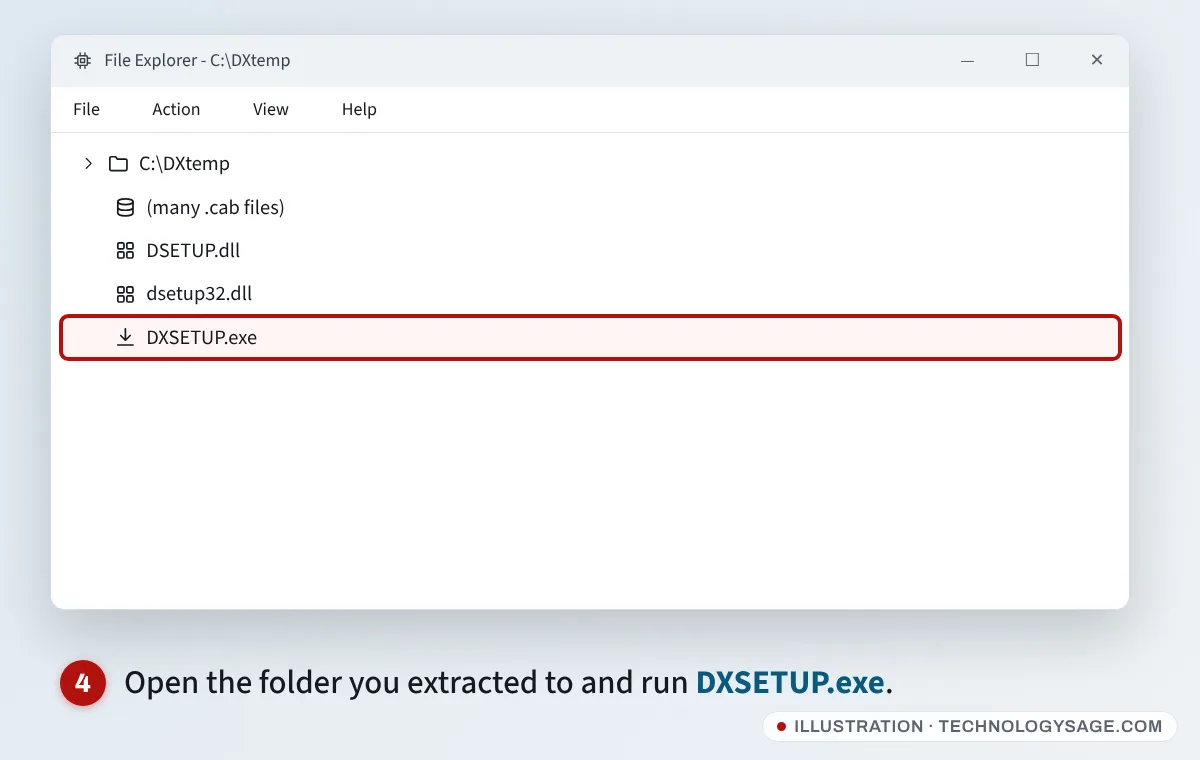
You can delete the temporary folder afterwards. The runtime installs both the 32-bit and 64-bit versions of the files, so you don’t need to choose.
2. Or use the DirectX End-User Runtime Web Installer
If you’d rather not download 96 MB up front, Microsoft’s DirectX End-User Runtime Web Installer (dxwebsetup.exe) downloads only the pieces your PC is missing. Run it, accept the agreement, let it finish, and restart.
Microsoft’s page lists only old Windows versions under system requirements, but the package is the one Microsoft offers for legacy DirectX games and is widely used on Windows 10 and 11.
3. Run the DirectX installer that came with the game
Many games include the same package:
- Steam: look inside the game’s folder for
_CommonRedist\DirectX\Jun2010and run DXSETUP.exe there. You can open the folder from your Library by right-clicking the game and selecting Manage → Browse local files. - Disc or installer: look for a
DirectXorRedistfolder. - Other launchers: use the launcher’s repair or verify option so it reruns its prerequisites.
Don’t download XINPUT1_3.dll from a DLL site
It’s tempting to grab a single XINPUT1_3.dll and drop it into the game folder or System32. Please don’t:
- You can’t verify the file. A DLL is executable code that runs inside your game. Fake or modified DLLs are a known way to slip malware onto gaming PCs.
- One file is rarely enough. Games that need XInput 1.3 usually need D3DX9 or XAudio 2.7 files from the same runtime, so you’ll just hit the next “missing” error.
- 32-bit vs 64-bit mix-ups. On 64-bit Windows, 32-bit DLLs belong in
C:\Windows\SysWOW64and 64-bit ones inC:\Windows\System32. A file of the wrong type causes errors such as 0xc000007b instead.
Microsoft’s installer is free, signed and puts the right files in the right places. You also don’t need paid “DLL fixer” or “driver updater” tools.
More fixes
4. If the DirectX installer fails (PC)
If DXSETUP reports “An internal system error occurred”:
- Right-click DXSETUP.exe and select Run as administrator.
- Install pending updates in Settings → Windows Update and restart.
- If it still fails, the error message points you to DXError.log and DirectX.log in your Windows folder (
C:\WindowsorC:\Windows\Logs). Open them in Notepad and look at the last lines that mention an error; these help the game’s support team or Microsoft’s community forums pin down the cause.
5. Reinstall the game
If the error persists after installing the runtime, the game’s own files may be incomplete. On Steam, right-click the game, select Properties → Installed Files → Verify integrity of game files. Otherwise, uninstall, restart, and reinstall from the official store or disc.
6. Install the Visual C++ Redistributables too
Older games often need both the DirectX runtime and a Visual C++ runtime. If the next error after fixing XInput mentions MSVCR, MSVCP or VCRUNTIME, follow our VCRUNTIME140.dll was not found guide, which links Microsoft’s official x64 and x86 packages.
7. XINPUT1_4.dll or XINPUT9_1_0.dll missing
These are different. XInput 1.4 and XInput 9.1.0 are built into Windows 8, 10 and 11, so the DirectX June 2010 package won’t add them. If Windows says XINPUT1_4.dll is missing, a system file is damaged. Open Terminal (Admin) and run:
DISM /Online /Cleanup-Image /RestoreHealth
sfc /scannow
Then restart. See SFC vs DISM for what the results mean.
8. Controller works in Windows but not in the game
Once the error is gone, a game built for XInput expects an Xbox-style controller. Many generic and PlayStation-style controllers need a mode switch (often an “X” or “XInput” mode on the controller) or the launcher’s controller settings, for example Steam Input. Check your controller maker’s manual for the exact button.
If nothing works
Note the exact error message, the game name and version, where you got it (Steam, Epic, GOG, disc), and your Windows version (Settings → System → About). Then contact the game’s publisher support or the store’s support page; they know which runtimes their installer should add. Graphics-related errors such as “GPU does not support DirectX 11” are a different problem: see our DirectX 11 requirement guide.
Beware of “support” accounts in comments or on social media offering to fix DLL errors for a fee or asking for remote access. Official support doesn’t ask for payment in gift cards or for your passwords.
FAQ
How do I fix XINPUT1_3.dll is missing on Windows 11?
Download the DirectX End-User Runtimes (June 2010) from Microsoft, extract them to a folder, run DXSETUP.exe, restart and launch the game again. The same steps work on Windows 10.
Doesn’t Windows 11 already have DirectX 12?
Yes, but DirectX 12 doesn’t include the old XInput 1.3, D3DX9 or XAudio 2.7 libraries that older games call by name. The June 2010 runtime adds them side by side without changing DirectX 12.
Is it safe to install the DirectX June 2010 runtime?
Yes, when you download it from microsoft.com. It only adds legacy files that games use and doesn’t replace your current DirectX.
Where do I put XINPUT1_3.dll?
You shouldn’t place it manually. The DirectX installer copies the 64-bit file to C:\Windows\System32 and the 32-bit file to C:\Windows\SysWOW64 for you.
Does this fix X3DAudio1_7.dll missing too?
Yes. X3DAudio1_7.dll belongs to XAudio 2.7, which the same DirectX End-User Runtime installs.