In this guide
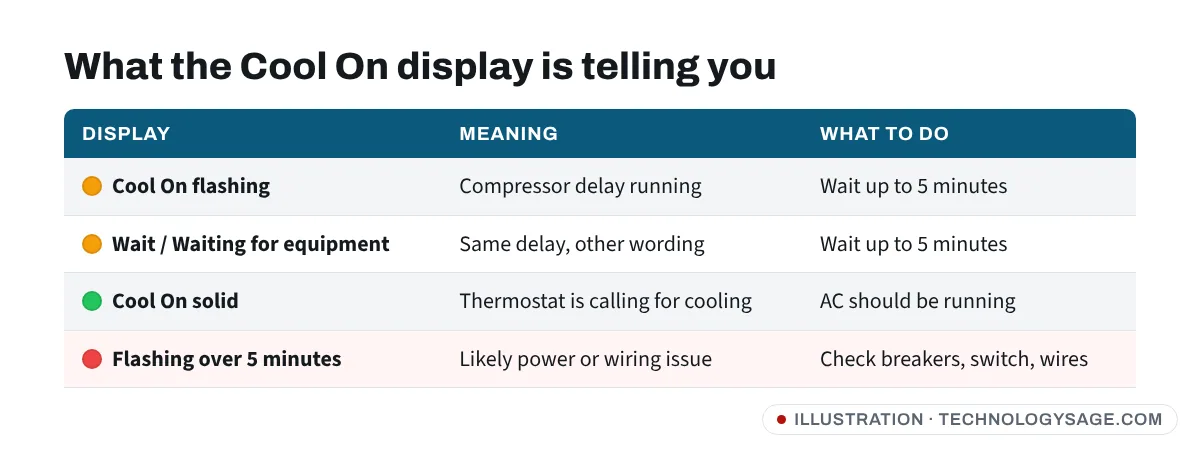
A Honeywell thermostat flashing “Cool On” is usually not a fault: it means the thermostat is in its compressor protection delay and is waiting a few minutes before it lets the air conditioner start. Honeywell says this delay can last up to five minutes and protects the compressor from short cycling. If “Cool On” keeps flashing for longer than about five minutes and the AC never starts, the thermostat probably isn’t getting steady power, and that’s what you need to check next.
What does a flashing “Cool On” mean on a Honeywell thermostat?
Honeywell (now part of Resideo) thermostats show different wording for the same thing, depending on the model:
- “Cool On” flashing (common on FocusPRO, Pro and T-series displays)
- “Wait” (some RTH and Pro models)
- “Waiting for equipment” (shown under the temperature on newer displays)
- A flashing snowflake or flame icon on some models
All of these mean the same: the thermostat wants cooling but is holding the compressor off. Honeywell’s support page, Why is my thermostat display showing “wait,” “waiting for equipment,” or flashing “cool on”?, explains that the built-in minimum off timer keeps the compressor off for a few minutes after it shuts down, because restarting it too soon can damage it.
When the delay ends, “Cool On” stops flashing and stays solid, and you should hear the outdoor unit start.
When the delay is normal
You’ll often see it:
- right after you change the setpoint or switch the mode to Cool;
- after the AC just turned off and the room warmed up again;
- after a power cut or a tripped breaker, when everything restarts;
- after you replace the batteries or take the thermostat off its wall plate.
In all of these, waiting five minutes is the fix.
Quick fixes
1. Wait five full minutes
Leave the thermostat alone. Pressing buttons or changing the setpoint again doesn’t skip the timer, and on some models it can restart it.
2. Check the mode and setpoint
Make sure the system mode is Cool (not Heat, Off or Fan only) and the setpoint is at least 2-3 °F (1-2 °C) below the room temperature shown on the display. If the setpoint is above room temperature, the thermostat has no reason to call for cooling.
3. Replace the batteries
Many Honeywell thermostats use AA alkaline batteries, either as their only power or as a backup. Weak batteries can make a thermostat behave erratically and restart its delay. Fit fresh alkaline batteries the right way round, not rechargeables, unless your manual allows them.
Cool On flashing for more than 5 minutes: what to check
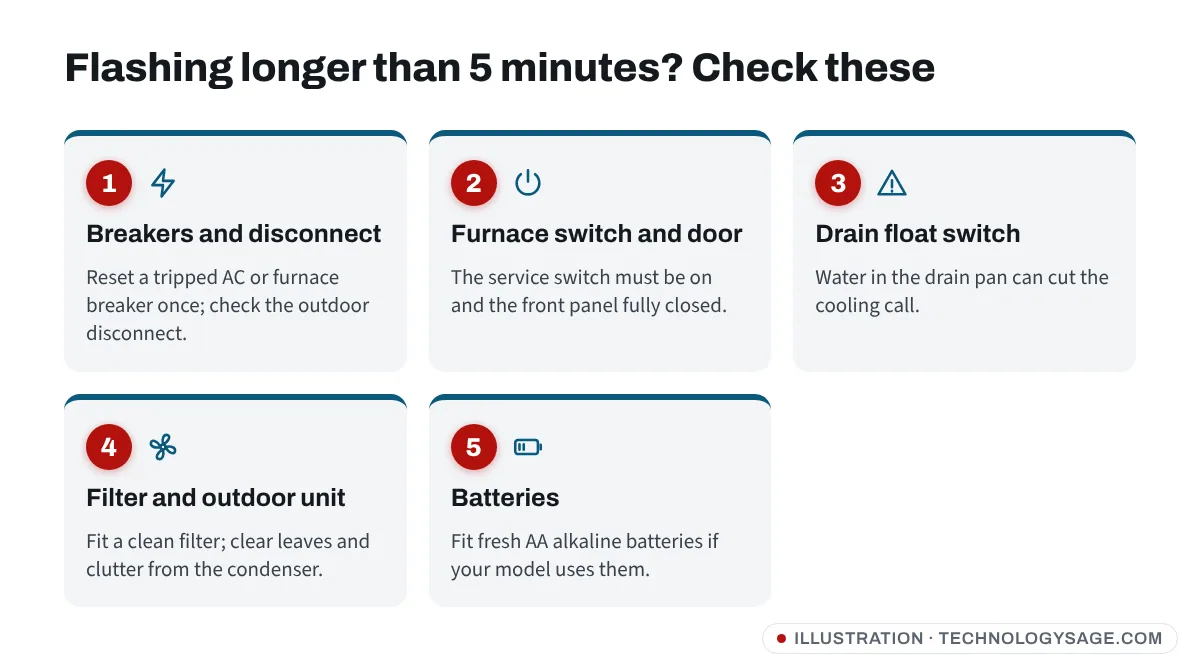
If it’s been well over five minutes, Honeywell’s guidance is that there may be an issue with the voltage to the thermostat, and a professional should check that the voltage is in range and no wires are shorted. Before you call, these safe checks find the most common causes.
4. Check the breakers and the outdoor disconnect
In your electrical panel, look for a tripped breaker labelled AC, condenser, furnace or air handler. Reset it once. Outside, the condenser usually has a disconnect box on the wall near it; make sure it’s switched on or the pull-out block is in place.
If a breaker trips again, leave it off and call an HVAC technician: a breaker that keeps tripping points to an electrical fault.
5. Check the furnace or air handler switch and door
The indoor unit (furnace, air handler or fan coil) normally has a light-switch-style power switch nearby, and a door safety switch that cuts power when the front panel isn’t seated properly. Make sure the switch is on and the panel is pushed fully closed. Honeywell’s FocusPRO troubleshooting lists both, along with the breaker, for heating or cooling that won’t run.
6. Check the condensate drain safety switch
Many indoor units, especially in attics, have a float switch in the drain pan or drain line. If the drain is blocked and water backs up, the switch cuts the cooling call to stop a leak. If you see water in the pan or a tripped float switch, the drain needs clearing before the AC will run. A technician can do this if you aren’t comfortable with it.
7. Replace a dirty air filter
A clogged filter doesn’t usually cause the flashing on its own, but it can make the coil freeze and the system shut down on its safety controls, which looks like the AC “won’t start”. Fit a clean filter of the right size and leave the system on Fan for a while if the indoor coil is iced up.
8. Make sure the outdoor unit isn’t blocked
Clear leaves, grass and anything stacked against the condenser. A blocked unit overheats and can shut off on its own protection.
Check the thermostat wiring (only with the power off)
If the checks above are fine, a loose or shorted low-voltage wire is the usual cause of a thermostat that keeps restarting its delay.
Safety first: turn off the heating and cooling system’s power at the breaker before you remove the thermostat from its wall plate. The wires are low voltage, but a short can blow the fuse on the furnace control board.
- Take a photo of the wiring before you touch anything.
- Gently tug each wire at the terminals (usually R/Rc, C, Y, G and W). Tighten any that are loose.
- Look for bare copper touching another wire or terminal.
- Refit the thermostat, restore power at the breaker, set it to Cool, and wait five minutes.
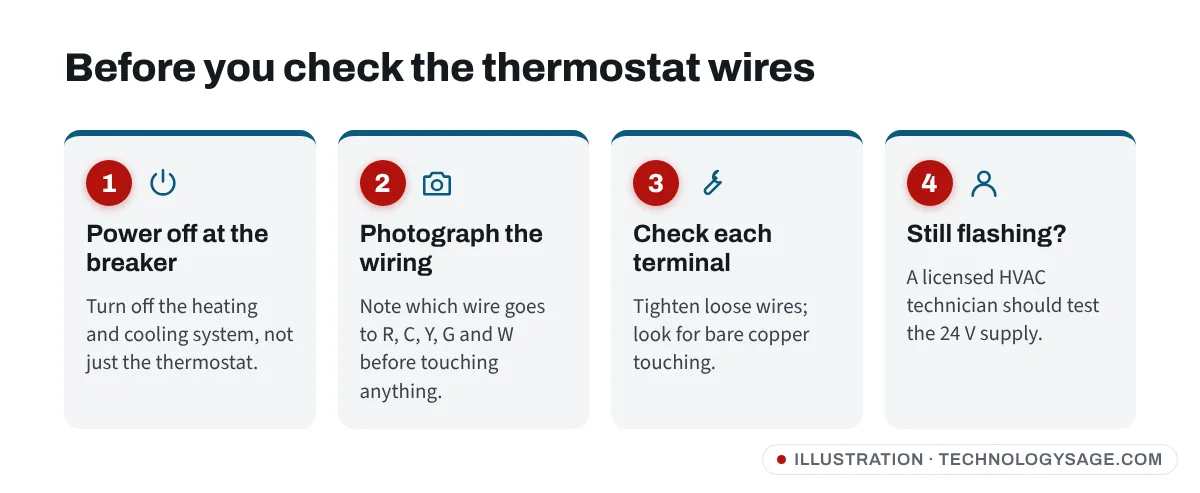
Don’t open the furnace control board, transformer or outdoor unit yourself. If the wires look fine and the delay never ends, a licensed HVAC technician should measure the 24-volt supply, check the board fuse and test the contactor and capacitor outside. Low refrigerant and compressor faults also need a professional.
If “Cool On” is solid but the AC still doesn’t run
That’s a different situation: the delay has ended and the thermostat is calling for cooling, but the equipment isn’t answering. The cause is almost always at the indoor or outdoor unit (power, float switch, contactor, capacitor), not the thermostat. Honeywell’s cooling system isn’t running article covers the basics; beyond that, call an HVAC technician.
If you have a Wi-Fi model and the app shows the thermostat offline, see Wi-Fi connected but no internet and router red light to rule out your home network first.
Contacting Honeywell Home (Resideo) support
Use the support section of the official Honeywell Home website or the support option inside the official Honeywell Home app. Have your model number ready (it’s usually on the back of the thermostat or on the wall plate).
Be careful with search results: some sites list “Honeywell support” numbers that are not Honeywell. Only use contact details shown on the official site. Real support won’t ask for remote access to your computer, gift cards or payment to “unlock” a thermostat.
FAQ
How long does a Honeywell thermostat flash Cool On?
Normally up to about five minutes. That’s the compressor protection delay. Longer than that suggests a power or wiring problem.
Can I bypass the Honeywell compressor delay?
You shouldn’t. The delay protects the compressor from short cycling. Some professional models let an installer adjust related settings, but for home users the answer is to wait.
Why does my Honeywell thermostat say Wait?
“Wait” is the same compressor protection delay as flashing “Cool On”, worded differently on some models. It should clear within about five minutes.
Why is Cool On flashing but the AC isn’t running?
During the delay, the AC is intentionally off. If it flashes for much longer, check the breaker, outdoor disconnect, furnace switch and door, the condensate float switch and the batteries, then the thermostat wiring with the power off.
Do I need a new thermostat?
Rarely. Most cases are the normal delay or a power interruption. Have a technician check the 24-volt supply before replacing a thermostat that otherwise works.