In this guide
- What does “Scam Likely” mean on a call?
- How to stop Scam Likely calls on T-Mobile (free)
- How to block Scam Likely calls on iPhone
- How to stop spam calls on Android
- Free spam blocking on other carriers
- Add your number to the Do Not Call list
- Common Scam Likely scams to watch for
- If you’re still getting Scam Likely calls
- FAQ
“Scam Likely” on your screen means your carrier’s network has checked the incoming call and believes it is probably a scam, so it shows that warning instead of a name. It’s T-Mobile’s label (also used on Metro by T-Mobile and many T-Mobile-network brands), and the quickest way to stop Scam Likely calls for free is to turn on Scam Block, which stops flagged calls before your phone rings. On any phone you can add a second layer: Silence Unknown Callers on iPhone or Filter spam calls on Android.
None of this costs money. You don’t need a paid “call blocker” app to deal with Scam Likely calls.
What does “Scam Likely” mean on a call?
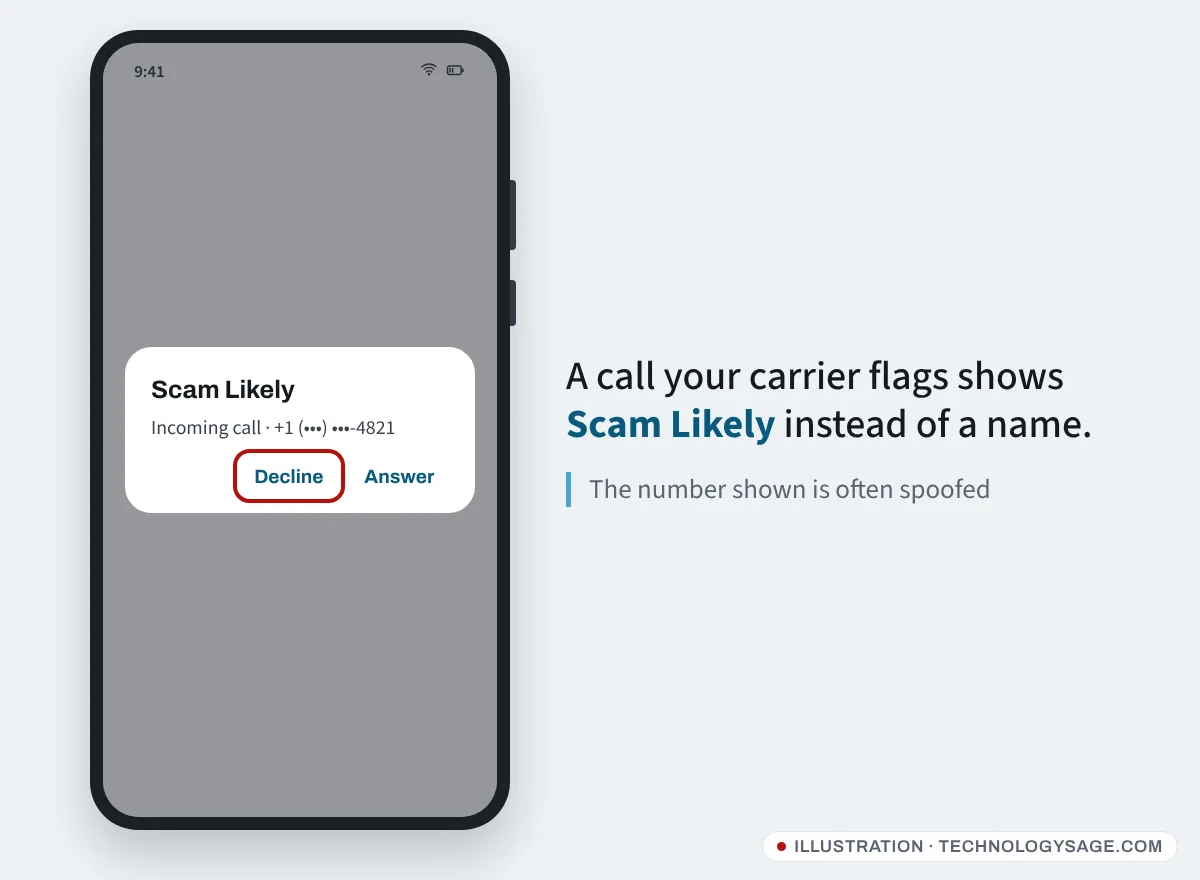
T-Mobile’s Scam ID service looks at every incoming call on its network: the number, whether it appears to be spoofed, and how that number has been behaving (thousands of short calls a minute is a giveaway). When the call looks like fraud, T-Mobile’s support page says it displays “Scam Likely” along with the calling number.
A few things are worth knowing:
- It’s a warning, not a block. With Scam ID alone, the call still rings. You decide whether to answer.
- The number shown is often fake. Scammers spoof numbers, sometimes copying your own area code and first three digits (“neighbourhood spoofing”). Calling it back usually reaches an innocent person or nobody.
- It can be wrong. A pharmacy, a doctor’s office or a delivery firm that makes lots of calls can occasionally be flagged. If you’re expecting an important call, let it go to voicemail and listen to the message.
- Other carriers use other words. Verizon’s Call Filter shows labels such as “Potential Spam”, AT&T’s ActiveArmor uses “Spam Risk” or “Fraud Risk”, and Android’s own protection shows “Suspected spam caller”. They all mean the same thing: the network or your phone thinks the call is unwanted.
Should I answer a Scam Likely call?
It’s safest not to. Answering, or pressing a key when a recording tells you to “press 1 to be removed”, tells the caller the number is live, which tends to bring more calls. If it really was someone you know, they can leave a voicemail. Never give a code, a password or payment details to someone who called you, whatever they claim to be.
How to stop Scam Likely calls on T-Mobile (free)
T-Mobile offers two free tools, and you probably already have the first one.
- Scam ID labels calls as “Scam Likely”. It’s on by default.
- Scam Block goes further and blocks every call tagged Scam Likely at the network, so your phone never rings and the call doesn’t reach voicemail.
To turn on Scam Block:
- Postpaid customers: open the T-Life app, go to the Manage (or Account) tab, choose your line, then Scam Shield, and switch on Scam Block. Scam Shield used to be a separate app; T-Mobile has moved it into T-Life.
- Prepaid customers: T-Mobile’s support page says to dial #662# from your phone to enable Scam Block (the T-Life app doesn’t manage Scam Shield on prepaid lines). You can also ask in a T-Mobile store.
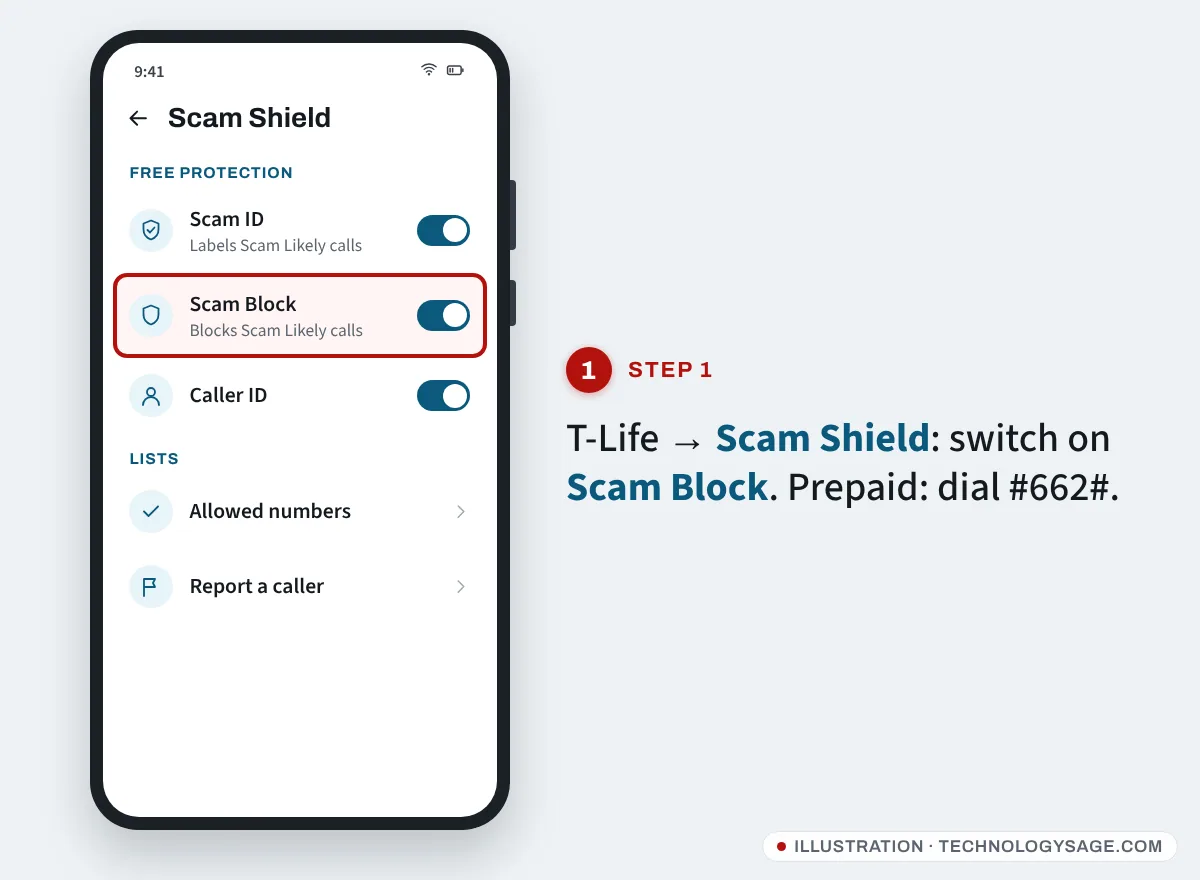
Scam Block can occasionally catch a call you wanted. If that happens, T-Mobile lets postpaid customers add the number to Allowed numbers in Scam Shield, and anyone can report a wrongly flagged number through the call reporting form at callreporting.t-mobile.com. T-Mobile says verified corrections take up to 48 hours. Full details are on T-Mobile’s Help with scams, spam and fraud page.
Scam Shield also has a paid Premium tier (category blocking, personal block lists stored on the network, voicemail-to-text). You don’t need it to stop Scam Likely calls.
How to block Scam Likely calls on iPhone
iPhone has built-in tools that work on any carrier, on top of whatever your carrier does.
Silence or screen unknown callers
- Open Settings → Apps → Phone (on iOS 17 and earlier, Settings → Phone).
- Scroll to Screen Unknown Callers (called Silence Unknown Callers on older versions).
- Choose Silence to send every number that isn’t in your contacts, recent outgoing calls or Siri Suggestions straight to voicemail, or Ask Reason for Calling to have your iPhone answer and ask the caller who they are before it rings (iOS 26 and later, in supported countries and languages).
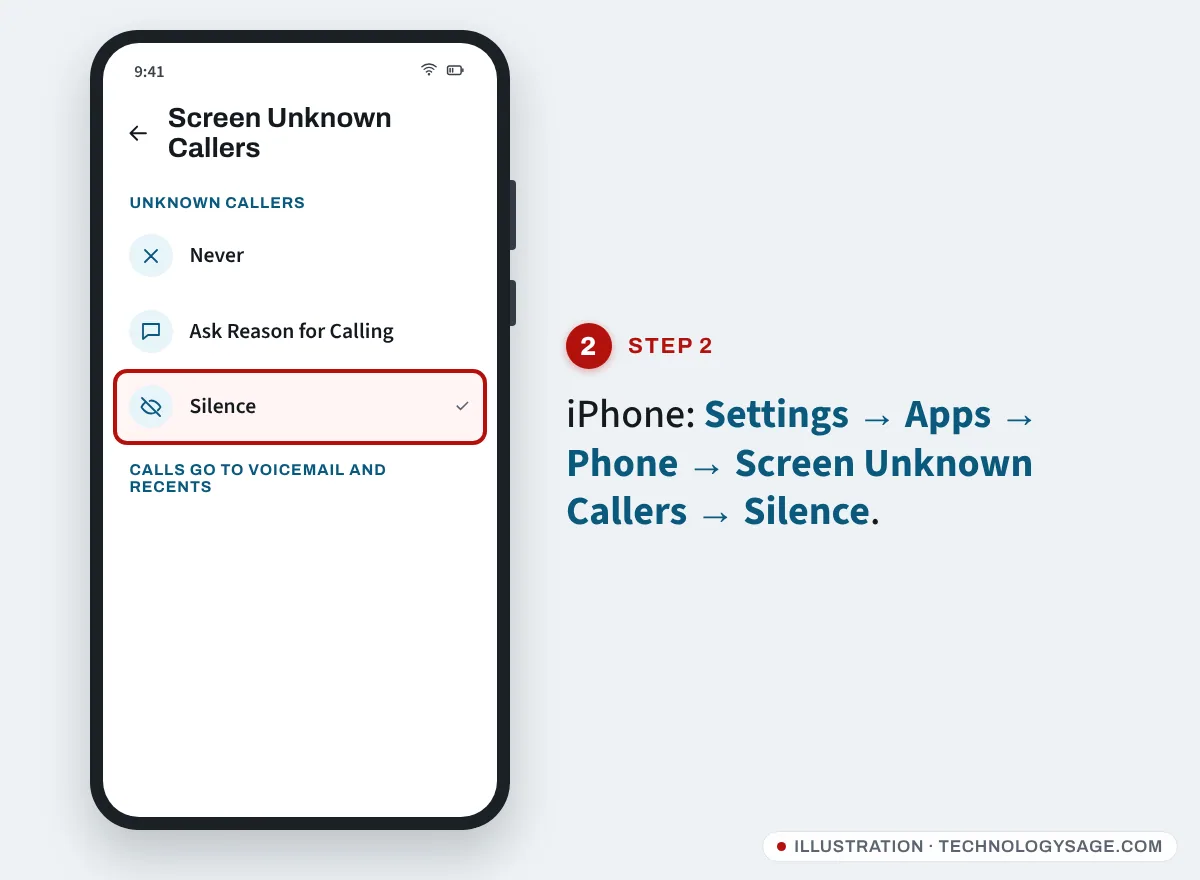
Silenced calls still appear in your Recents and go to voicemail, so you won’t lose a genuine message. The catch: a new doctor, a courier or a job interviewer won’t ring through either. Check voicemail regularly while this is on, and see our guide to why your phone is not ringing if calls you want start going missing.
Block one number
In Phone → Recents, tap the i next to the call, then Block Caller. Because Scam Likely numbers are usually spoofed and change constantly, blocking one number rarely helps much; the filters above do more.
How to stop spam calls on Android
Most Android phones have spam protection built into the Phone app. The menu names differ a little by maker:
- Google Phone app (Pixel, Motorola, many others): open Phone, tap the three dots → Settings → Caller ID & spam (on some versions Spam and Call Screen) and turn on Filter spam calls. Google’s caller ID and spam protection help page explains the options. On phones with automatic Call Screen, you choose how spam is handled in the Call Screen settings instead.
- Samsung Phone app: open Phone, tap the three dots → Settings → Caller ID and spam protection, switch it on and choose to block spam and scam calls.
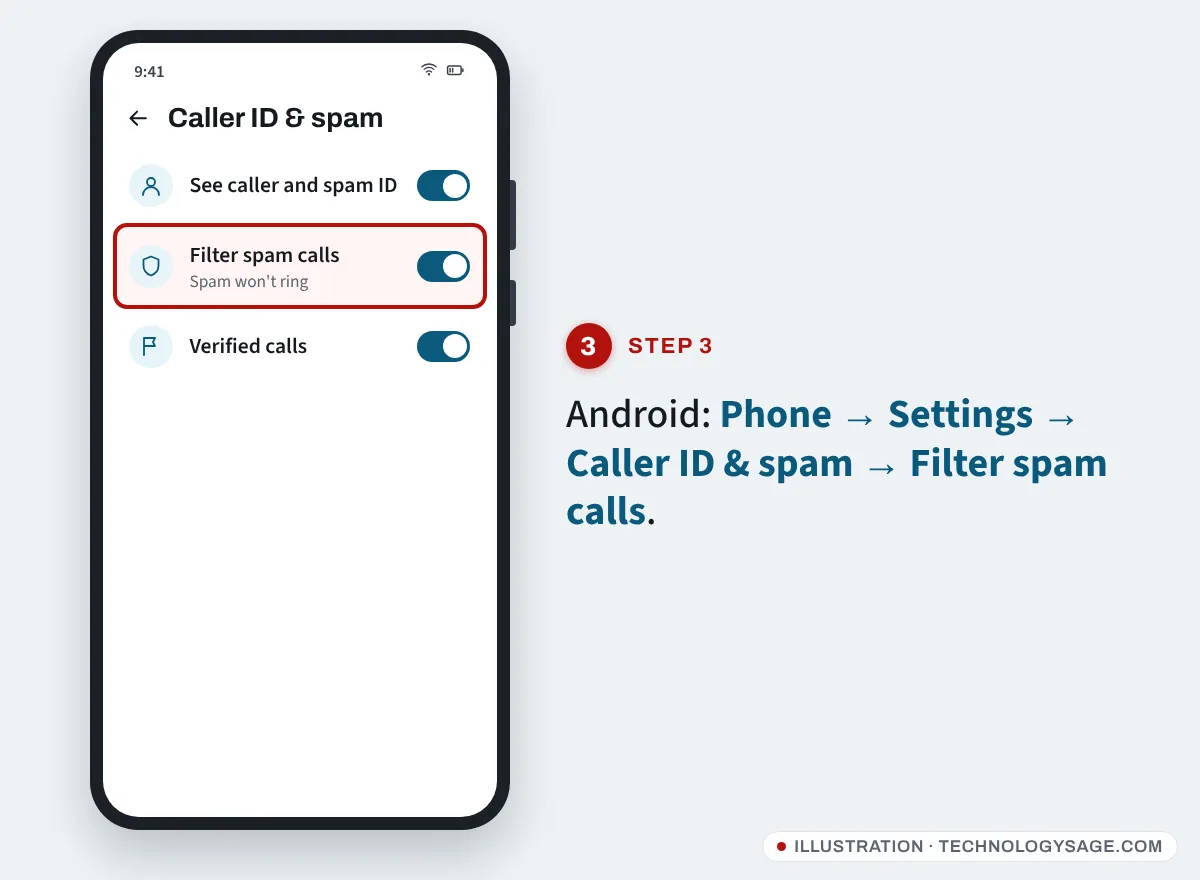
Filtered calls still show in your call history, and you can report a call as spam or mark it “not spam” from there.
Free spam blocking on other carriers
If you’re not on T-Mobile you won’t see “Scam Likely”, but your carrier almost certainly has a free filter:
| Carrier | Free tool | Where to turn it on |
|---|---|---|
| T-Mobile / Metro | Scam ID + Scam Block | T-Life app → Scam Shield; prepaid: #662# |
| Verizon | Call Filter (free spam filter) | Verizon’s Call Filter in the Verizon app or My Verizon |
| AT&T | ActiveArmor | ActiveArmor app → Calls tab (spam blocking is off until you turn it on) |
Verizon’s Call Filter FAQs and AT&T’s ActiveArmor page describe the free and paid tiers. In each case the paid upgrade adds extras; the basic spam filter is free.
Outside the US, carriers in the UK, Canada and Australia also filter scam calls at network level, and your phone’s built-in tools above work everywhere.
Add your number to the Do Not Call list
Do Not Call registers stop legitimate telemarketers, not criminals, but they cut down the noise so real scams stand out:
- US: register at donotcall.gov and report scam calls at ReportFraud.ftc.gov.
- Canada: the National Do Not Call List at lnnte-dncl.gc.ca.
- UK: the Telephone Preference Service at tpsonline.org.uk.
- Australia: the Do Not Call Register at donotcall.gov.au.
The FCC’s guide to stopping unwanted robocalls and texts is a good plain-English summary of US rules and options.
Common Scam Likely scams to watch for
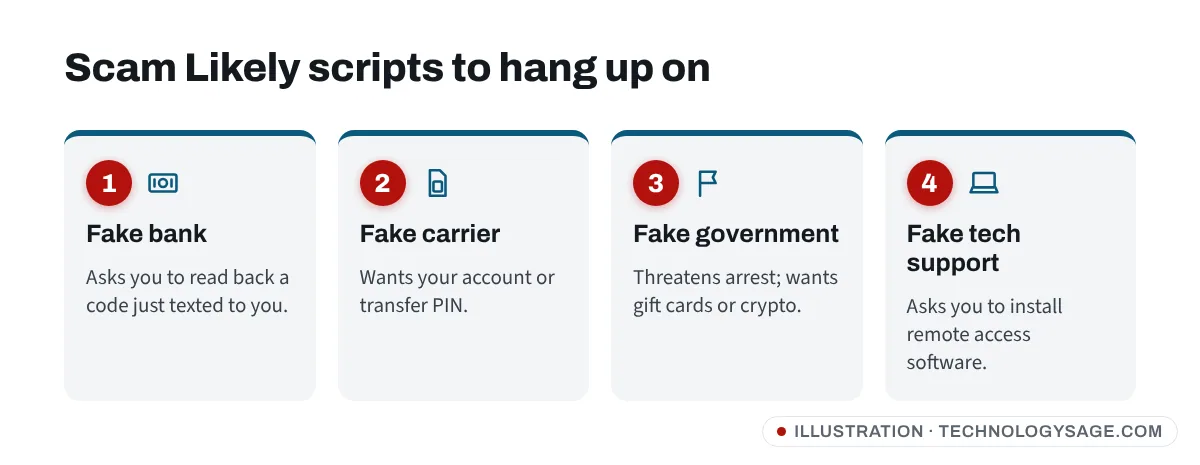
The scripts change, but most fall into a few patterns:
- “Your bank’s fraud department.” They ask you to read back a code that has just been texted to you. That code is what lets them into your account.
- “Your phone carrier.” They want your account PIN or the transfer PIN “to stop a fraud”, which can be used to move your number to their SIM.
- Government or police. The IRS, CRA, HMRC or ATO won’t threaten arrest over the phone or ask for gift cards or crypto.
- Tech support. “Microsoft” or “Apple” calls about a virus and asks you to install remote access software.
Real support never asks for gift cards, crypto, your password, a one-time code or remote access to your phone or computer. If a call worries you, hang up and contact the company yourself through its official app or the number on its own website or your card, never a number the caller gives you.
If you’re still getting Scam Likely calls
- Check Scam Block is really on. On prepaid T-Mobile, T-Mobile’s support material says #787# shows the status. On postpaid, look in T-Life → Scam Shield.
- Update the Phone app and your phone’s software, so the latest spam filters apply.
- Report the calls. Reporting in T-Life, your Phone app or to the FTC helps the filters learn.
- Make sure your number isn’t leaking. Signing up for contests and “free quote” forms puts your number on marketing lists.
- Try voicemail screening. If unknown calls are sent to voicemail, scammers rarely leave a message. Our guide on how to check voicemail covers every phone.
If none of that helps and the calls are constant, your carrier can change your number, though that’s a last resort.
FAQ
Why am I getting so many Scam Likely calls?
Your number is on lists that scammers buy and share, often from data breaches or marketing sign-ups. Autodialers ring huge numbers of phones at once. The “Scam Likely” label means your carrier is catching them; turning on Scam Block stops them ringing.
Is Scam Likely a real person?
Usually it’s a robocall or an autodialer that connects to a person only if you answer. “Scam Likely” isn’t the caller’s name; it’s the warning your carrier adds.
Can I call back a Scam Likely number?
It’s best not to. The number shown is often spoofed, so you may reach an innocent person, and some scams use premium-rate callback numbers. If you think the call was genuine, contact the company through its official website or app.
Can Scam Likely calls hack my phone if I answer?
Answering a call doesn’t install anything on your phone. The risk is what happens next: being talked into sharing codes, payment details or installing an app. Hang up if anything feels off.
Does Scam Block cost money?
No. T-Mobile’s Scam ID and Scam Block are free. Only Scam Shield Premium is a paid add-on.