In this guide
A PayPal payment pending status means the money has left one side but hasn’t fully landed on the other. If you sent it, the usual reason is that the recipient hasn’t accepted it yet (or has no PayPal account on that email or phone number). If you received it, PayPal is either waiting for a bank-funded eCheck to clear or holding the funds for a while, which is common for new sellers. Open Activity, tap the payment and read the status line: it tells you which of these it is and what to do next.
The fix depends on which side you’re on, so this guide splits the two.
What does “payment pending” mean on PayPal?
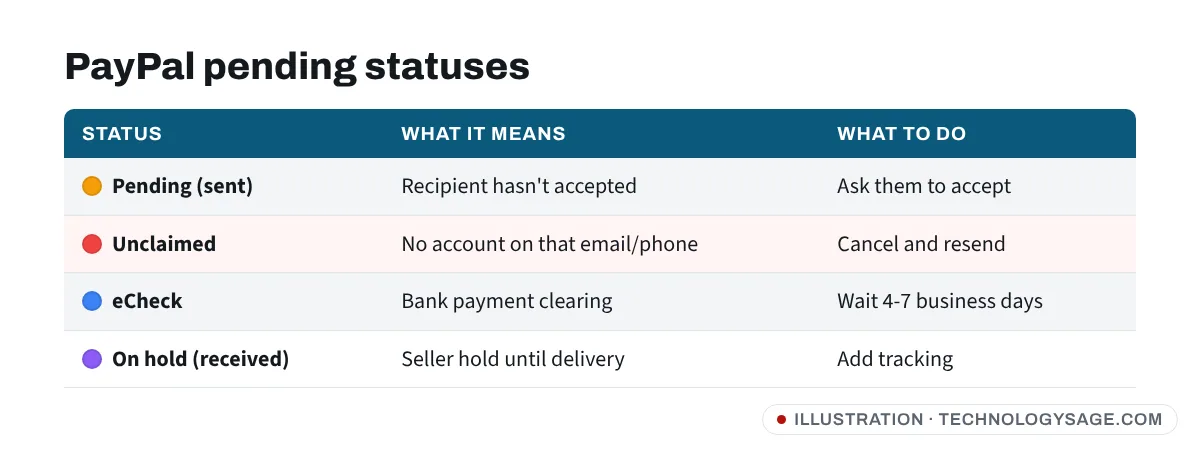
PayPal uses a handful of similar words. They mean different things:
- Pending (you sent it): the payment is waiting for the recipient. It hasn’t been accepted, or PayPal is still reviewing it.
- Unclaimed: you sent money to an email address or phone number that isn’t linked to a confirmed PayPal account. The person has to sign up or add that address to their account before they can claim it.
- Pending eCheck: the payment is funded straight from a bank account (an “eCheck”), and it’s waiting for the bank to clear it. You’ll see an expected clearing date on the transaction.
- On hold / unavailable (you received it): the money is in your account, but you can’t spend or withdraw it yet. This is a seller hold, usually until the buyer gets the item.
PayPal explains the sender-side reasons on its help page Why is my payment pending or unclaimed?.
How long does a PayPal pending payment take?
These are the timeframes PayPal publishes. Your transaction details always show the exact date for your case.
| Status | Typical time |
|---|---|
| Pending, waiting for the recipient | Up to 30 days, then cancelled and refunded automatically |
| Unclaimed | Up to 30 days, then cancelled and refunded automatically |
| eCheck | About 4-7 business days (weekends and holidays don’t count) |
| Seller hold, tracked item | Roughly a day after the carrier confirms delivery |
| Seller hold, service or digital item | About 7 days after you mark the order Completed |
| Seller hold, unusual cases | Up to 21 days |
When a pending or unclaimed payment is cancelled, the money goes back to the original funding source. PayPal says refunds to a bank account can take up to 5 business days and refunds to a card up to 30 days.
If you sent the payment and it’s pending
1. Check the recipient’s email or phone number
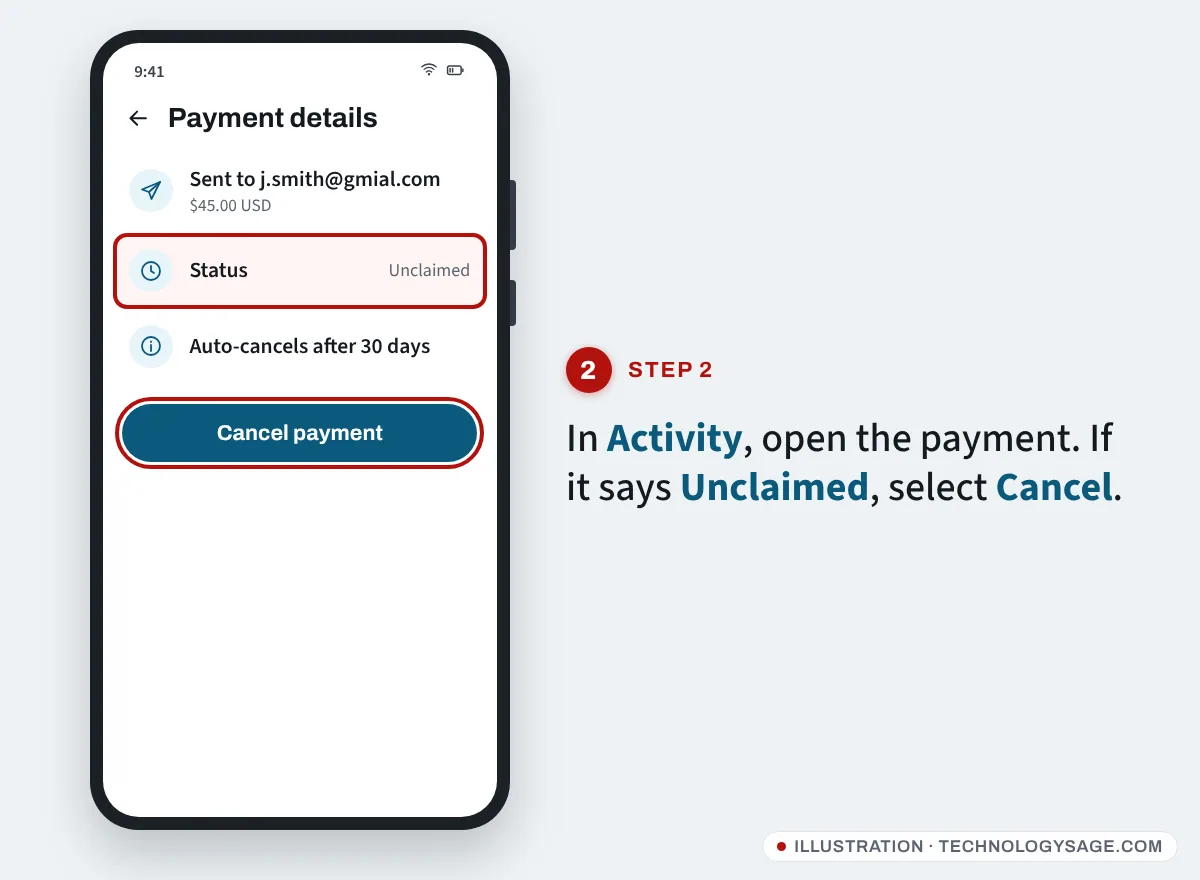
Open the PayPal app or website, go to Activity, and select the payment. Look at the email address or phone number it went to. A single typo (gmial.com, a missing digit) sends the money to an address nobody owns, and it will sit as Unclaimed.
2. Cancel an unclaimed payment
If the payment is Unclaimed, you can usually take it back yourself:
- Go to Activity and find the payment.
- Select Cancel (on the website, it appears under the payment) and confirm.
- The money returns to the account, bank or card you paid with.
Then send it again to the correct address. If the email was right, ask the recipient to sign in to PayPal (or create an account) with exactly that email or phone number, or to add it to their existing account and confirm it.
3. Ask the recipient to accept it
Some payments are held by the recipient’s own settings: for example, they’ve chosen to review payments in a different currency before accepting them. You can’t cancel these yourself. The recipient will see the payment in their Activity with Accept and Deny options and has 30 days to choose. Send them a short message; most people simply haven’t noticed.
4. Paid with a bank account? Wait for the eCheck to clear
If the payment shows as an eCheck, PayPal is pulling the money from your bank the slow way. You can’t speed it up. Make sure the bank account has enough money in it: if the bank declines the debit, PayPal tries again within about 3 business days, then cancels the payment, and your bank may charge a returned-payment fee. For next time, keeping a PayPal balance or adding a debit card avoids eChecks.
5. Paying a business or invoice
A PayPal invoice payment pending usually means the business hasn’t completed the order on its side, or the payment is an eCheck. Check the invoice in Activity; if it stays pending after the expected date, contact the merchant first. They can see the order and often clear it.
If you received money and it’s pending or on hold
1. Accept the payment if PayPal asks
If you see Accept next to an incoming payment, it’s held by your own payment receiving preferences (often a currency setting). Tap Accept and it moves into your balance. You can change these preferences in your account settings so future payments are accepted automatically.
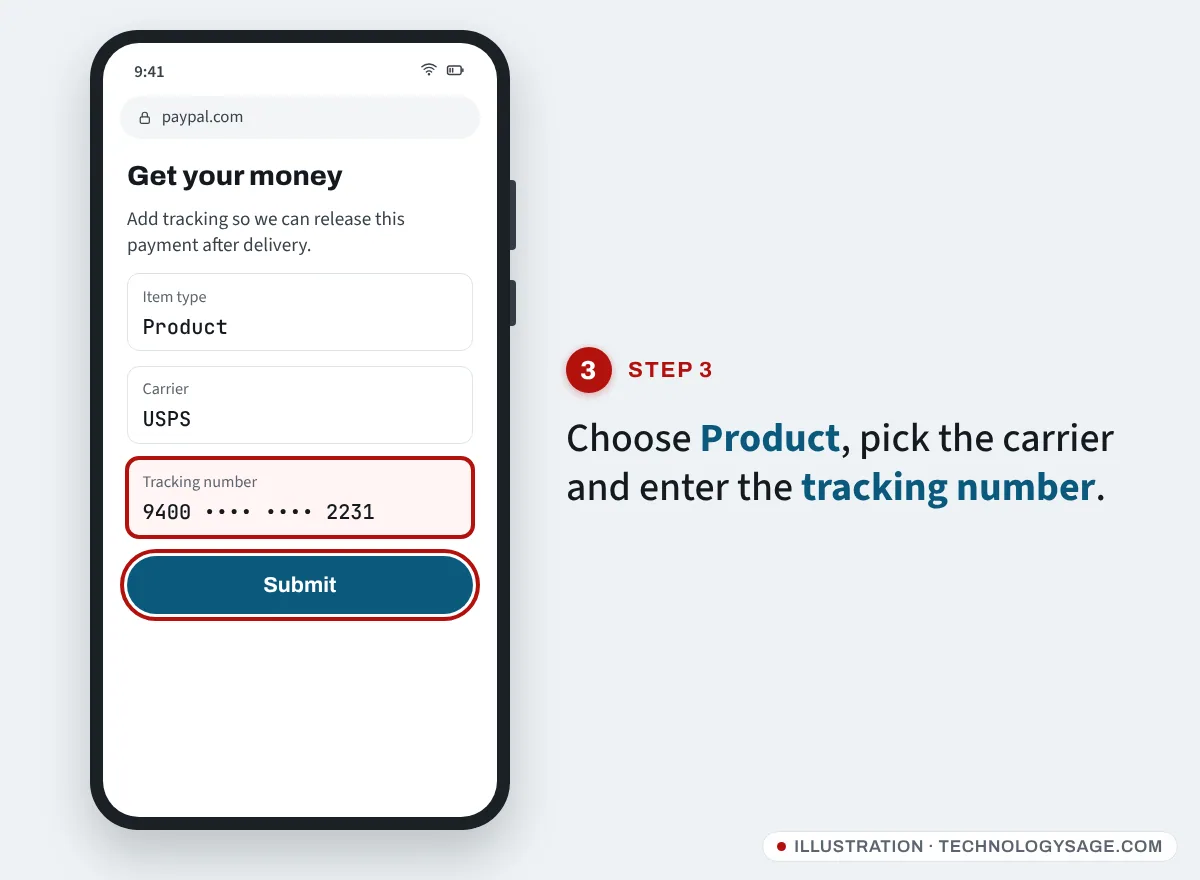
2. Add tracking to release a seller hold
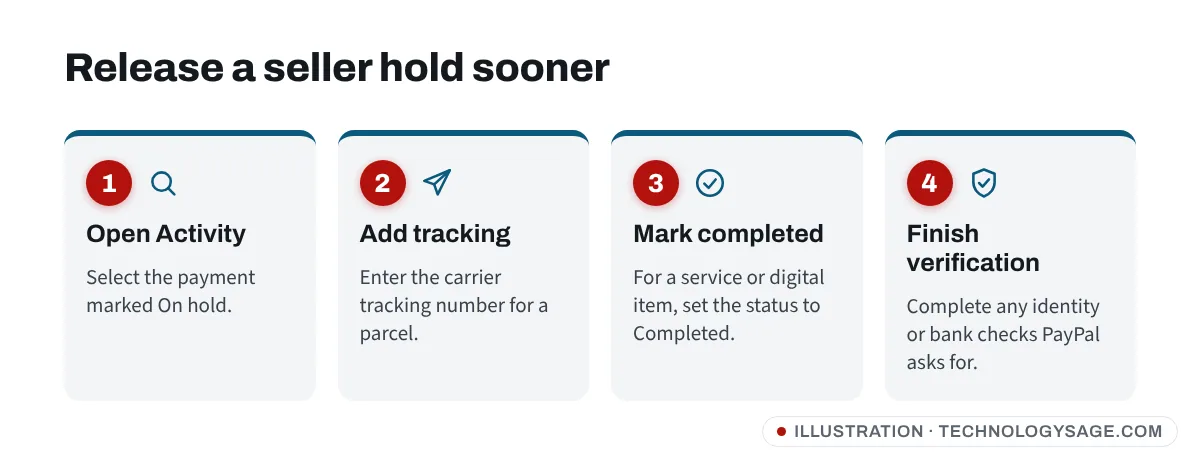
PayPal often holds money for new sellers, sellers who haven’t sold in a while, unusual sales spikes, items PayPal considers higher risk (such as electronics, event tickets, gift cards or travel), and accounts with recent complaints or refunds. To release it sooner:
- Go to Activity and open the held payment.
- Choose the option to get your money, usually labelled Get your money or Add tracking.
- For a physical item, enter the tracking number from a supported carrier, or buy your label through PayPal’s own shipping tool so tracking is added for you.
- For a service or digital item, pick Service or virtual product and set the order status to Completed when you’ve delivered it.
Funds for a tracked parcel are usually released about a day after the carrier confirms delivery; for a completed service, about 7 days later. PayPal explains this on its page Why is my payment on hold or unavailable?.
3. Finish any verification PayPal asks for
If your account shows a banner asking you to confirm your identity, add a bank account or verify a card, do it. Unfinished verification is one of the listed reasons for holds and limits. Only do this inside the PayPal app or by typing paypal.com yourself, never through a link in an email or text.
4. Received an eCheck? Don’t ship yet
If a buyer paid by eCheck, the money shows as pending until it clears, and PayPal advises sellers not to ship until then. If the eCheck bounces, you don’t get paid.
Spotting fake “pending payment” scams
Scammers use the word “pending” a lot, especially against sellers on marketplaces.
- “Your payment is pending until you send a tracking number / pay a fee / upgrade to a business account.” That’s a fake email. PayPal never asks you to send money to release money, and a real hold only shows inside your PayPal account.
- Check the real account, not the email. Open the PayPal app or type paypal.com yourself. If the payment isn’t in your Activity, it doesn’t exist, whatever the email says. See Google Docs and phishing for how convincing these messages can look.
- Fake support numbers. Search ads, forum posts and pop-ups often list “PayPal support” numbers run by scammers. Contact PayPal only through the Help section of the app or the Help Center on paypal.com, which you reach by typing the address yourself. Real support never asks for remote access to your computer, your password, your one-time codes, or payment in gift cards or crypto.
If PayPal’s genuine emails aren’t arriving at all, the cause is usually spam filtering on your side: see not receiving emails.
If the payment is still pending
- Past the date shown: if the expected clearing or release date has passed, contact PayPal from Help → Contact us in the app.
- Buyer never received the item: the buyer can open a dispute in the Resolution Center. Sellers with tracking that shows delivery are in a much stronger position.
- Money disappeared from your bank but PayPal shows nothing: check your bank app first. A pending debit there can be a temporary authorisation that drops off by itself; your bank can tell you whether it’s a hold or a completed payment.
- Account limited: if PayPal has placed a limitation on the account, held funds stay held until you resolve it in the Resolution Center.
Outside the US, the steps are the same in the UK, Canada, Australia, New Zealand and Ireland, though hold periods and supported carriers can differ slightly by country. For a dispute about a large amount, check with your bank too.
FAQ
Why is my PayPal payment pending for so long?
Usually because the recipient hasn’t accepted it, it went to an unregistered email, or it’s an eCheck still clearing. The transaction details in Activity show the reason and the expected date.
Can I cancel a pending PayPal payment?
Yes, if it’s Unclaimed: open it in Activity and select Cancel. If it’s held by the recipient’s settings, only they can accept or deny it. If neither happens, PayPal cancels it after 30 days and refunds you.
Why does my PayPal say money received pending?
The money is either waiting for you to Accept it, or it’s a seller hold. Add tracking, or mark a service as completed, to release a hold sooner.
How long does PayPal hold money for new sellers?
Typically until delivery is confirmed (about a day after) or 7 days after a service is marked completed; in rare cases up to 21 days.
Does PayPal call or email me to release a pending payment?
PayPal shows holds inside your account. An email or call asking you to pay a fee, buy gift cards or give remote access to release money is a scam.