In this guide
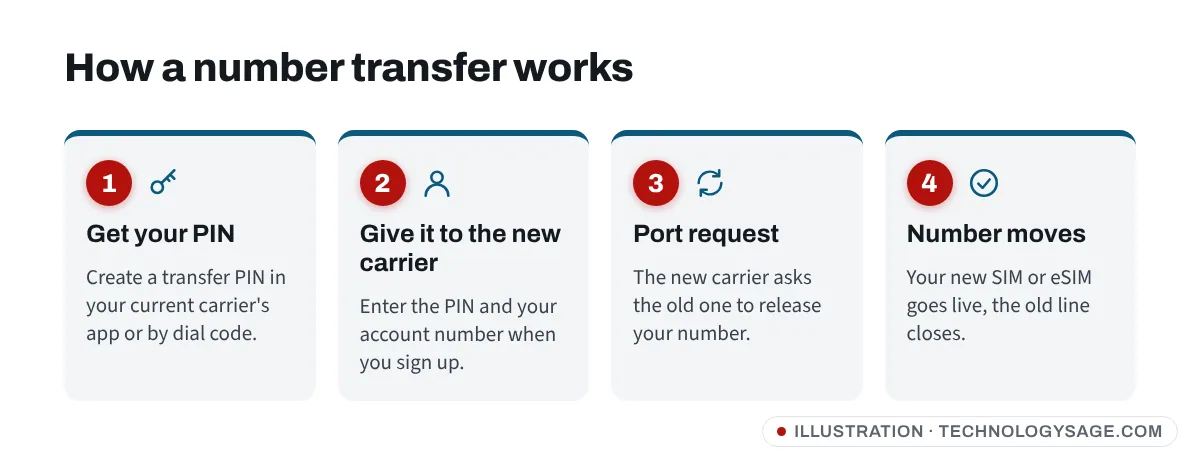
A transfer PIN (also called a port-out PIN or Number Transfer PIN) is a short one-time code your current carrier gives you so another carrier can take over your phone number. You get it yourself, usually in your carrier’s app or website or by dialing a short code from your phone, then give it to the new carrier together with your account number. Most PINs expire after a few days, so request it only when you’re ready to switch.
Carriers added these PINs to stop criminals moving a number without the owner knowing. Only the account holder (or an authorised manager) can create one, and you should never create one for a number that isn’t yours.
What is a port-out PIN, and why do carriers ask for it?
Moving a number between carriers is called porting. In the US, the FCC’s number portability rules let you keep your number when you switch, and your old carrier can’t refuse because you owe them money (you still owe the balance).
The new carrier sends a “port request” to the old one. To approve it, the old carrier checks that the details match its records:
- Account number (on your bill or in the app; not your phone number)
- Transfer PIN (the one-time port-out PIN)
- Sometimes the billing ZIP code and the account holder’s name
The transfer PIN replaced the old system, where your normal account PIN or the last four digits of your SSN were enough. That made port-out fraud easy: someone who knew your details could move your number to their SIM and receive your bank texts and two-factor codes. A fresh PIN that only appears inside your own account closes most of that gap.
Transfer PIN vs account PIN: your account PIN or passcode is the permanent code you use to prove who you are when you call or visit your carrier. The transfer PIN is a separate, temporary code used only for a port. Some carriers ask for the account PIN before they’ll show you the transfer PIN.
How to get a transfer PIN from your carrier
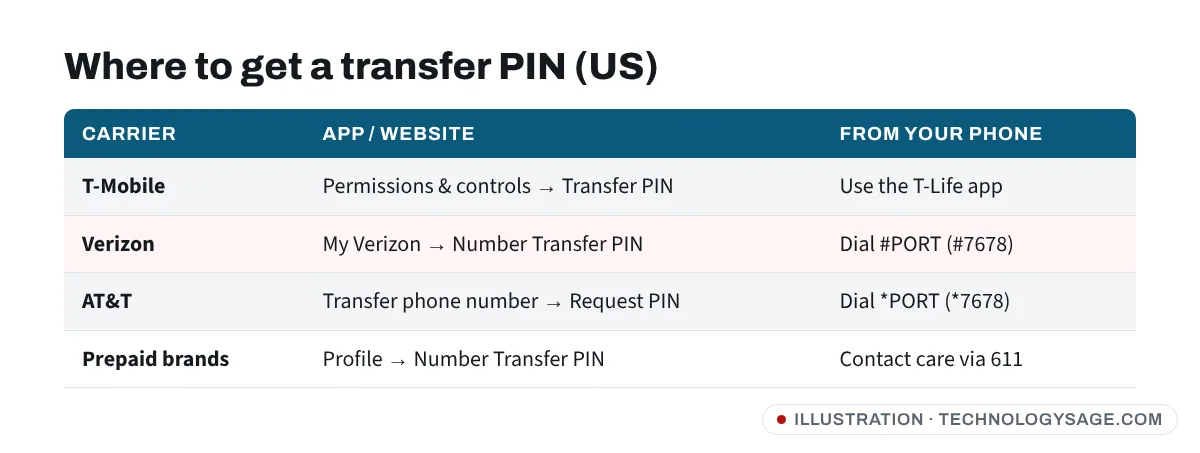
Exact menu names change between app versions, but the route is the same everywhere: sign in as the account holder, find the number transfer section, and generate the PIN. Here’s where to look at the big US carriers.
T-Mobile transfer PIN
T-Mobile calls it a Transfer PIN (internally, a temporary port-out PIN). Only the primary account holder can create it.
- Open the T-Life app or sign in at T-Mobile.com.
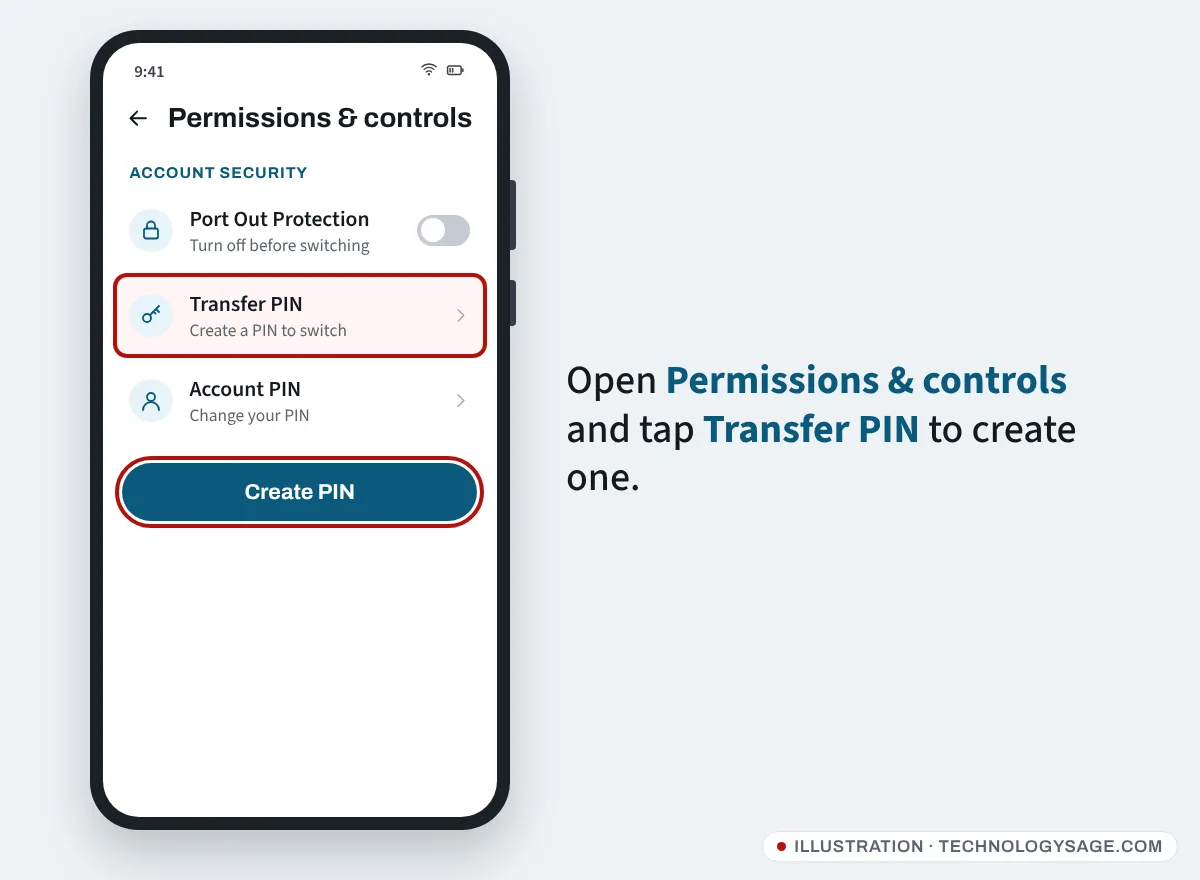
- Go to your account settings and open Permissions & controls (on some versions, Profile settings).
- Tap Transfer PIN → Create PIN, then confirm with your account PIN if asked.
- Note the PIN and your account number, then give both to the new carrier.
If Port Out Protection is turned on, the transfer will be rejected until you turn it off in the same area. T-Mobile’s transfer your phone number page lists what you need.
Verizon transfer PIN (Number Transfer PIN)
Verizon’s PIN is valid for 7 days, according to its port-out support page, and the account owner or an account manager creates it.
- From your Verizon phone: dial #PORT (#7678) and press call. Verizon texts you a link that opens the Number Transfer PIN page in My Verizon.
- In the My Verizon app or website: look under Account or Security for Number Transfer PIN, then tap Generate PIN.
On a personal account, one PIN covers every line you’re moving. If Number Lock is on, turn it off first or the port will fail.
AT&T transfer PIN
Dial *PORT (*7678) from your AT&T phone, or use the AT&T app or att.com and go to the transfer phone number section to request a PIN. AT&T says to request it close to when you’ll submit the switch, and the same PIN covers all numbers on the account. See our full guide to the AT&T transfer PIN for business accounts, Wireless Account Lock and expiry.
Metro, Straight Talk, Cricket and other prepaid brands
Prepaid carriers usually put the option in the account profile of their app or website, often named Number Transfer PIN or Port Out PIN, with a Generate PIN button. If you can’t find it, contact the carrier through its app or by dialing 611 from the phone on that plan, which reaches its own customer care. Have your account PIN ready.
Prepaid account numbers are often not on a paper bill. Look in the app’s account or profile screen, or ask customer care for it at the same time as the PIN.
Outside the US: PAC codes and other systems
The idea is the same in other countries, but the code has a different name:
- UK: you request a PAC (Porting Authorisation Code) from your current network. The PAC is free and Ofcom lets you get it by text, online or over the phone, and the switch usually completes within one working day.
- Canada: most carriers don’t use a transfer PIN. The new provider asks for your old account number and sometimes the device IMEI.
- Australia and New Zealand: the new provider starts the port and you confirm it, usually with your old account number or date of birth plus a verification code texted to your number.
Keep your number safe: port-out locks and scams
Because a transfer PIN can move your number, treat it like a password:
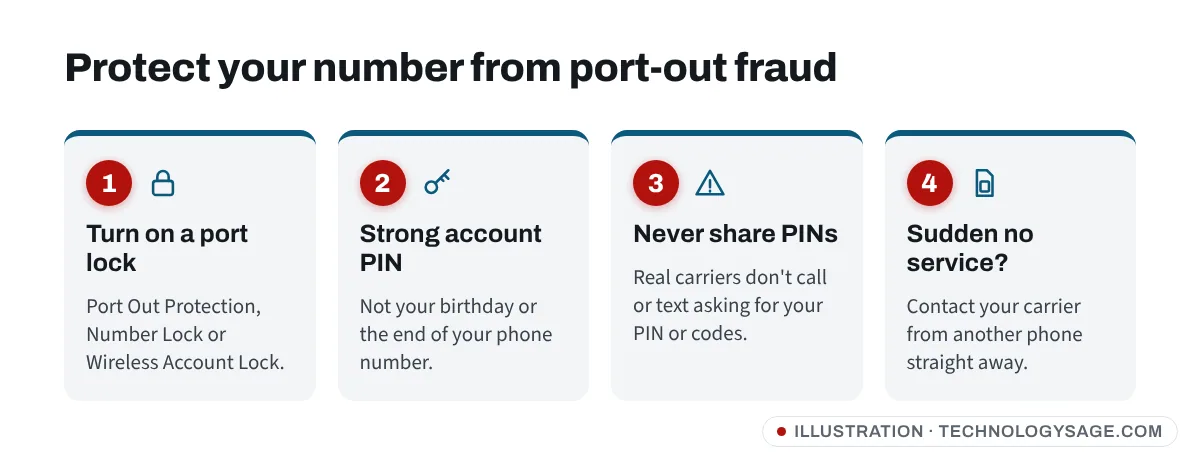
- Never share it with anyone who contacts you first. A real carrier never phones or texts to ask you for your transfer PIN, account PIN or a verification code. Only give it to the new carrier you chose, inside their checkout or store.
- Turn on your carrier’s free port-out lock when you’re not switching: T-Mobile’s Port Out Protection, Verizon’s Number Lock or AT&T’s Wireless Account Lock. Turn it off only when you’re ready to move.
- Set a strong account PIN that isn’t your birthday or the last four digits of your number.
- Watch for sudden loss of service. If your phone suddenly shows no service and you didn’t switch, contact your carrier from another phone right away, and change your email and bank passwords. Our guide to scam likely calls covers the calls that often come before a SIM-swap attempt.
- Ignore “support” numbers from search ads or social media. Reach your carrier through its official app or the website you type in yourself.
If your transfer PIN doesn’t work
Most failed ports come down to a mismatch. Before you call anyone, check:
- The PIN expired. Generate a new one. Verizon allows several per day; others simply replace the old PIN.
- Wrong account number. It’s the account number on your bill or in the app, not your phone number. Remove any spaces or dashes unless the form asks for them.
- A port lock is still on. Turn off Port Out Protection, Number Lock or Wireless Account Lock, then retry.
- You’re not the account holder. On a family plan, the primary holder must create the PIN.
- Name or ZIP mismatch. Use the billing ZIP code and the name exactly as your old carrier has them.
- The line is suspended or the account is closed. Don’t cancel your old service before the port completes; cancelling can release the number for good.
Once the port starts, your new SIM or eSIM usually activates within minutes to a few hours. Leave the old SIM in until the new one shows signal. If you see Not registered on network on the new phone, restart it and check the new carrier’s activation status. For the whole switch, including moving contacts, see how to transfer your phone number to a new phone, and if the new line is an eSIM, how to activate an eSIM.
FAQ
Is a transfer PIN the same as my account PIN?
No. The account PIN (or passcode) is permanent and proves who you are. The transfer PIN is a temporary code made just for moving your number. Some carriers ask for the account PIN before they’ll show the transfer PIN.
How long does a transfer PIN last?
It depends on the carrier. Verizon says 7 days. Others last only a few days, and a new request replaces the old PIN. Request it when you’re ready to finish the switch.
Will my old account be cancelled automatically?
The line that ports out is removed from your old account when the port completes. Other lines and any device payments stay, and you may get a final bill, so check with your old carrier.
Can someone port my number without the PIN?
It’s much harder, which is the point of the PIN. Criminals try instead to trick you or a store employee into giving it up. A port-out lock and a strong account PIN make it harder still.
Do I need a transfer PIN to move to a new phone on the same carrier?
No. Upgrading or moving to a new phone on the same carrier isn’t a port. You just move or activate the SIM or eSIM.