In this guide
5G UC stands for 5G Ultra Capacity, T-Mobile’s name for the faster part of its 5G network. When your phone shows 5G UC in the status bar, you’re connected to T-Mobile’s mid-band or high-band (millimetre wave) 5G, which is usually much quicker than the plain “5G” you see on its wide-coverage low-band network.
It is not a different kind of 5G, a feature you switch on, or something you pay extra for. It’s simply a label that tells you which slice of T-Mobile’s network you’re on right now. Verizon shows 5G UW and AT&T shows 5G+ for the same idea on their networks.
What does 5G UC mean?
T-Mobile splits its 5G network into two tiers and gives each one its own icon:
- 5G (Extended Range 5G): low-band spectrum (mainly 600 MHz). Signals travel a long way and get through walls, so it covers most of the country, but speeds are often only a little better than good 4G LTE.
- 5G UC (Ultra Capacity 5G): mid-band spectrum (mostly 2.5 GHz) plus high-band millimetre wave in some city spots. It carries far more data, so speeds are typically several times faster, with less slowdown when lots of people are online.
T-Mobile’s own explainer says “UC” describes the part of its network that uses mid-band and/or high-band 5G frequencies, and that when you see the 5G UC icon “you’ll know you’re in an area with these speeds.” The icon is a promise about the network you’re on, not a guaranteed speed: a crowded cell or a weak signal can still feel slow.
5G UC vs 5G: what’s the difference?
The difference is the radio frequency your phone is using, and that decides speed and range.
| 5G (Extended Range) | 5G UC (Ultra Capacity) | |
|---|---|---|
| Spectrum | Low-band (600 MHz) | Mid-band (2.5 GHz) and mmWave |
| Coverage | Very wide, good indoors | Cities and towns, growing; mmWave only in small hotspots |
| Typical speed | Similar to or a bit above LTE | Usually several hundred Mbps, sometimes more |
| Battery use | Low | Slightly higher on busy, fast transfers |
| Icon | 5G | 5G UC |
In everyday use you’ll notice 5G UC most when downloading big files, updating apps, streaming in high quality or using your phone as a hotspot. For messages, maps and social media, plain 5G or LTE is usually fine. (For more on what 5G changed for everyday users, see how 5G has improved the mobile experience.)
Why does my phone switch between 5G UC, 5G and LTE?
Your phone constantly picks the best signal it can hold. Walk deeper into a building, drive out of town or move behind a hill, and mid-band signals fade, so the phone drops to low-band 5G or LTE. Step back outside and it may jump to 5G UC again. This is normal and doesn’t mean anything is wrong with your phone or plan.
Battery-saving settings can also hold you on LTE or plain 5G even where UC is available (see below).
5G UC vs 5G UW vs 5G+: other carriers’ icons
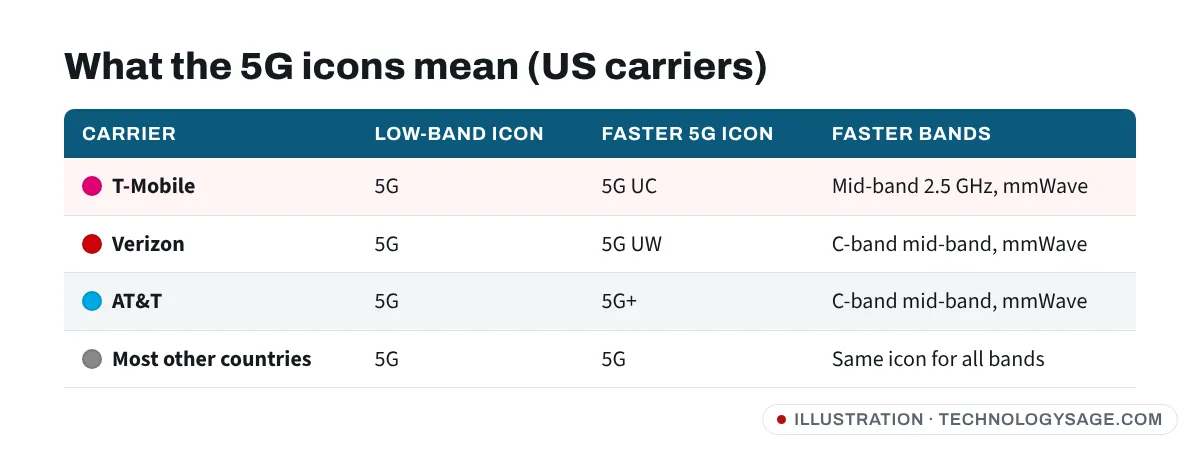
Each US carrier markets its faster 5G with its own label. They describe much the same thing: mid-band (including C-band) or millimetre-wave 5G.
- T-Mobile: 5G UC (Ultra Capacity). Mid-band 2.5 GHz and mmWave.
- Verizon: 5G UW (Ultra Wideband). Originally only mmWave; it now also covers Verizon’s C-band mid-band network.
- AT&T: 5G+. AT&T’s mid-band (C-band) and mmWave service.
All three carriers show a plain 5G icon on their slower low-band networks. Apple’s Use 5G with your iPhone page lists 5G+, 5G UW, 5G UC and a newer 5GA (5G Advanced) icon together as signs that “higher frequency 5G networks” are available.
Outside the US, most phones simply show 5G whatever band they use, and the carrier-branded icons above are mainly a US thing. If you’re in the UK, Canada, Australia or Ireland and see only “5G”, you aren’t missing anything.
What does 5G+ mean?
On AT&T, 5G+ means you’re on its faster mid-band or high-band 5G, the AT&T equivalent of 5G UC. Some phones and carriers in other countries also use a “5G+” style icon for their faster bands; check your carrier’s coverage pages if you’re unsure.
What about 5GE?
5GE (“5G Evolution”) was an AT&T label from a few years ago that actually meant advanced 4G LTE, not real 5G. If an old phone still shows it, it’s on LTE.
Do you need a special phone or plan for 5G UC?
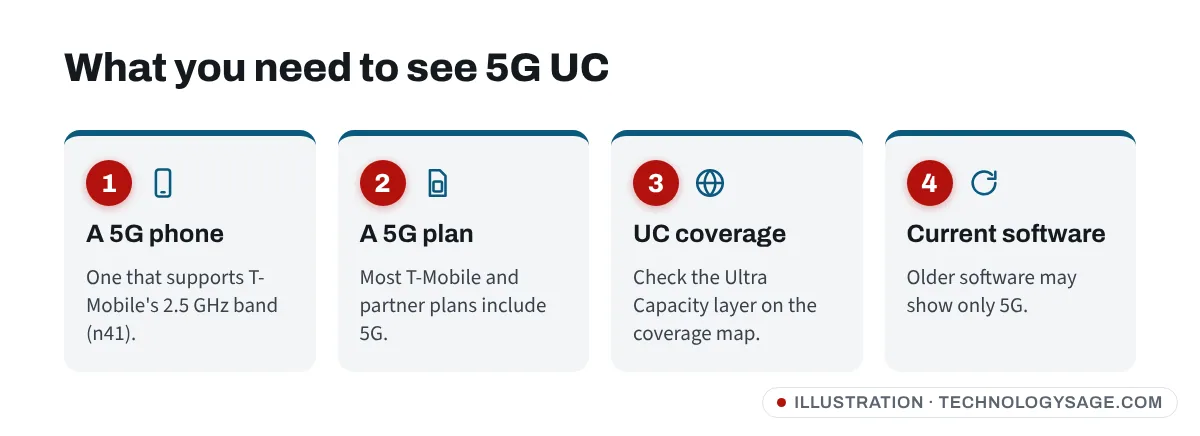
You need three things:
- A 5G phone that supports the right bands. Most recent 5G phones support T-Mobile’s 2.5 GHz band (n41). Millimetre wave needs a phone with mmWave support, which many budget and non-US models lack.
- A plan that includes 5G. Most current T-Mobile plans do, including many prepaid and partner (MVNO) plans that run on T-Mobile’s network. Some cheaper MVNO plans limit speeds, so check yours.
- Software that shows the icon. The phone’s software has to support the label. An older iPhone or Android phone may connect to Ultra Capacity 5G but only show “5G”. Keep the phone and carrier settings updated.
If you’ve just switched phones or carriers, make sure your SIM or eSIM is set up properly; our guide to activating an eSIM covers the common steps.
How to make sure your phone uses 5G UC
On iPhone
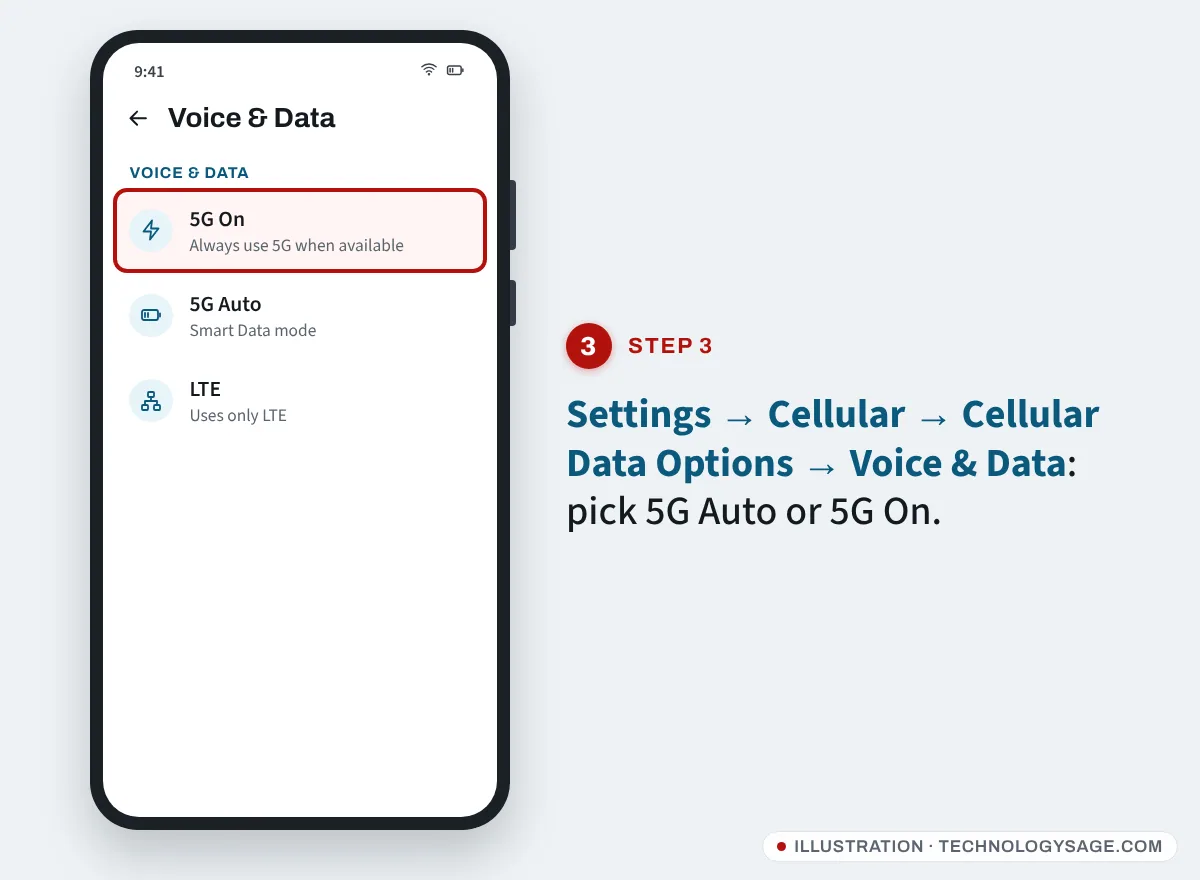
- Open Settings → Cellular (or Mobile Data).
- Tap Cellular Data Options (or Mobile Data Options), then Voice & Data.
- Choose 5G Auto (the default, which uses 5G when it won’t badly drain your battery) or 5G On (always uses 5G when it’s available).
If you picked LTE, your iPhone won’t use 5G at all. Low Power Mode can also keep you on LTE for everyday tasks.
On Android
Menu names vary by maker:
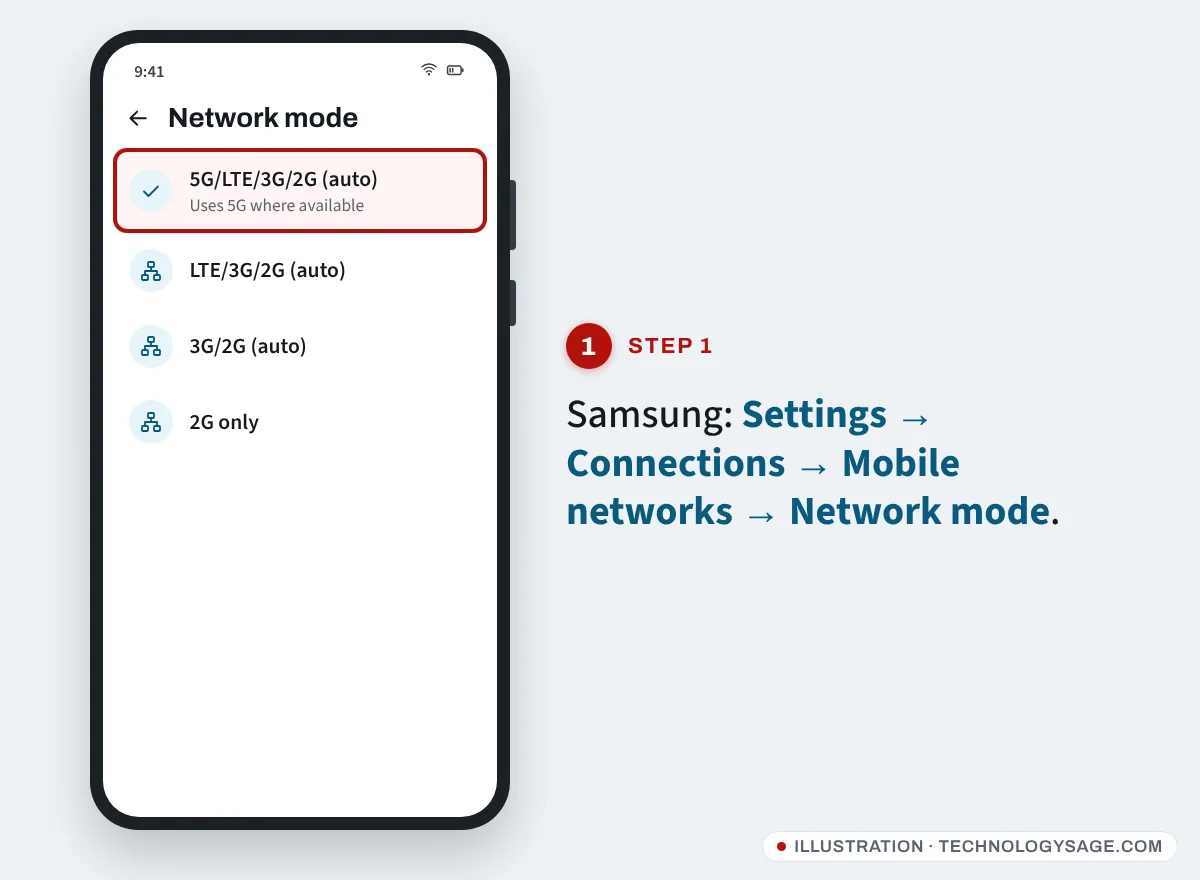
- Samsung Galaxy: Settings → Connections → Mobile networks → Network mode, then choose the option that starts with 5G (for example “5G/LTE/3G/2G (auto connect)”).
- Google Pixel: Settings → Network & internet → SIMs, tap your SIM, then Preferred network type → 5G.
- Other Android phones: look under Settings → Mobile network (or SIM cards & mobile networks) for Preferred network type.
If you never see 5G UC
- Check the coverage map. T-Mobile’s map on its website shows Ultra Capacity and Extended Range areas separately. Coverage indoors is weaker than the map suggests.
- Restart the phone or turn Airplane mode on and off to force it to search again.
- Turn off battery saver or Low Power Mode and try again.
- Update the phone’s software (and on iPhone, accept any carrier settings update under Settings → General → About).
- Check your plan in the carrier app; some plans or MVNOs don’t include full-speed 5G.
- Check the phone’s bands. Phones imported from other regions may lack the US bands needed for UC.
If speed is the real problem rather than the icon, run a speed test in a couple of places. A strong LTE signal often beats a weak 5G UC one, so the icon alone doesn’t tell the whole story. Faster 5G also burns through data quicker, so it’s worth knowing how to save mobile data. For the longer history of how mobile data got this fast, see the evolution of mobile internet speed.
FAQ
Is 5G UC better than 5G?
Usually, yes. 5G UC means you’re on T-Mobile’s mid-band or millimetre-wave 5G, which is normally much faster than its low-band “Extended Range” 5G. Plain 5G covers more area, though, and holds a signal better indoors.
What does UC stand for in 5G UC?
UC stands for Ultra Capacity. It’s T-Mobile’s marketing name, not an industry standard.
Does 5G UC use more battery?
Slightly, when you’re moving lots of data. Modern phones manage this well; settings like iPhone’s 5G Auto switch to LTE when 5G speed wouldn’t make a noticeable difference.
Why does my phone say 5G UC but the internet is slow?
The icon only tells you which network you’re on. The cell may be busy, your signal may be weak, or your plan may be in a slower data priority after heavy use. Try a speed test, move closer to a window, or restart the phone.
Is 5G UC the same as 5G UW?
They describe the same idea on different carriers: 5G UC is T-Mobile’s faster 5G and 5G UW is Verizon’s. Both mean mid-band or millimetre-wave 5G rather than low-band 5G.