In this guide
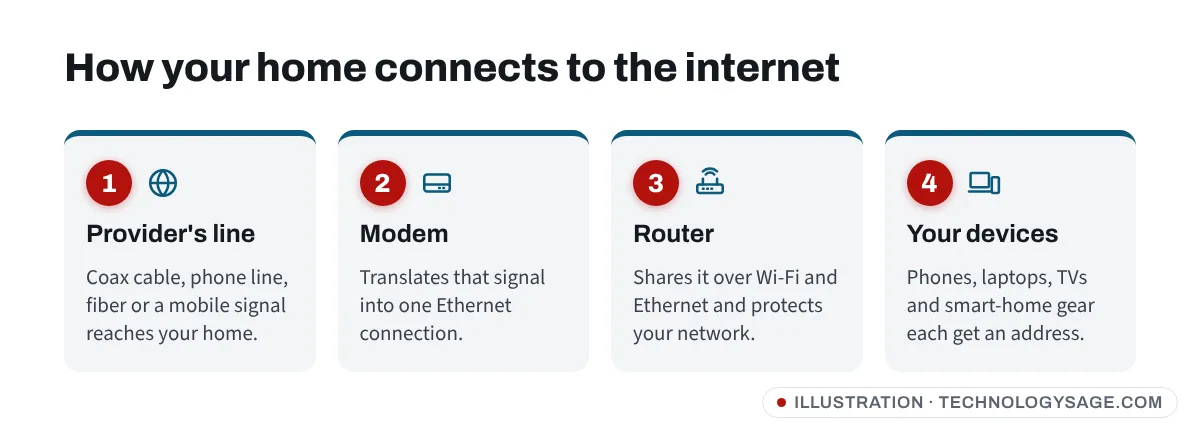
In the router vs modem question, the short answer is: the modem connects your home to your internet provider’s line (cable, phone line, fiber or mobile signal), and the router shares that one connection with all your devices, over Wi-Fi and Ethernet cables. You need both jobs done, but many homes get them in a single box called a gateway (or “hub” in the UK and Ireland, “modem router” in Australia).
So if you only see one box, it’s almost certainly doing both. If you see two, the one plugged into the wall socket or coax cable is the modem, and the one with the Wi-Fi network name on its sticker is the router.
What does a modem do?
A modem translates between the signal on your provider’s line and the standard Ethernet that computers understand. The name comes from modulator-demodulator: it turns digital data into a signal that can travel over the line and back again.
The type of modem depends on what reaches your house:
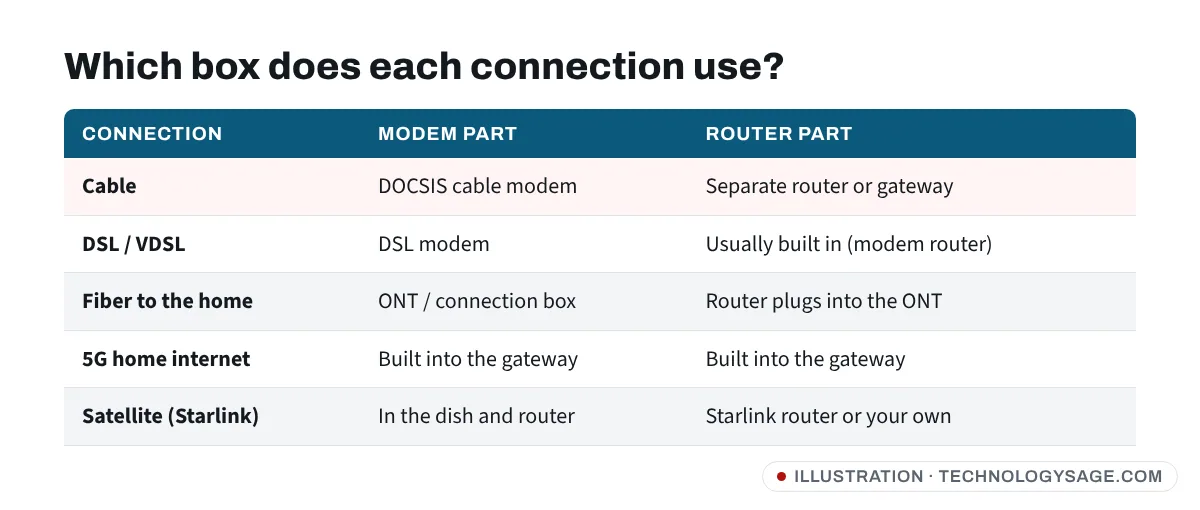
- Cable internet (Xfinity, Spectrum, Cox, Virgin Media): a DOCSIS cable modem on the coax cable.
- DSL (many phone-line services, some UK and Australian connections): a DSL or VDSL modem on the phone line.
- Fiber to the home: an ONT (optical network terminal), which is the fiber version of a modem. In Australia, nbn’s FTTP connection box does this job.
- 5G or 4G home internet and Starlink: the modem is built into the provider’s gateway or the dish’s router.
A modem on its own gives you one internet connection, normally one Ethernet port, with one public IP address from your provider. Plug a single computer into it and that computer is online. It doesn’t create Wi-Fi and it can’t share the connection safely with ten devices.
What does a router do?
A router builds your home network. It takes the single connection from the modem and:
- Creates your Wi-Fi network (name and password) and usually has a few Ethernet ports.
- Gives each phone, laptop and TV its own private address (that’s DHCP), and routes traffic so the right video ends up on the right screen.
- Acts as a basic firewall: devices on the internet can’t reach your devices directly (that’s NAT).
- Lets you change the Wi-Fi password, set parental controls, update firmware and see who’s connected.
A router without a modem is a local network with no internet: your devices can see each other, but nothing loads. That’s the classic “connected, no internet” situation, covered in Wi-Fi connected but no internet.
Router vs modem: the key differences
| Modem | Router | Gateway (combo) | |
|---|---|---|---|
| Connects to | Provider’s line | The modem | Provider’s line |
| Makes Wi-Fi | No | Yes | Yes |
| Devices it serves | One | Many | Many |
| Typical lights | Power, downstream/upstream, online | Power, internet/WAN, Wi-Fi | All of these |
| Can you replace it yourself? | Sometimes (must be approved by the provider) | Yes, almost always | Sometimes |
The easiest way to tell them apart on your desk: the modem has the coax, phone or fiber cable going into it. The router has a WAN or Internet port (often a different colour) that takes an Ethernet cable from the modem.
What is a gateway (modem router combo)?
A gateway is a modem and router in one case. Most providers rent or include one by default: the Xfinity Gateway, Spectrum’s WiFi router (paired with its modem), BT’s Smart Hub, Virgin Media’s Hub and the modem routers Australian providers send with nbn plans.
Pros: one box, one power socket, the provider can troubleshoot it remotely, and setup is plug-and-play.
Cons: you usually pay a monthly rental fee, the Wi-Fi may be weaker than a good standalone router, and if one half fails you replace both.
Many gateways have a bridge mode (Virgin Media calls it modem mode) that switches off the router part so you can plug in your own router or mesh system. If you add your own router without bridge mode, you get “double NAT” (two routers in a row), which mostly works but can upset gaming, video calls and some smart-home gear.
Do you need both a modem and a router?
You need both functions, not necessarily both boxes. Use this checklist:
- You have one box from your provider with Wi-Fi. That’s a gateway. You don’t need anything else unless the Wi-Fi doesn’t reach every room.
- You have one box with no Wi-Fi network on its label. That’s a modem (or an ONT/connection box). You need a router plugged into it.
- You have fiber and an ONT on the wall. The ONT is your modem. Your provider’s router or your own router plugs into it with Ethernet.
- You have 5G home internet or Starlink. The provider’s unit is already both; add a mesh node or your own router only if you need more coverage or features.
Should you buy your own modem or router?
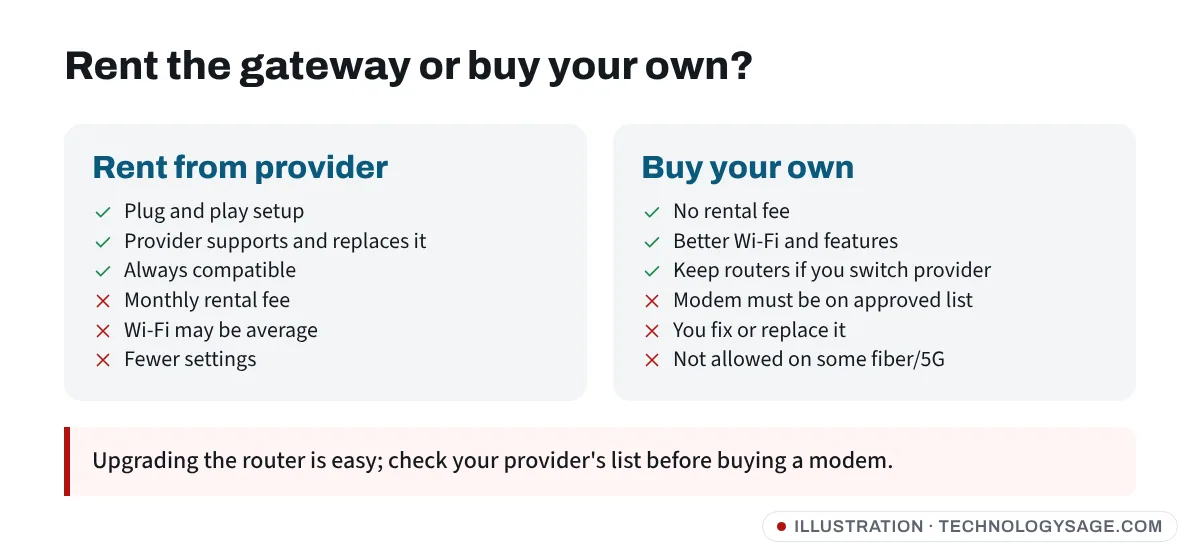
Buying your own can save the monthly equipment fee and often gives better Wi-Fi, but check three things first.
For a modem:
- It must be on your provider’s approved list. Xfinity, for example, publishes its list of approved cable modems and asks you to check compatibility for your address. Spectrum and Cox have similar lists.
- It must support your plan’s speed (for cable, a DOCSIS 3.1 modem for gigabit plans).
- Some services can’t use your own modem at all: most fiber ONTs, most 5G home internet gateways and some voice/phone bundles need the provider’s equipment.
For a router: almost any modern Wi-Fi 6 or newer router works with any modem or ONT, because it only needs an Ethernet connection. That’s why upgrading the router (or adding a mesh system) is the easier win for weak Wi-Fi.
Check the cost. In the US, providers must show monthly equipment fees on their Broadband Facts label. Compare the rental over two or three years against the price of your own device, and remember you’ll be responsible for fixing or replacing gear you own.
Which box is causing my internet problem?
Knowing which box does what makes troubleshooting much faster:
- Check the modem’s lights first. If the online/internet light is off, red or blinking, the problem is between your home and the provider (outage, cable, account). See router red light for what the lights mean.
- If the modem looks fine, plug a laptop straight into it with Ethernet. If that works, the router or Wi-Fi is the problem.
- Restart in order: unplug both, plug in the modem first and wait until it’s fully online (2-5 minutes), then plug in the router.
- If a wired PC says “Unidentified network”, follow Ethernet unidentified network.
Safety tip: if you call your provider, find the number in its official app or on its website. Search ads and pop-ups sometimes show fake “router support” lines that ask for remote access or payment. Your provider will never ask for gift cards or your password.
FAQ
Is a router the same as a modem?
No. The modem connects to your internet provider; the router shares that connection with your devices and creates Wi-Fi. A gateway or hub combines both in one box, which is why many people think they’re the same thing.
Can I use a router without a modem?
Only if something else is doing the modem’s job, such as a fiber ONT, an nbn connection box or a provider gateway. A router on its own can’t connect to your provider’s line, so you’d have a local network with no internet.
Do I need a modem if I have fiber?
You need an ONT, which is the fiber equivalent of a modem. Your provider installs it, usually on a wall or inside its own router. Your router connects to it with an Ethernet cable.
Does a better router make my internet faster?
It can’t make your plan faster than what the modem receives, but it can make Wi-Fi faster and more reliable around your home, especially if your current router is old or in a bad spot. For gaming needs, see how much internet speed you need for gaming.
Which one do I plug into the wall?
The modem (or gateway, or ONT) connects to the wall socket: the coax, phone or fiber line. The router plugs into the modem’s Ethernet port through its WAN or Internet port.