In this guide
To know your laptop’s generation, open Settings → System → About and read the Processor line. On Intel laptops, the generation is in the number after “Core i3/i5/i7”: a four-digit number’s first digit is the generation (i5-8250U is 8th gen), and a five-digit number’s first two digits are the generation (i5-1135G7 is 11th gen). Newer Intel “Core Ultra” chips use series instead (Core Ultra 7 258V is Series 2), and AMD Ryzen names follow their own rules, explained below.
This matters most when you’re buying a used or “UK used” laptop: two laptops both sold as “Core i5” can be eight years apart in age and very different in speed and battery life.
Step 1: Find the processor name
In Settings (Windows 11)
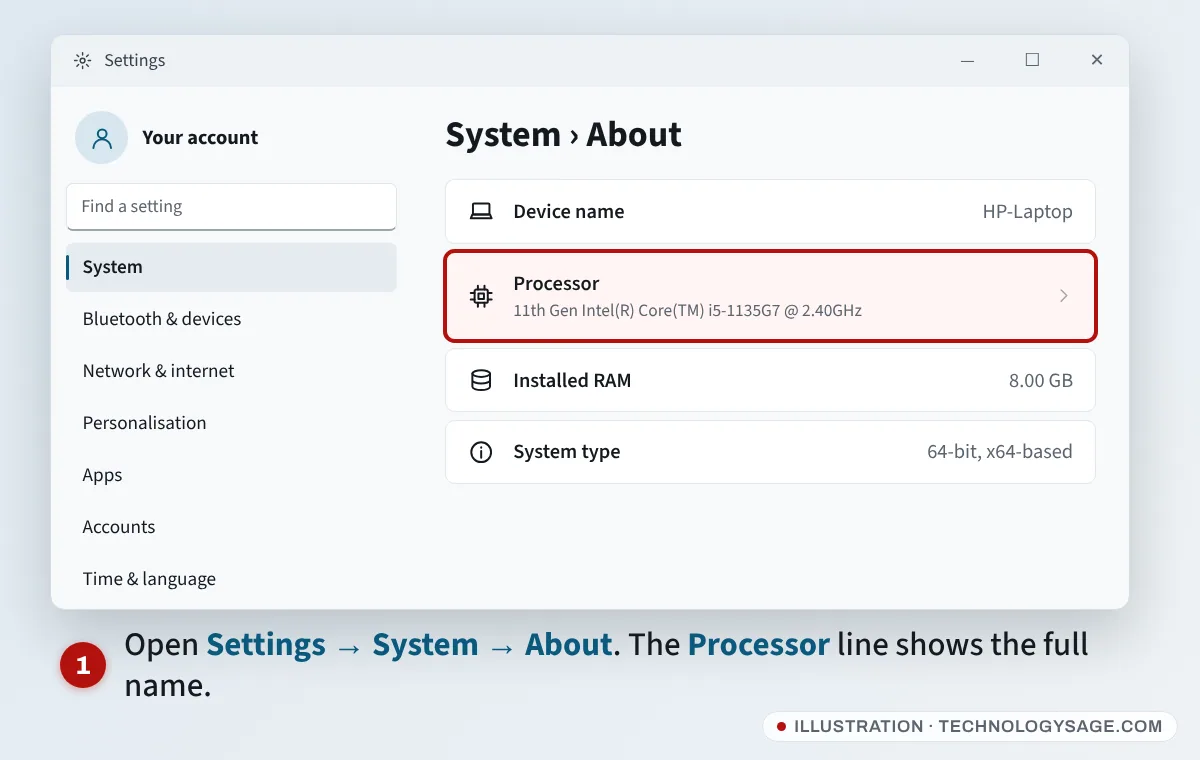
- Press Windows + I to open Settings.
- Go to System → About.
- Under Device specifications, read the Processor line. Intel laptops from 11th gen onward often say it in words, for example “11th Gen Intel(R) Core(TM) i5-1135G7”.
You can also press Windows + R, type msinfo32 and press Enter. System Information shows the processor, the laptop model and the BIOS version.
In Task Manager
Press Ctrl + Shift + Esc, open Performance, then CPU. The processor’s full name is at the top right.
Without turning it on (in a shop or market)
- The sticker on the palm rest often says only “Core i5” or “Ryzen 5”, which isn’t enough.
- Turn the laptop over and note the model number on the label (for example an HP, Dell or Lenovo product number), then search for that exact model on the maker’s website to see which processor it shipped with.
- Ask the seller to boot it and open Settings → System → About in front of you. Check Task Manager as well, after a restart. If the two don’t agree, walk away.
Step 2: Decode an Intel processor
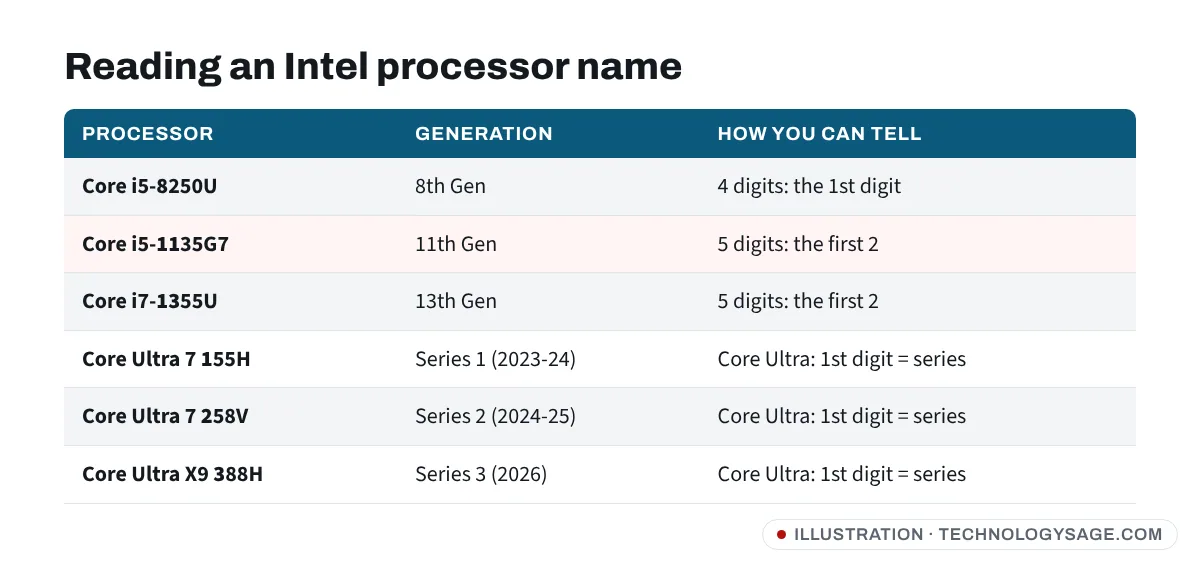
Look at the digits after the dash:
| Example | Generation | Rule |
|---|---|---|
| Core i5-4210U | 4th gen | 4 digits: first digit |
| Core i5-8250U | 8th gen | 4 digits: first digit |
| Core i5-10210U | 10th gen | 5 digits: first two digits |
| Core i5-1135G7 | 11th gen | 5 digits (starts “11”): first two |
| Core i5-1235U | 12th gen | first two digits |
| Core i7-1355U | 13th gen | first two digits |
| Core i9-14900HX | 14th gen | first two digits |
Watch out: “1135” is 11th gen, not 1st gen. Real 1st-gen Core chips (around 2010) had three-digit names such as i5-520M.
Intel Core Ultra and the new “Core” names
From late 2023, Intel dropped the “i” and the “Nth Gen” label:
- Core Ultra 5/7/9 1xx (for example Core Ultra 7 155H) is Series 1, launched from December 2023.
- Core Ultra 5/7/9 2xx (for example Core Ultra 7 258V) is Series 2, from 2024.
- Core Ultra 3xx (for example Core Ultra X9 388H or Core Ultra 7 365) is Series 3, from early 2026.
- Core 3/5/7 1xx without “Ultra” (for example Core 5 120U or Core 7 150U) is Intel’s lower-cost Core Series 1, closely related to the 13th-gen design.
In each case, the first digit of the three-digit number is the series, and the single number after “Ultra” or “Core” (5, 7, 9) is the tier, like the old i5/i7/i9.
Budget Intel chips with no generation number
Names like Intel N100, N200, Core i3-N305, Celeron or Pentium Silver are low-power chips for basic laptops. They don’t follow the generation scheme. They’re fine for browsing, documents and video calls, but slow for heavy multitasking.
Step 3: Decode an AMD Ryzen processor
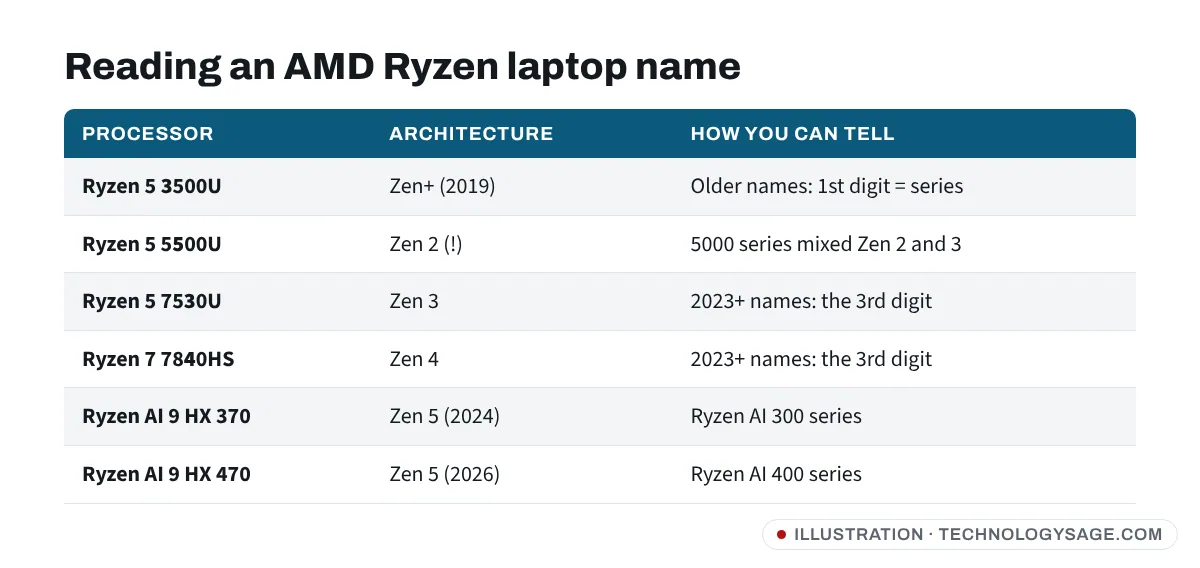
AMD’s laptop names are trickier because the scheme changed in 2023.
Older names (Ryzen 2000 to 6000 series): the first digit is the series. Ryzen 5 3500U is a 3000-series chip from 2019, Ryzen 5 5600U is 5000 series. Be careful: in the 5000 series, Ryzen 3 5300U, Ryzen 5 5500U and Ryzen 7 5700U use the older Zen 2 design, while 5400U, 5600U and 5800U use the newer Zen 3.
2023 onward (Ryzen 7000 and 8000 series): read the digits like this:
- 1st digit = model year: 7 = 2023, 8 = 2024.
- 2nd digit = tier (higher is faster within the year).
- 3rd digit = architecture (Zen version): this is the one that matters. Ryzen 5 7530U is Zen 3; Ryzen 7 7840HS is Zen 4; Ryzen 5 7520U is the older Zen 2.
- 4th digit: 0 or 5, a small step up within the same model.
So a “new” 2023 Ryzen 5 7520U can actually be slower than a 2021 Ryzen 5 5600U. Check the third digit.
Ryzen AI names (2024 onward): Ryzen AI 300 series (for example Ryzen AI 9 HX 370 or Ryzen AI 7 350) use Zen 5, and the Ryzen AI 400 series announced at CES 2026 (for example Ryzen AI 9 HX 470) is a refresh of the same Zen 5 design.
Step 4: Understand the letters at the end
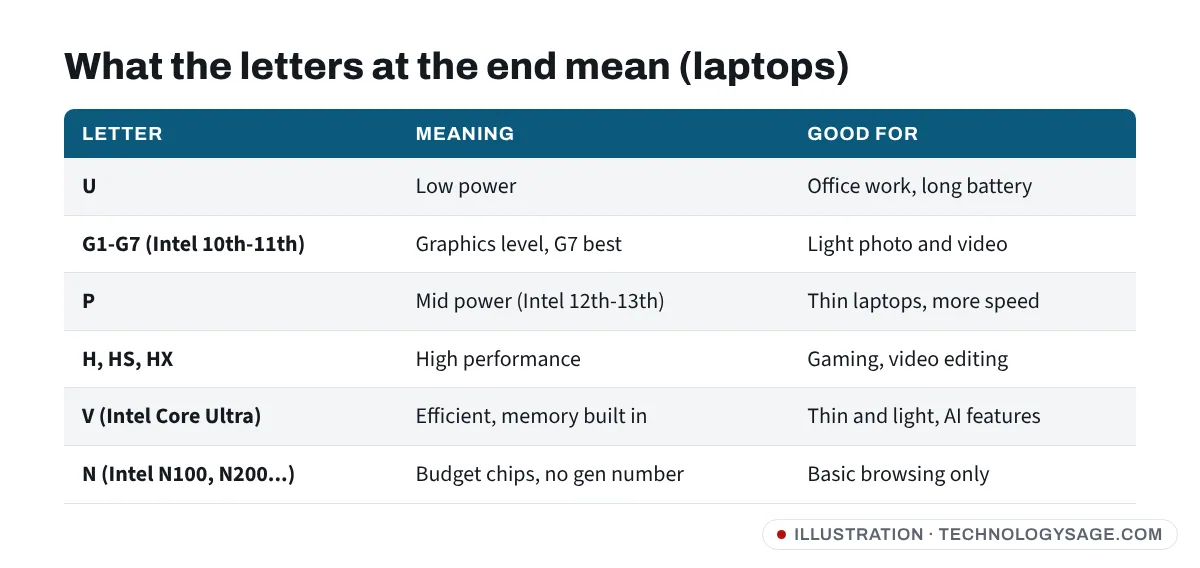
- U: low power, best battery life. Fine for school and office work.
- G1 to G7 (Intel 10th and 11th gen): graphics level; G7 has the strongest built-in graphics.
- P: Intel 12th and 13th gen thin laptops with more performance than U.
- H, HS, HX: high performance, usually in gaming and workstation laptops. Hotter and louder; see why a laptop fan gets loud.
- V: Intel Core Ultra Series 2 chips with memory built into the processor package. The RAM can’t be upgraded.
Step 5: Check the RAM type and speed
Generation and RAM go together: newer processors use faster memory.
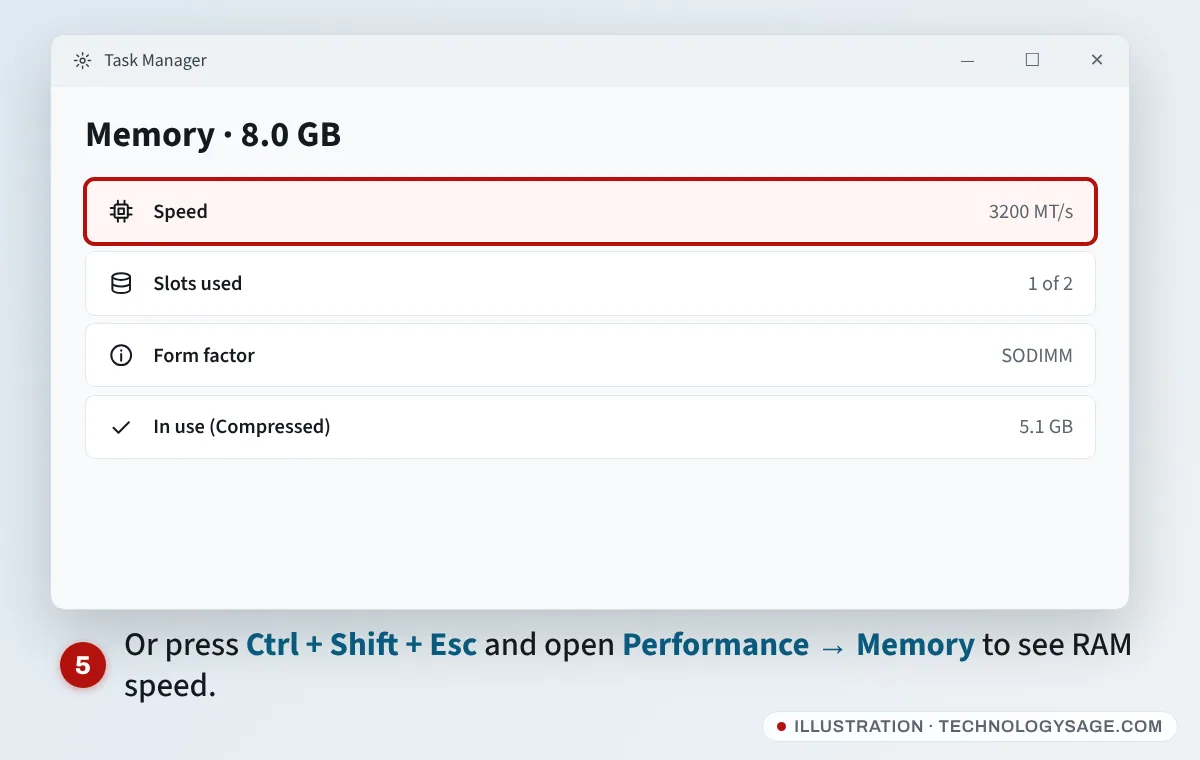
- Press Ctrl + Shift + Esc to open Task Manager.
- Open Performance → Memory.
- Read Speed (for example 3200 MT/s), Slots used (1 of 2 means you can add another stick) and Form factor (SODIMM is a removable laptop stick; “Row of chips” usually means soldered RAM).
To see the type (DDR3, DDR4 or DDR5), open PowerShell from the Start menu and run:
Get-CimInstance Win32_PhysicalMemory | Select SMBIOSMemoryType, Speed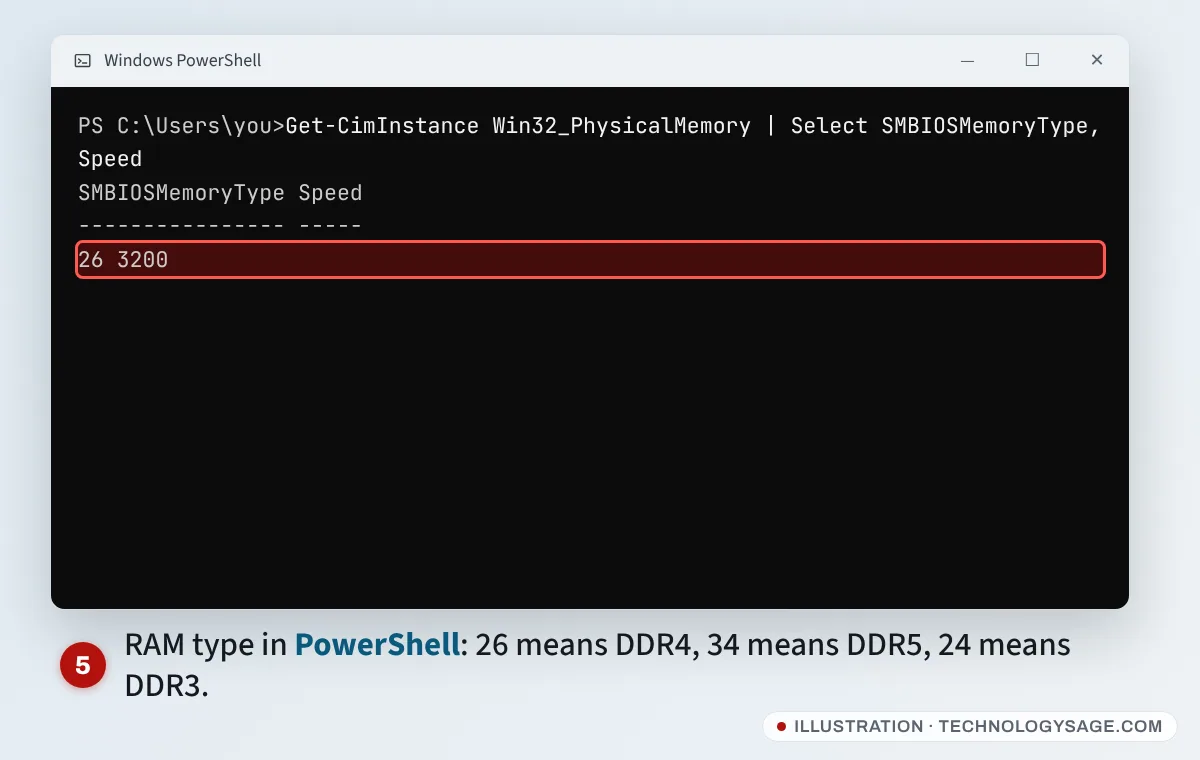
The number means: 24 = DDR3, 26 = DDR4, 30 = LPDDR4, 34 = DDR5, 35 = LPDDR5. Some laptops report 0; in that case, check the laptop model’s specification page. Our older guide on checking RAM type in Windows shows a few more methods, and how to tell if RAM is bad helps if you suspect a faulty stick.
Which generation should you buy in 2026?
- Windows 11 support: Microsoft’s official requirements cover roughly Intel 8th gen and newer and AMD Ryzen 2000 series and newer. Older laptops (for example 6th or 7th gen Intel) can’t get Windows 11 updates officially, and Windows 10 support has ended for most users.
- Used budget pick: Intel 10th or 11th gen, or AMD Ryzen 5000 (Zen 3), with an SSD and at least 8 GB RAM.
- For years of use: Intel 12th gen or newer, Core Ultra, or AMD Ryzen 7x4x, 8000 or Ryzen AI.
If you’re also checking the rest of a used laptop, test the keyboard, touchpad and Wi-Fi before paying; our guides on a laptop keyboard not working and Wi-Fi not showing on a laptop list the quick checks.
If something doesn’t add up
- Settings shows a different processor from the sticker: stickers are sometimes swapped. Trust what Windows and the BIOS show, and check the model number on the maker’s site.
- “Processor” shows a strange name: search the exact text on Intel’s or AMD’s official product pages, which list the launch date and specifications.
- Seller won’t let you turn it on: don’t pay. You can’t confirm the generation, battery or screen without booting it.
FAQ
How do I know if my laptop is 8th gen or 10th gen?
Read the processor name in Settings → System → About. Core i5-8xxx is 8th gen; Core i5-10xxx is 10th gen (five digits, first two are “10”).
Is Core Ultra 5 better than Core i7?
It depends on the generation. A Core Ultra 5 from 2024 is usually faster and more efficient than an older Core i7 from 8th or 10th gen, but a recent high-power Core i7 HX can be faster for gaming.
What generation is Intel Core i5-1135G7?
11th gen. Five-digit Intel numbers starting with “11” are 11th generation, and G7 means the higher graphics tier.
How do I check my laptop specs quickly?
Press Windows + R, type msinfo32 and press Enter. System Information lists the processor, RAM, laptop model and BIOS in one place.