In this guide
- Reason 1: You hid your own last seen
- Reason 2: They hid their last seen from you
- Reason 3: You aren’t saved in each other’s contacts
- Reason 4: Your contacts need to resync
- Reason 5: A temporary network problem
- Reason 6: Your WhatsApp is out of date
- Reason 7: You might be blocked
- Status or profile picture not showing either?
- Want to hide your own last seen instead?
- FAQ
If you can’t see someone’s last seen on WhatsApp, the most likely reason is privacy settings: either they’ve hidden it, or you’ve hidden yours. WhatsApp works both ways, so if your Last seen and online setting is Nobody, you can’t see anyone else’s either. Other reasons include not having each other saved as contacts, never having chatted, a contact sync problem, a network glitch, or, less often, being blocked.
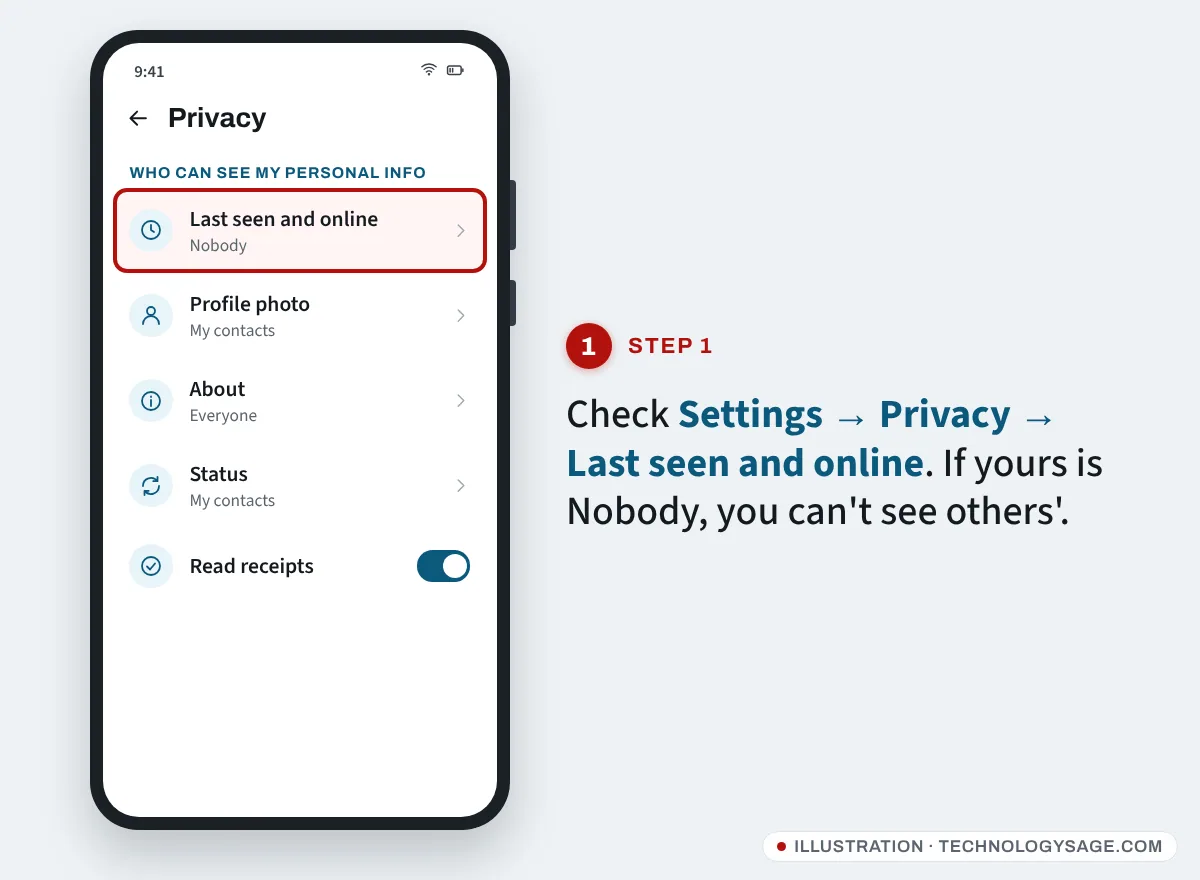
Start by checking your own setting: Settings → Privacy → Last seen and online. Then work through the reasons below.
Reason 1: You hid your own last seen
This catches most people out. If you don’t share your last seen or online status, WhatsApp doesn’t show you anyone else’s.
- Open WhatsApp and tap the three dots → Settings (on iPhone, the Settings or You tab at the bottom).
- Tap Privacy → Last seen and online.
- Under Who can see my last seen, choose Everyone or My contacts.
- Under Who can see when I’m online, choose Everyone or Same as last seen.
The same “fair exchange” applies to read receipts: if you turn off Read receipts, you won’t see other people’s blue ticks.
Reason 2: They hid their last seen from you
Your contact can choose Nobody, My contacts, or My contacts except… and leave you out. There’s no setting, app or trick that reveals a hidden last seen, and apps that claim to “track” someone’s WhatsApp online status break WhatsApp’s terms and can get your account banned. If you want to know whether someone is around, just send a message.
Reason 3: You aren’t saved in each other’s contacts
If someone’s last seen is set to My contacts, you only see it if they have your number saved. Even with Everyone, WhatsApp only shows last seen and online to people the user has messaged or called before, or who are saved in their contacts.
If you use two WhatsApp accounts on one phone (see how to run multiple WhatsApp accounts), make sure you are looking from the account they know.
Check that you’ve saved their number correctly in your phone, in full international format (for example +234 803 …, +91 98…, +254 7…), without the leading 0.
Reason 4: Your contacts need to resync
WhatsApp’s help centre lists a contact sync problem as a common cause, and it’s simple to fix.
- Make sure WhatsApp has permission to read your contacts: long-press the WhatsApp icon → App info → Permissions → Contacts → Allow.
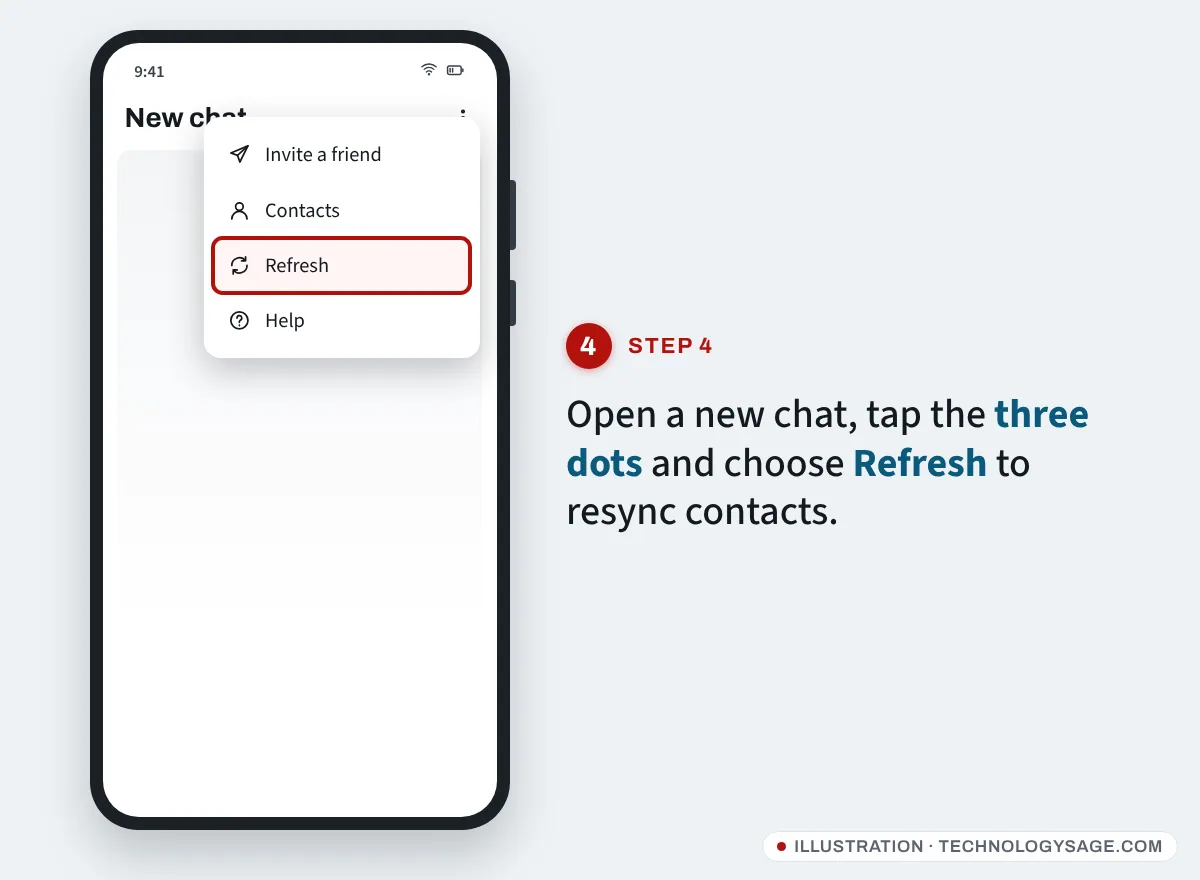
- In WhatsApp, open a new chat (the message icon), tap the three dots and tap Refresh.
- Close and reopen WhatsApp.
Your contact may need to do the same on their phone, especially if they only recently saved your number.
Reason 5: A temporary network problem
If you or your contact has a weak connection, last seen and online can stop updating. Switch between Wi-Fi and mobile data, close and reopen WhatsApp, and check again a little later. If WhatsApp itself won’t connect, the problem isn’t last seen; see Wi-Fi connected but no internet for network fixes.
Reason 6: Your WhatsApp is out of date
Older versions can behave oddly with newer privacy options. Open the Play Store (or App Store), search for WhatsApp and tap Update if offered.
Reason 7: You might be blocked
When someone blocks you, you no longer see their last seen, online status, profile photo updates or status updates. WhatsApp deliberately makes blocking hard to confirm, but these signs together suggest it:
- No last seen or “online” in their chat, even though you can see other people’s.
- No profile photo, or an old one that never changes.
- Your messages only ever show one grey tick (sent, never delivered).
- Calls to them don’t go through on WhatsApp.
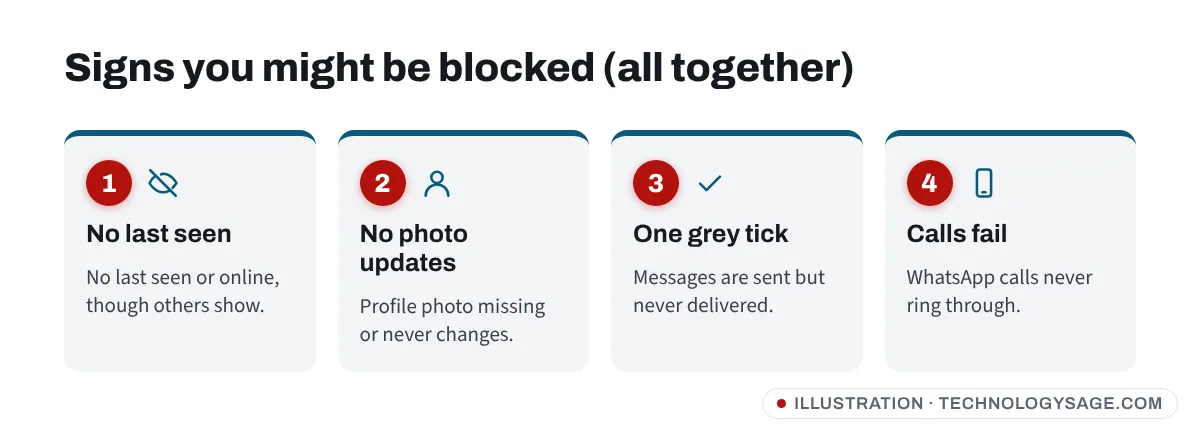
Any one of these can also mean they’ve hidden their information, changed their number, deleted WhatsApp, or simply have their phone off. Don’t assume the worst from one sign.
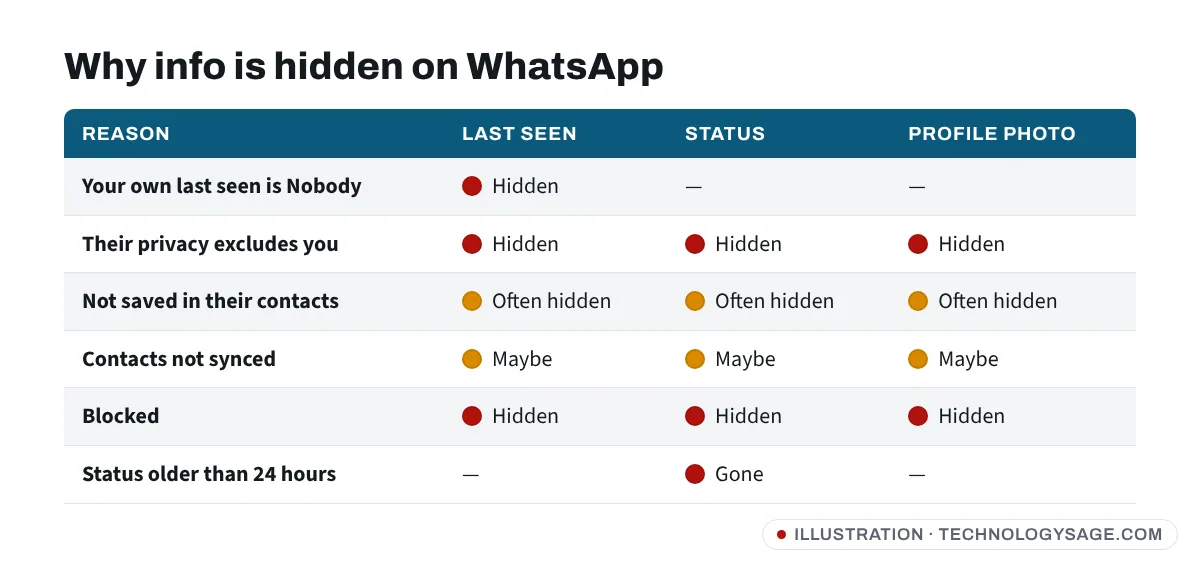
Status or profile picture not showing either?
The same reasons usually apply.
Status not showing:
- A status disappears after 24 hours, or the person may have deleted it.
- Their status privacy may exclude you (Settings → Privacy → Status on their side).
- For My contacts status privacy, you both need each other’s numbers saved.
- Weak connection, or WhatsApp not allowed to read your contacts.
- If you’ve blocked them, you won’t see their statuses.
Profile picture not showing:
- Their Profile photo privacy may be My contacts or Nobody.
- You may not be saved in their contacts.
- Resync contacts (Reason 4) and check your connection.
- They may have removed their photo, or blocked you.
Want to hide your own last seen instead?
If you came here because you want to hide your activity, choose Nobody under Privacy → Last seen and online, and Same as last seen for online. Our older guide on hiding WhatsApp last seen and blue ticks explains the trade-offs. You can also set a public WhatsApp username if you’d rather not share your number.
FAQ
Why can’t I see last seen even though it’s set to Everyone?
“Everyone” only applies to people the user has chatted with, called, or saved as a contact. If you’ve never chatted and they don’t have your number saved, you won’t see it. Also check your own last seen isn’t set to Nobody.
Can I see someone’s last seen if they’ve hidden it?
No. There’s no legitimate way. Third-party “online trackers” and modified WhatsApp apps break WhatsApp’s terms, can steal your data and can get your account banned.
Why does it show “online” but not last seen?
WhatsApp has separate settings for last seen and online. Someone can hide their last seen but still show when they’re online, unless they chose Same as last seen for online.
Does “last seen” disappear if someone is using WhatsApp on a computer?
No. Activity on WhatsApp Web or the desktop app still counts. If it disappears, it’s due to privacy settings, contacts, or connection, not the device they use.