In this guide
If Telegram has banned or restricted your account, the way to appeal depends on the message you see. If you can still open the app but can’t message people (a limited or frozen account), appeal through Telegram’s official @SpamBot. If the login screen says “This phone number is banned”, tap Help under the message or email [email protected] from your own email address, explaining your case. There is no paid “unban service”: only Telegram can lift a ban.
Below you’ll find what each type of restriction means, how to appeal each one, and how to avoid it happening again.
Which restriction do you have?
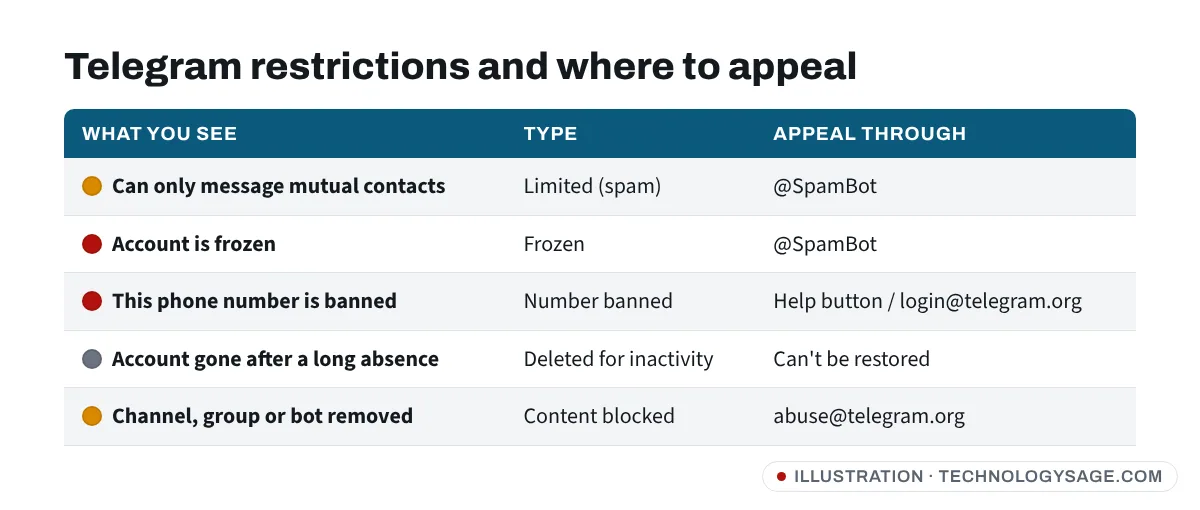
| What you see | What it means | Where to appeal |
|---|---|---|
| You can only message mutual contacts, or a note that your account is limited | Limited (spam limit). People reported your messages as unwanted. | @SpamBot |
| A notice that your account is frozen; you can read chats but not send, join or log in on new devices | Frozen. Telegram suspects serious rule-breaking. | @SpamBot |
| “This phone number is banned” when logging in | Number banned. The number cannot create or log in to a Telegram account. | Help button / [email protected] |
| Your account is gone after a long time away | Deleted for inactivity. | Cannot be restored |
| Your channel, group or bot was removed | Content blocked. | [email protected] |
Why Telegram bans or limits accounts
Telegram’s own spam FAQ explains that when people report your messages as unwanted and moderators agree, your account is limited. Common triggers:
- Messaging strangers, especially many people in a short time, even with friendly messages.
- Adverts, links and invite links sent to people who didn’t ask for them: selling, crypto or investment offers, “earn money” schemes, followers and likes.
- Adding lots of people to groups without asking them.
- Using unofficial Telegram clients or automation tools that break Telegram’s terms.
- A “recycled” phone number. If the number belonged to someone else who spammed, the restriction can follow the number. Telegram also says some virtual and VoIP numbers can trigger harsh limits.
- Sharing illegal content or content that breaks Telegram’s terms in public places.
Being reported once by a few people doesn’t usually ban you, but repeated reports bring longer and stricter limits.
How to appeal a limited or frozen account (@SpamBot)
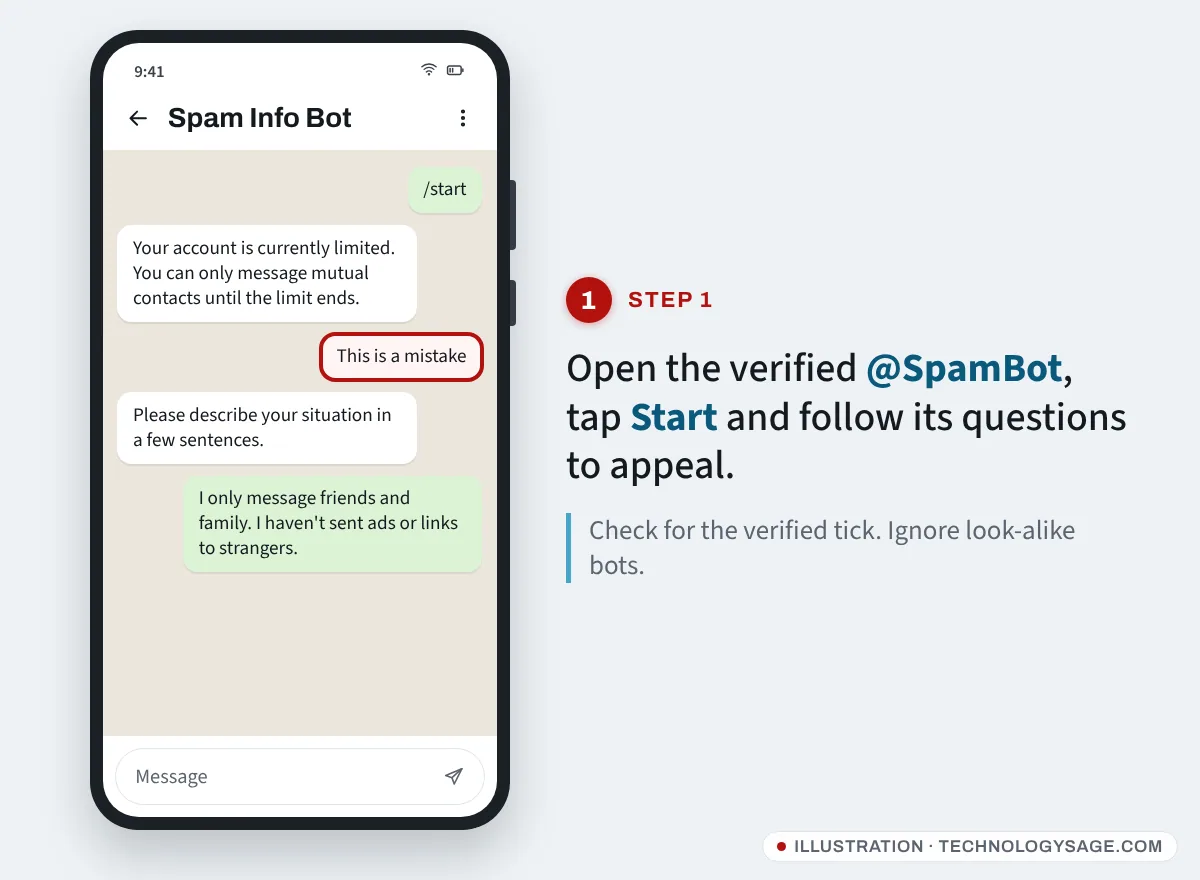
@SpamBot is Telegram’s official bot for checking and appealing spam limits. It has a blue verified tick. Do not use look-alike bots with slightly different names.
- In Telegram, tap the search icon and type @SpamBot. Open the verified result.
- Tap Start (or send
/start). - The bot tells you whether your account is currently limited and, for temporary limits, when it ends.
- If you believe the limit is a mistake, choose the option that says so (for example This is a mistake or But I can’t message non-contacts!) and answer its questions.
- When asked, explain your case honestly in a few sentences: what you use Telegram for, whether you messaged people you don’t know, and that you will follow the rules.
What to expect:
- A first spam limit usually lasts a few days. Telegram says it cannot remove a limit early, so if the bot gives an end date, waiting is the fastest option.
- Repeated limits last longer and can become permanent.
- For frozen accounts, the appeal goes through the same bot. The account may be unfrozen without a message, or it may stay frozen.
- Send one clear appeal. Spamming the bot or sending many repeated requests won’t help.
How to appeal “This phone number is banned”
You will see this when you try to log in or sign up, so you can’t use @SpamBot from that number.
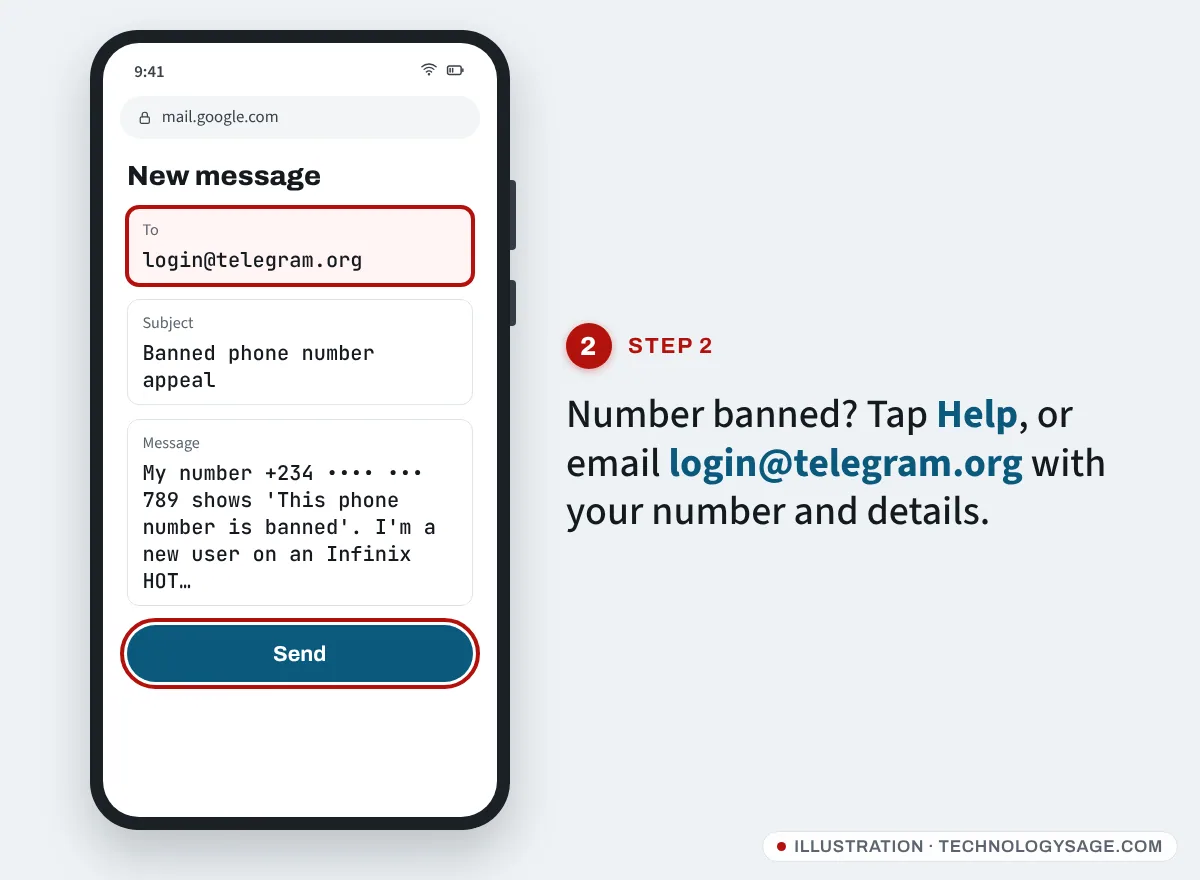
- On the login screen, tap Help under the ban message. On many versions this opens your email app with a message to Telegram’s login support, including technical details they need.
- If no email opens, write to [email protected] yourself (this is the address shown in Telegram’s own ban message).
- Use a short subject such as “Banned phone number appeal”.
- In the email, include:
- Your full phone number in international format (for example +234…, +91…, +254…).
- The exact error message.
- The device and app you used (for example “Telegram for Android on an Infinix HOT”).
- A brief, honest explanation: whether you are a new user, whether the number is new to you, and what you use Telegram for.
- Send it once, from an email address you check. Wait several days before following up once.
Replies are not guaranteed, and Telegram does not have to explain its decision. If you recently bought a SIM and the number is banned, it was probably used for spam by a previous owner; ask your mobile network for a new number if the appeal fails.
If your account was deleted
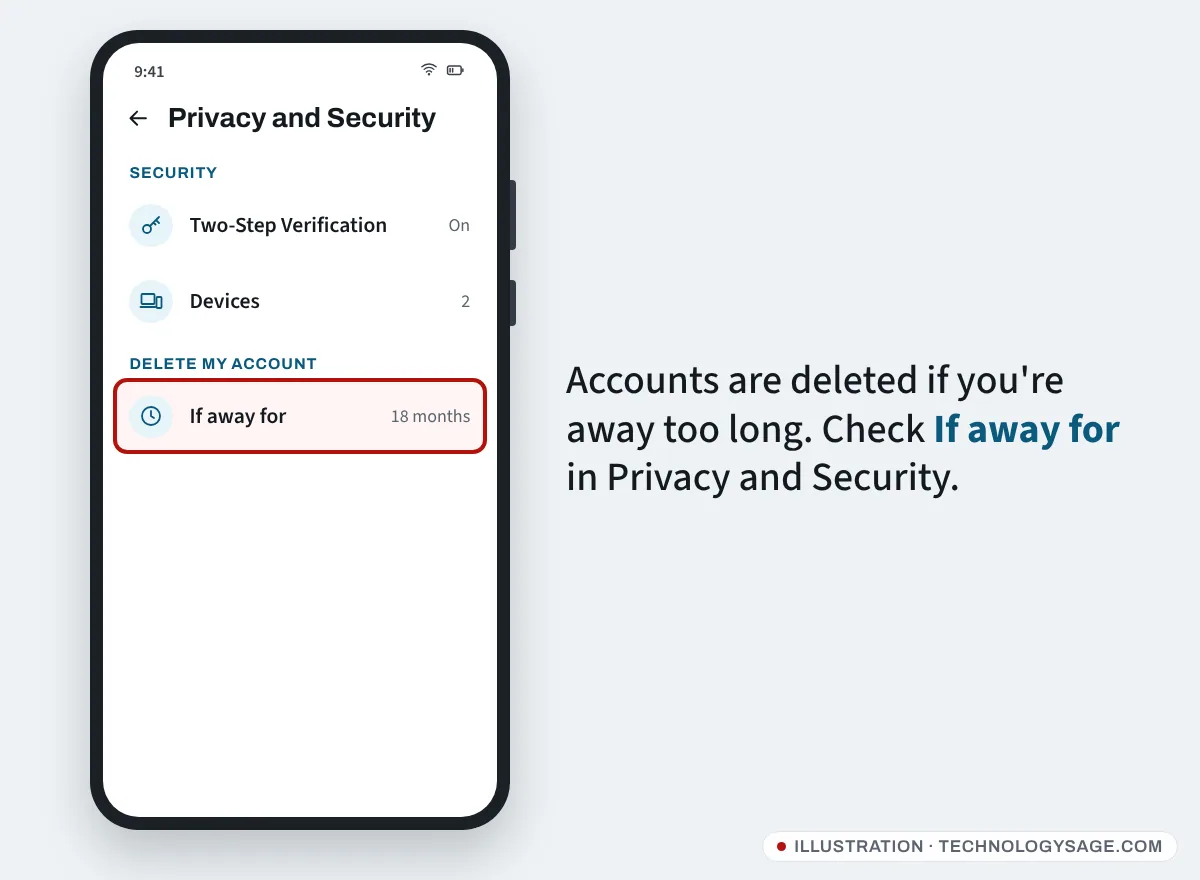
Telegram deletes accounts that don’t come online for a set period. The default is 18 months, and you can change it under Settings → Privacy and Security → If away for (it may be called Automatically delete my account or Delete my account if away for). Telegram says deleted accounts cannot be restored. You can sign up again with the same number, but old messages and contacts are gone.
Channels, groups and bots
If a channel, group or bot you run was blocked and you believe it was a mistake, Telegram’s FAQ points to [email protected]. Explain what the channel is, link to it, and say why you believe it doesn’t break the rules.
Beware of “Telegram unban” scams
Banned users are a favourite target for scammers. Remember:
- Telegram never charges a fee to unban you. Anyone asking for money, crypto, gift cards or airtime is a scammer.
- Telegram will never ask for your login code or two-step verification password. Never send them to anyone.
- “Recovery agents” on Facebook, Instagram, TikTok and X cannot unban your account. Only Telegram can.
- Don’t install “unban tools” or modified Telegram apps. They can steal your account or get it banned for good.
How to avoid getting restricted again
- Only message people who expect to hear from you, or who have messaged you first.
- Don’t send links, adverts or group invites to strangers.
- Ask before adding people to groups.
- Use the official Telegram app from the Play Store, App Store or telegram.org.
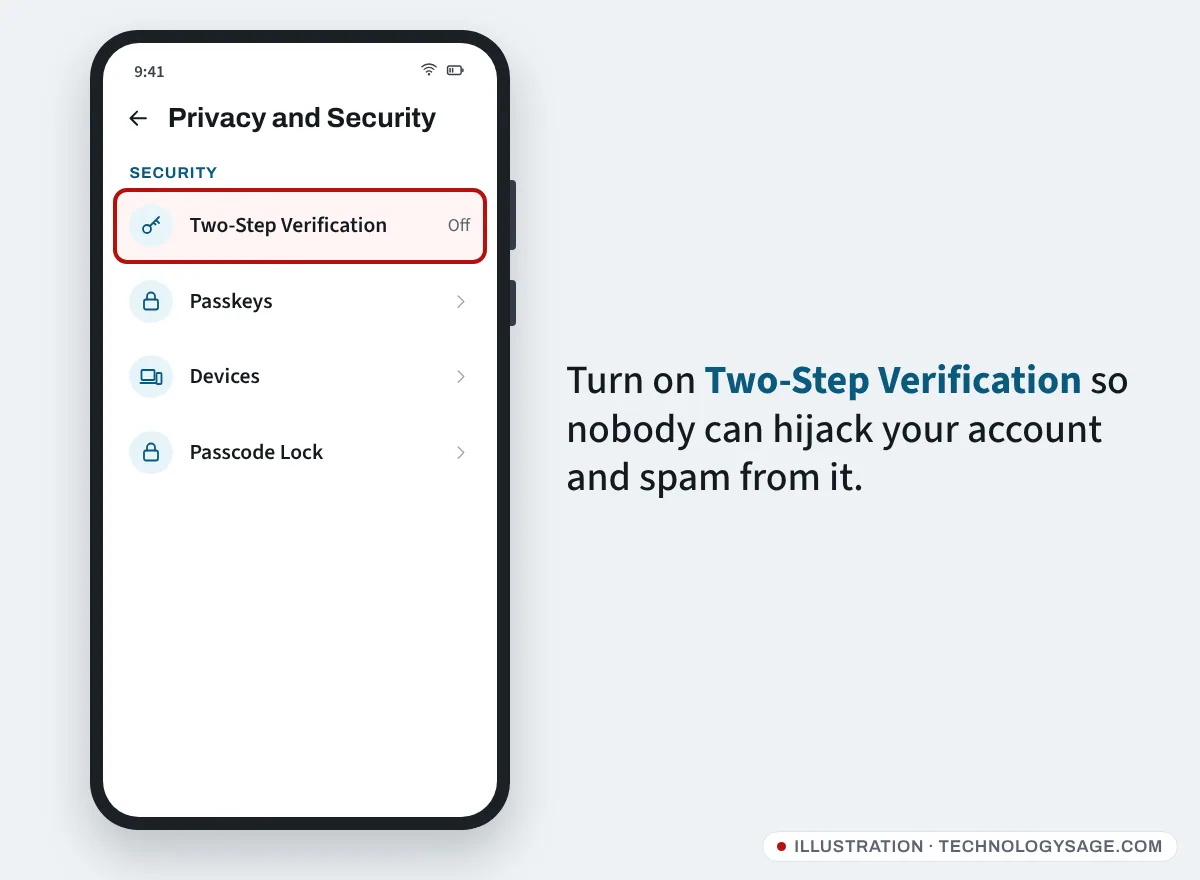
- Turn on two-step verification under Settings → Privacy and Security → Two-Step Verification, and consider a passkey, so nobody can take over your account and spam from it. Our tips to improve the security of your phone cover the rest.
If Telegram simply won’t connect, rather than showing a ban, see Telegram not working or stuck on connecting.
FAQ
How long does a Telegram ban last?
A first spam limit usually lasts a few days, and @SpamBot shows when it ends. Repeated limits last longer. A banned phone number stays banned until Telegram lifts it after an appeal.
Can I create a new account after a ban?
Not with a banned number. You would need a different phone number, and if you keep breaking the same rules, the new account can be restricted too.
Why was my number banned when I never used Telegram?
Most likely the number belonged to someone else before you, or it is a virtual or VoIP number. Appeal through the Help button or [email protected] and explain that the number is new to you.
Can someone else get my account banned by reporting me?
Reports from people you messaged without being asked are what trigger limits. Ordinary chats with friends who know you don’t lead to bans, and moderators review reports before acting.
My WhatsApp, Facebook or Instagram is also restricted. Is it the same process?
No, each app has its own appeal process. See our guides for a disabled Instagram account and Facebook’s “confirm your identity” check. For general phone security, read our tips to protect your Android phone from hackers.