In this guide
- Before you start: what “battery health” means
- How to check battery health on Samsung Galaxy
- How to check battery health on Google Pixel and stock Android
- How to check battery health on Tecno (HiOS)
- How to check battery health on Infinix (XOS) and itel
- The ##4636## code: what it shows today
- Use a battery app when there’s no built-in health page
- What the numbers mean and when to replace the battery
- How to slow down battery wear
- If it doesn’t work
- FAQ
To check battery health on Android, open Settings → Battery and look for Battery health or Battery information. On a Samsung Galaxy, the most reliable check is the Samsung Members app: Support → Phone diagnostics → Battery status. If your phone shows neither, a free battery app can estimate the health after a few charges.
How much detail you get depends on the brand and the software version. Some phones show an exact percentage and a charge-cycle count; many budget phones only say “Good” or “Normal”, or show nothing at all. Below are the steps for each brand, then what the numbers mean and when to replace the battery.
Before you start: what “battery health” means
A new lithium-ion battery holds 100% of its design capacity. Every full charge cycle wears it a little, so after two or three years of daily charging most batteries hold somewhere around 80% of what they did when new. (If you want the chemistry, see our explainer on how lithium-ion batteries work.)
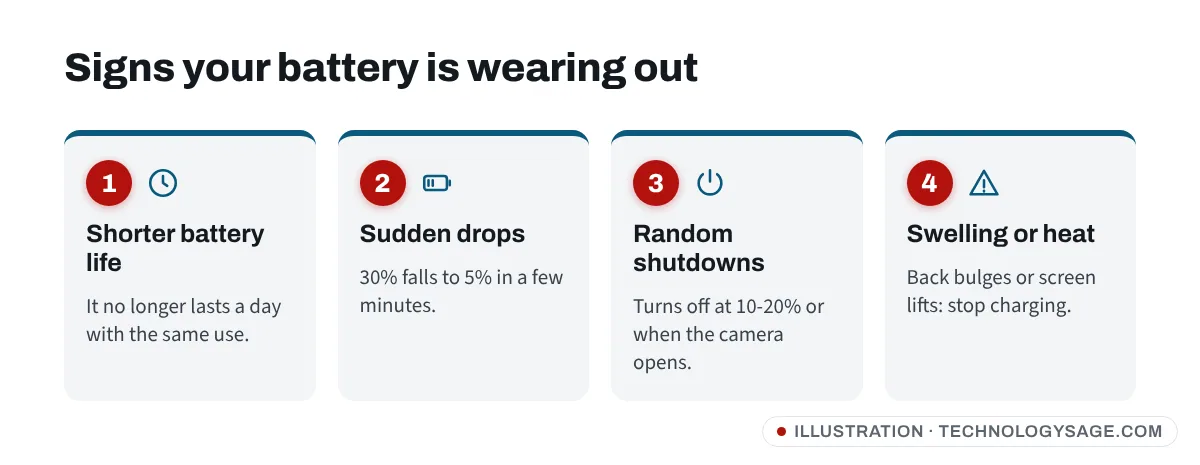
Signs the battery is wearing out:
- The phone no longer lasts a day with the same use.
- The percentage drops quickly, for example from 30% to 5% in minutes.
- The phone shuts down at 10-20% or restarts when you open the camera or a game.
- The back of the phone bulges, the screen lifts, or the phone gets hot while idle. Stop charging a swollen battery and get it replaced.
How to check battery health on Samsung Galaxy
Method 1: Samsung Members (works on most Galaxy phones)
This is Samsung’s own diagnostic tool, and it works on Galaxy A, M, F and S models.
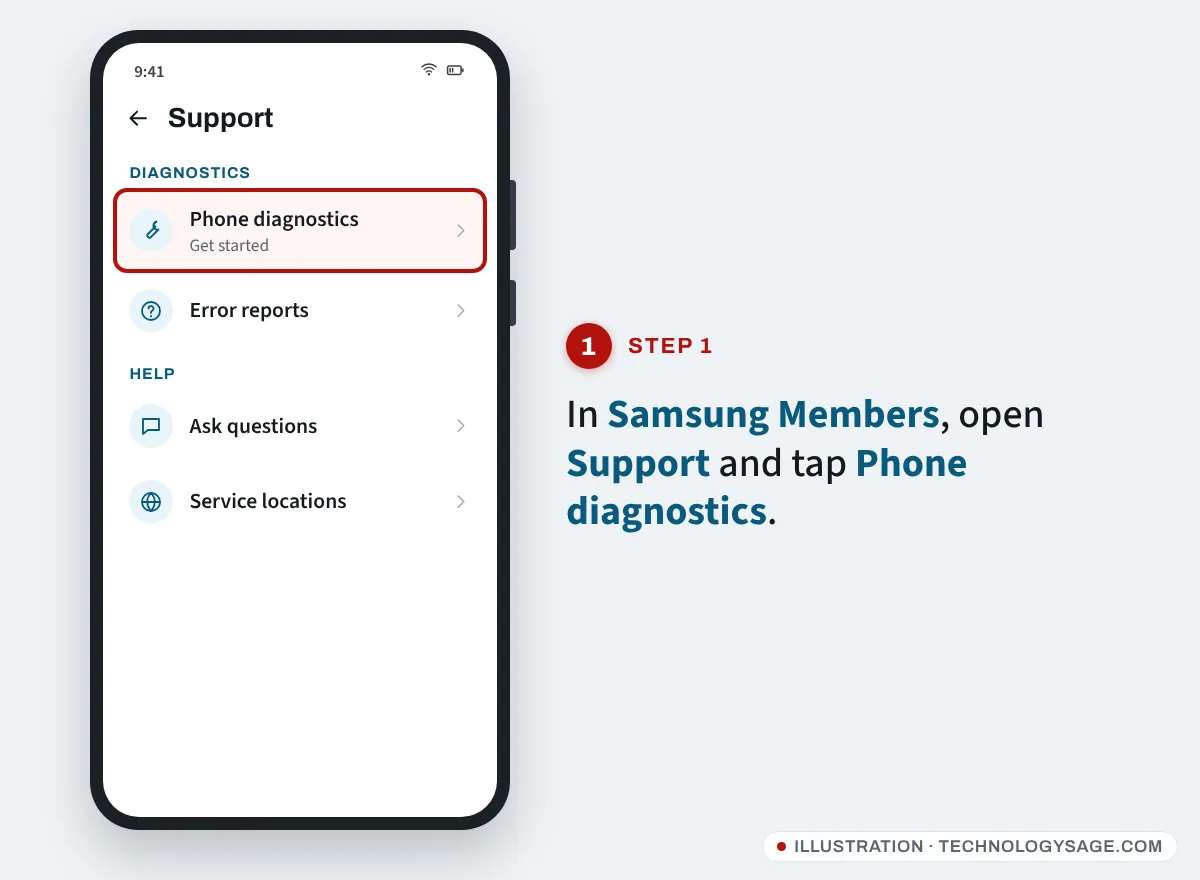
- Open the Samsung Members app. It is preinstalled on most Galaxy phones; if not, install it from the Galaxy Store or Play Store.
- Tap the Support tab.
- Under Phone diagnostics, tap Get started.
- Tap Battery status (you don’t need to run every test).
- Read the result. Samsung grades the battery as Normal, Weak or Bad.
- Normal: no problem with the battery.
- Weak: capacity has dropped from long use or heat. You can keep using it, but expect shorter battery life.
- Bad: the battery has degraded significantly. Samsung advises taking it to a Samsung service centre.
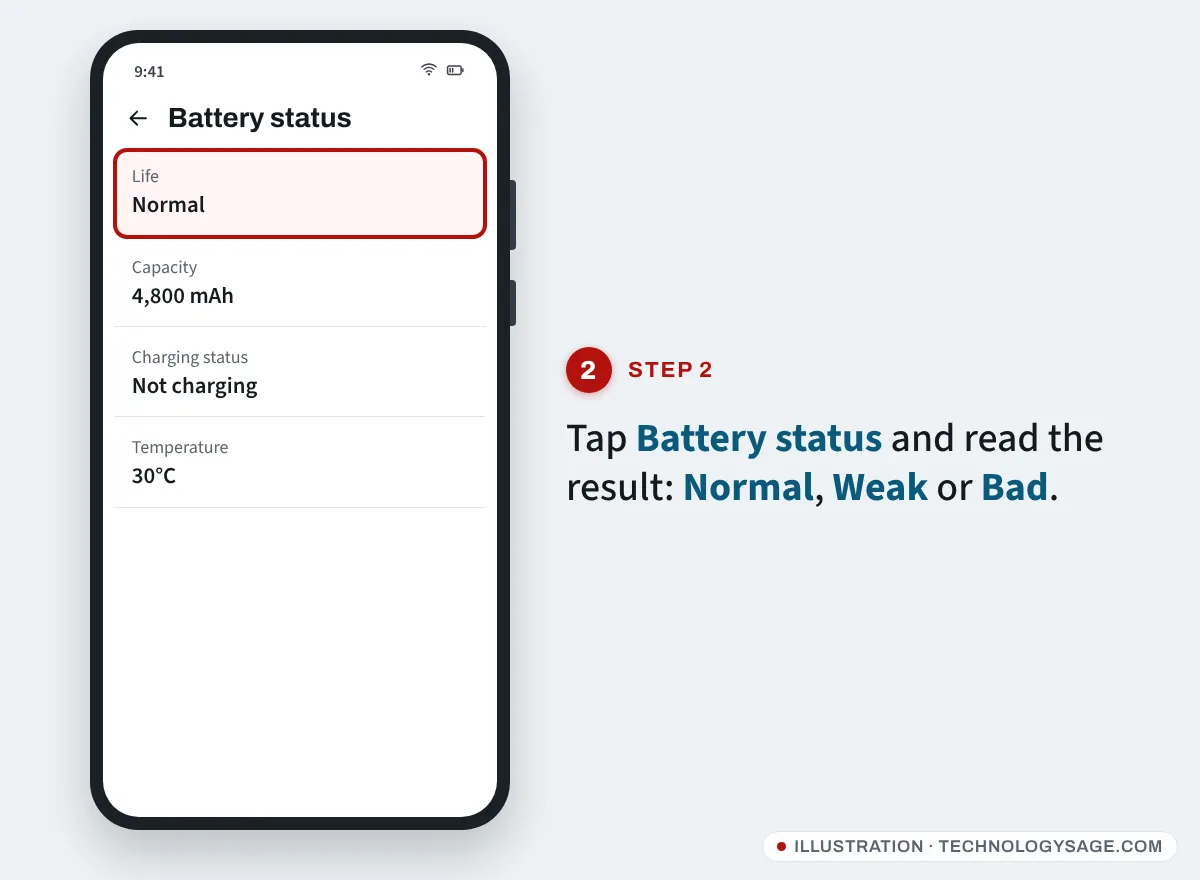
The screen may also show an estimated capacity. Menu names can differ slightly by model and app version.
Method 2: Settings → Battery → Battery information (newer flagships)
From One UI 7, some Galaxy phones, starting with the Galaxy S25 series, show a full page with Battery health as a percentage, cycle count, manufacture date and first-used date:
- Open Settings → Battery.
- Scroll down and tap Battery information.
On many Galaxy A phones this page only shows basic details or isn’t there at all, and even on flagships its availability has varied by region and firmware. If you don’t see a percentage, use Samsung Members instead.
How to check battery health on Google Pixel and stock Android
On Pixel phones running Android 16:
- Open Settings → Battery.
- Tap Battery health.
The Pixel 8a and newer show an estimated capacity percentage. Older Pixels (Pixel 6, 7 and 8) show the page with charging tips, but not the full capacity figure. Phones from Motorola, Nokia (HMD) and others with near-stock Android may have a similar page under Settings → Battery; if not, try the search bar at the top of Settings and type “battery health”.
How to check battery health on Tecno (HiOS)
Tecno does not publish a single official path, and it moves between HiOS versions, but this is where to look:
- Open Settings → Battery (on some models, Battery & power saving or similar).
- Look for Battery health or Battery information.
- If it isn’t there, tap the search bar at the top of Settings and type battery health.
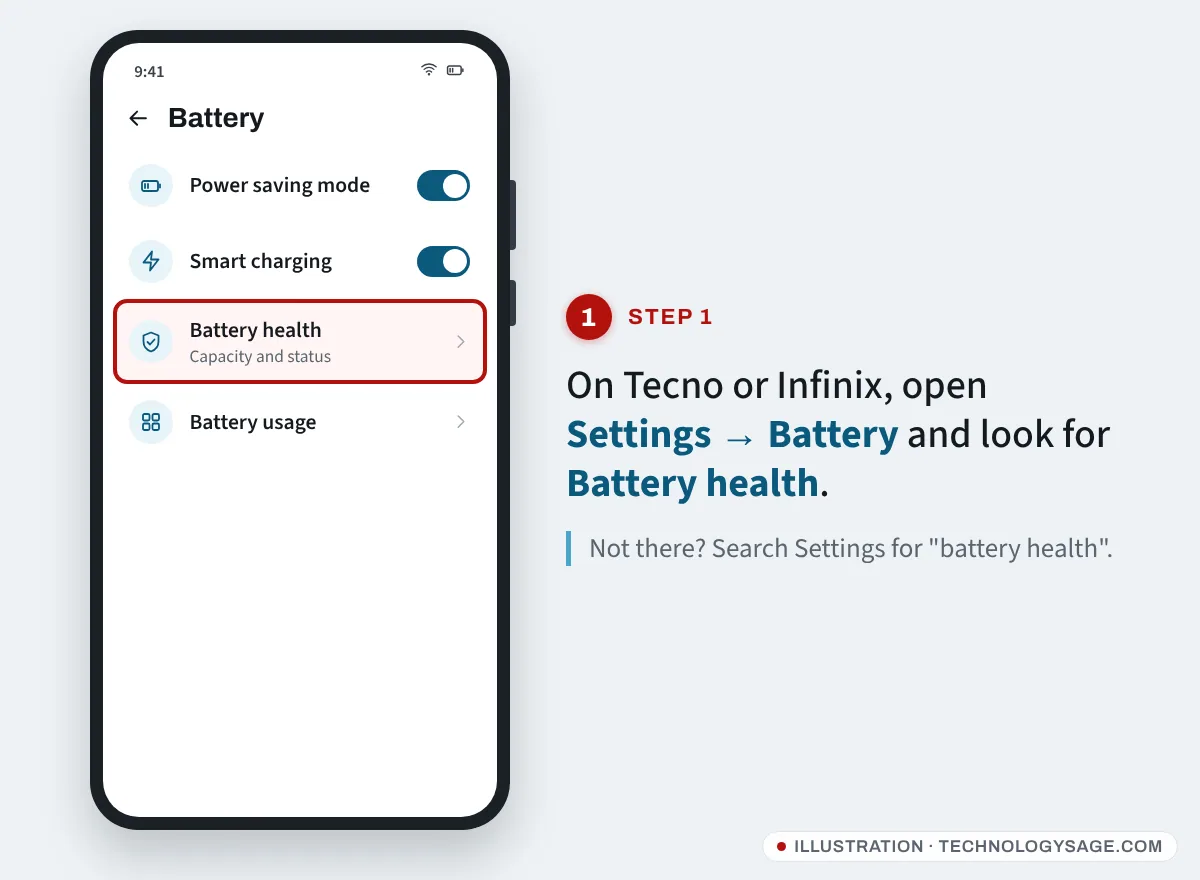
Recent HiOS versions on newer Spark, Camon and Pova models are more likely to show a health page. Older models usually show only battery usage by app, with no health reading. In that case use a battery app (see below) or ask a Carlcare service centre to test it.
How to check battery health on Infinix (XOS) and itel
Infinix: open Settings → Battery and look for Battery health. Some XOS versions also include battery care options such as stopping charging at 80-90%. If you can’t find a health entry, search Settings for “battery”.
itel: itelOS phones generally show battery usage under Settings → Battery but rarely a health percentage. Use a battery app or a Carlcare test for an accurate answer.
Tecno, Infinix and itel are all serviced through Carlcare, which can test the battery and replace it with an original part. If your phone is still under warranty, a faulty battery may be covered; our guide to the Infinix warranty check shows how to confirm your warranty status by IMEI.
The ##4636## code: what it shows today
Older guides tell you to dial *#*#4636#*#* to open a hidden Testing menu with “Battery information”. On many current phones the battery section has been removed from that menu, or the code does nothing. Where it still works, it shows the battery status as a simple word such as “Good”, which is not a capacity percentage, so a “Good” result doesn’t prove the battery is like new.
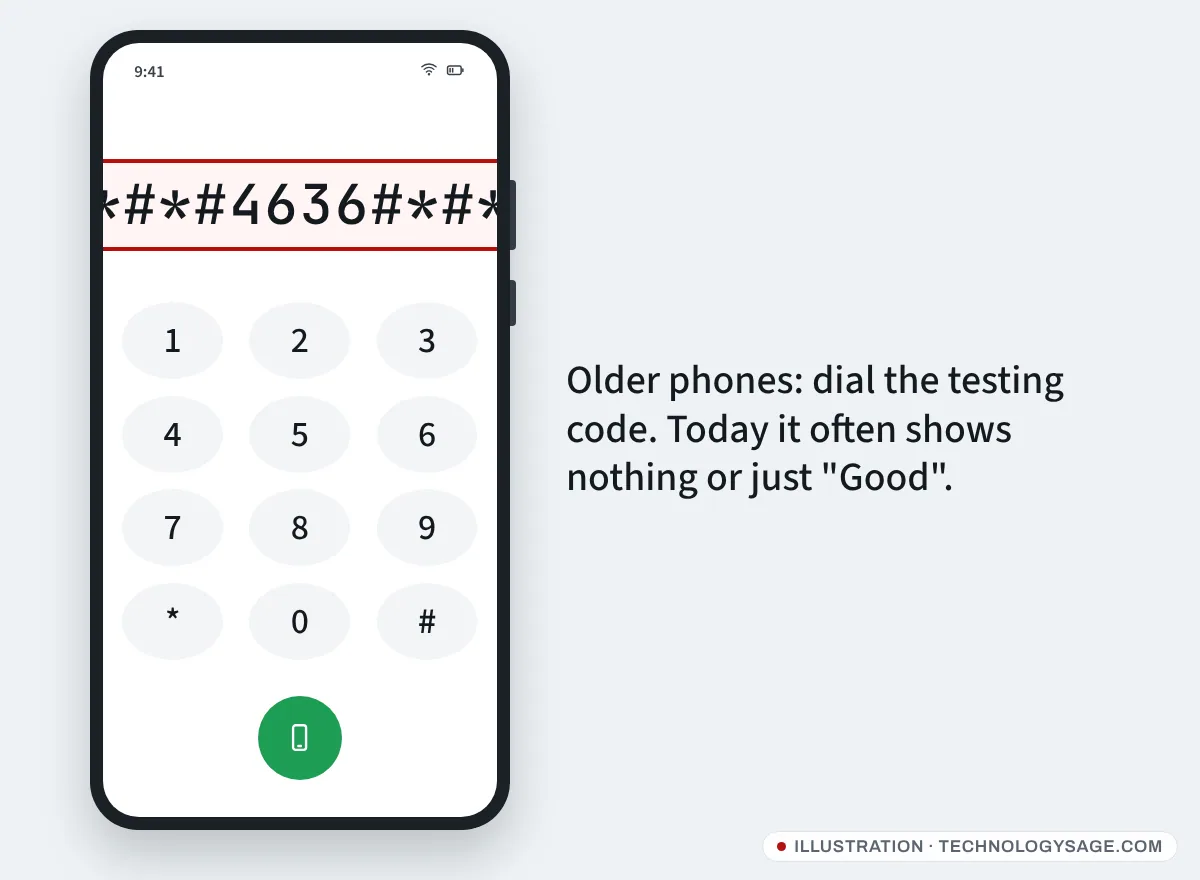
It’s safe to try, but don’t change any settings in that menu (especially the network type) unless you know what they do.
Use a battery app when there’s no built-in health page
If your phone has no battery health page, an app can estimate the capacity by measuring how much charge goes in while you charge. AccuBattery on the Google Play Store is a widely used free option.
- Install the app from the Play Store (avoid APK sites).
- Charge as normal for a few days. The estimate gets better after several charging sessions, ideally from below 30% up to 80-90%.
- Check the Health section for estimated capacity compared to the design capacity.
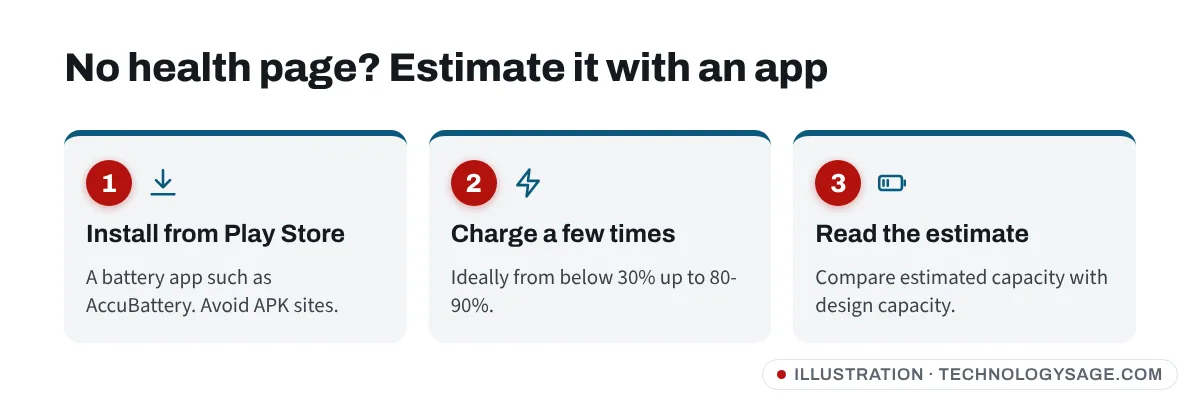
Treat this as an estimate. It depends on the phone reporting charge current correctly, and some budget phones report it badly.
What the numbers mean and when to replace the battery
| Battery health | What to expect | What to do |
|---|---|---|
| 90-100% | Close to new | Nothing |
| 80-89% | Slightly shorter battery life | Use battery care settings |
| Below 80% | Noticeably shorter life, possible shutdowns | Consider a replacement |
| Swollen, or “Bad” in Samsung Members | Unsafe or badly degraded | Replace now; stop charging if swollen |
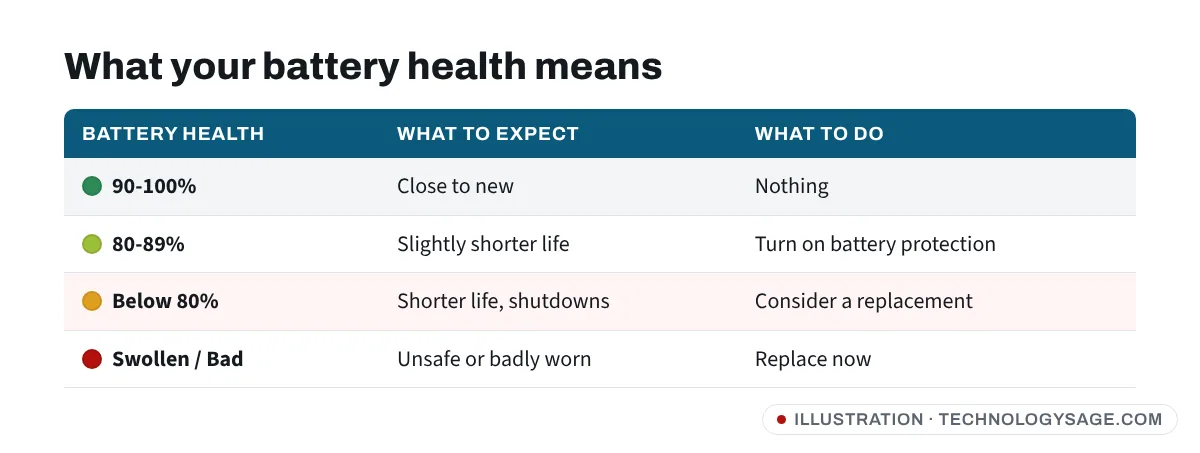
80% is the figure most manufacturers use as the usual point to think about a replacement. A battery replacement at an official service centre (Samsung or Carlcare) is usually much cheaper than a new phone, and it can make a two-year-old phone feel new again. Ask for an original battery; cheap unbranded batteries often have less real capacity than the label says.
How to slow down battery wear
- Avoid heat. Don’t charge under a pillow, in a hot car or while gaming for hours.
- Turn on battery protection. Samsung: Settings → Battery → Battery protection (options such as Maximum stop charging at 80%). Pixel, Tecno and Infinix have similar “adaptive” or “smart” charging options in Settings → Battery.
- Use a good charger. The original charger or a certified one. Our guide to charging your phone faster explains what matters with chargers and cables.
- Don’t keep it at 0% or 100% for long. Topping up between about 20% and 80% is gentlest.
If it doesn’t work
- Samsung Members has no Phone diagnostics: update the app from the Galaxy Store, then sign in with your Samsung account. On some carrier or regional models the feature is missing; a Samsung service centre can run the same test.
- “Battery health” disappeared after an update: restart the phone, then update Google Play services and the system (Settings → Software update or System → Software updates). On Samsung, clearing the Settings app’s cache (Settings → Apps → Settings → Storage → Clear cache) has helped some users.
- The health reading looks wrong (for example, 100% on an old phone): some phones never update the value, or report design capacity instead of real capacity. Judge by how long the phone lasts and, if needed, ask a service centre to test it.
- The phone dies at 20% but health shows “Good”: first restart, install any system update and check Settings → Battery for an app draining power. If it continues, have the battery tested.
FAQ
Is 85% battery health good?
Yes. 85% means the battery holds about 85% of its original charge, which is normal after a year or two. You’ll notice slightly shorter battery life, but there’s no need to replace it.
Can I restore battery health?
No. Lost capacity can’t be brought back by an app, a code or a calibration. You can only slow further wear (less heat, battery protection) or replace the battery.
Why doesn’t my Tecno or Infinix show battery health?
Not every HiOS or XOS version includes a health page. Search Settings for “battery health”; if nothing comes up, use a battery app for an estimate or ask Carlcare to test the battery.
How many charge cycles does a phone battery last?
It varies by phone and by how you charge. Many manufacturers design batteries to keep around 80% capacity after several hundred full cycles; some newer phones claim more. Heat shortens it.
Do battery saver apps improve battery health?
No. “Battery booster” and “cleaner” apps don’t change battery health and often add ads that use more power. Use the phone’s own battery settings instead. For a general speed-up, see how to make your Android phone run faster.