
In this guide
The best budget laptop for a student in 2026 has at least 8GB of RAM (16GB is better), a 256GB or larger SSD, a recent Intel Core i3/Core 3 or AMD Ryzen 3 or better, and a Full HD (1920 x 1080) IPS screen. In the US and UK, the Acer Aspire Go 15 and Lenovo IdeaPad Slim 3 are reliable Windows picks, and Apple’s MacBook Neo costs $499 with education pricing. In Nigeria, Kenya, India or the Philippines, a recent refurbished business laptop (8th-gen Intel or newer) is often the best value, as long as it meets Windows 11’s requirements.
Laptop names stay the same while the parts inside change, so this guide is built around the specs. Use it to check any laptop you find in a shop or online.
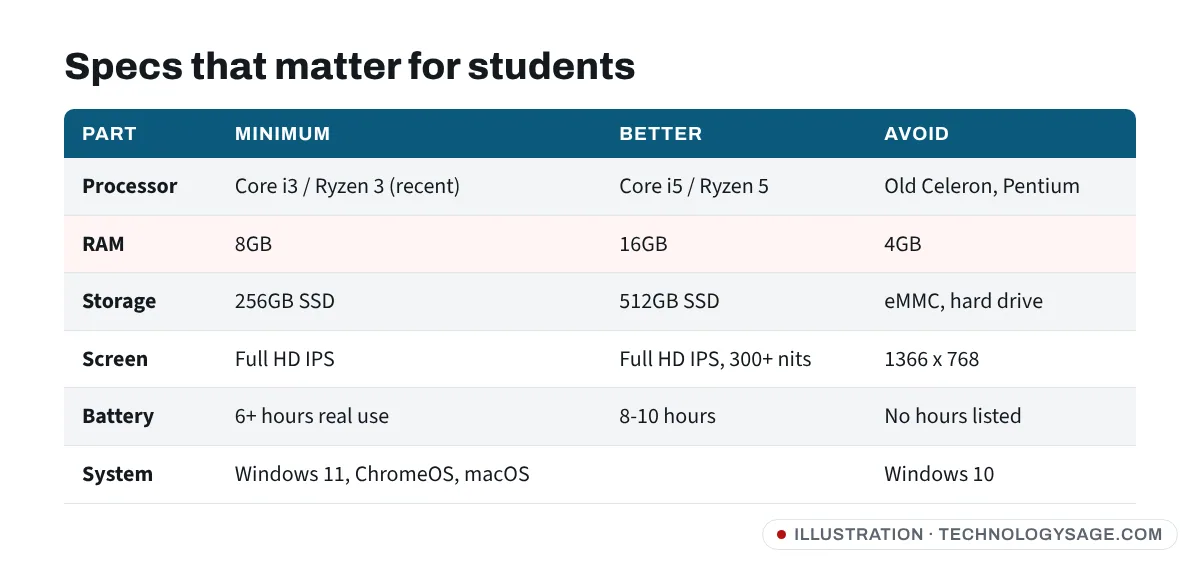
The specs that matter (and what to avoid)
| Part | Minimum | Better | Avoid |
|---|---|---|---|
| Processor | Intel Core i3 (12th gen+) / Core 3, AMD Ryzen 3 7000-series | Core i5 / Core 5, Ryzen 5 | Old Celeron and Pentium chips |
| RAM | 8GB | 16GB | 4GB |
| Storage | 256GB SSD | 512GB SSD | 64-128GB eMMC, hard drives (HDD) |
| Screen | 14-15.6” Full HD IPS | Full HD IPS, 300+ nits | 1366 x 768 “HD” screens |
| Battery | 6+ hours of real use | 8-10 hours | Laptops that only list “3-cell” with no hours |
| Operating system | Windows 11, ChromeOS, macOS | Windows 10 (no longer supported) |
Processor
For essays, research, Zoom, Google Docs, Microsoft Office and light coding, a recent Core i3 / Core 3 or Ryzen 3 is enough. A Core i5 / Ryzen 5 handles heavier multitasking and lasts more years. Intel’s low-cost N-series chips (such as the Core i3-N305) are fine for writing and browsing, but slower with heavy work.
The generation matters as much as the “i3/i5” label: an old Core i5 can be slower than a new Core i3. Here’s how to tell your laptop’s generation.
RAM and storage
8GB of RAM is the minimum for Windows 11 with a browser, Office and a video call open together. 16GB makes the laptop feel fast for longer. Many budget laptops have soldered RAM that can’t be upgraded, so check before you buy.
Insist on an SSD. A laptop with a hard drive (HDD) or tiny eMMC storage will feel slow, however good the processor is.
Screen, battery and weight
A Full HD IPS screen is much easier on the eyes for long study sessions than the cheap 1366 x 768 panels some laptops still use. If you carry the laptop to class every day, look for under 1.8kg and a battery rated for a full day. Manufacturer battery claims are measured with light use, so expect less.
Picks by need
Best cheap Windows laptop: Acer Aspire Go 15
The Acer Aspire Go 15 is one of the most recommended laptops under $500 in the US. Tom’s Guide calls it an easy recommendation for work or school, and PCWorld says it may be one of the best budget laptops under $500. The specs vary a lot by version, from an Intel Core i3-N305 with 8GB of RAM and a 512GB SSD to versions with newer Intel Core or AMD Ryzen chips. Reviewers’ main complaints are the screen’s viewing angles and the webcam.
Check: choose a version with at least 8GB of RAM and an SSD of 256GB or more.
Best value all-rounder: Lenovo IdeaPad Slim 3
The Lenovo IdeaPad Slim 3 is a step up, with configurations using Ryzen 5 or Ryzen 7 and Core i5 chips, often with 16GB of RAM and a 512GB SSD. It usually costs more than the Aspire Go 15, around or above $500 in the US, but gives you a laptop that will stay quick for the whole of a degree. IdeaPad Slim 3 models are sold in many countries, but the configurations differ, so check the exact processor and RAM.
Best Mac: MacBook Neo
Apple’s MacBook Neo, launched in March 2026, costs $599, or $499 through Apple’s education pricing for eligible students and staff. It uses the A18 Pro chip (the one in the iPhone 16 Pro), with 8GB of unified memory and a 256GB SSD, a 13-inch Liquid Retina screen and up to 16 hours of battery life according to Apple. The $699 version ($599 education) adds 512GB of storage and Touch ID.
Trade-offs: 8GB of memory can’t be upgraded, and there’s no backlit keyboard, MagSafe or Thunderbolt. Prices outside the US are higher, and Apple’s education pricing isn’t offered in every country.
Best for Google-based schools: a Chromebook
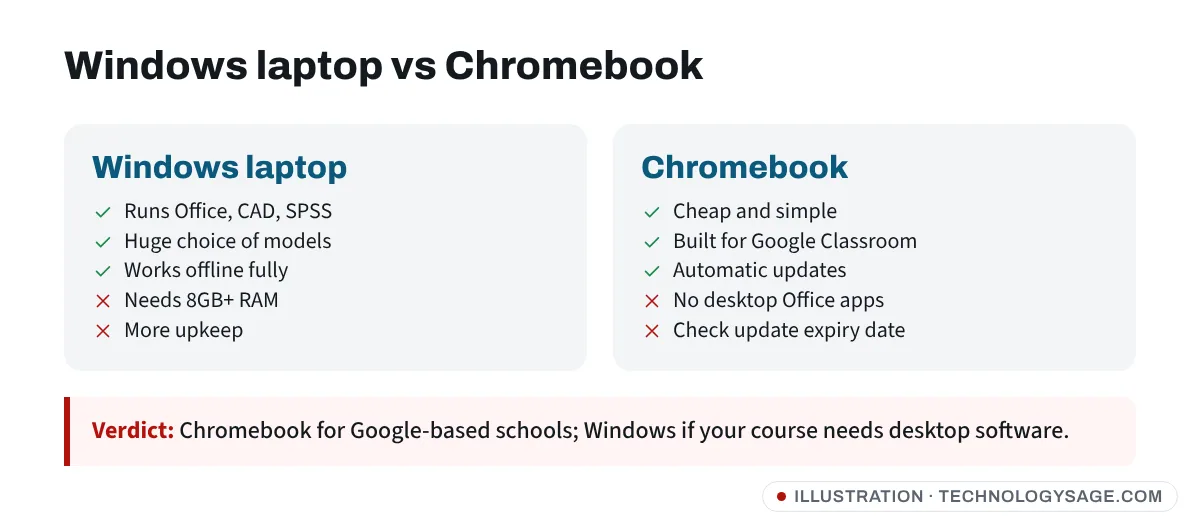
If your school uses Google Classroom and Google Workspace, a Chromebook is a cheap, simple, low-maintenance choice. Look for 8GB of RAM, 128GB of storage and a Full HD screen. Google now gives Chromebooks up to 10 years of automatic updates from launch, but check the “Auto Update Expiration” date before buying an older model.
Avoid a Chromebook if your course needs desktop software such as full Microsoft Office desktop apps, AutoCAD, MATLAB, SPSS or Adobe apps.
Best value in Nigeria, Kenya, India and the Philippines: a refurbished business laptop
In many markets, a refurbished business laptop such as a Lenovo ThinkPad, HP EliteBook or Dell Latitude (often sold as “UK used” or “foreign used”) costs less than a new consumer laptop with the same specs, and is usually built tougher. Follow these rules:
- Processor: Intel 8th generation or newer, or AMD Ryzen 2000 series or newer. Older chips don’t officially support Windows 11, and Windows 10 is no longer supported: mainstream support ended in October 2025, and the one-year Extended Security Updates option for home users ended in October 2026.
- SSD, not HDD, and at least 8GB of RAM.
- Check the battery. Older laptops often have worn batteries. Run a battery report (below) or budget for a replacement.
- Genuine Windows. Check Settings → System → Activation.
- Get a written warranty, even if it’s only 3-6 months.
Engineering, architecture or design courses
If your course uses 3D modelling, CAD or video editing, budget for 16GB of RAM, a Core i5 / Ryzen 5 or better, and possibly a dedicated graphics card. Ask your department for its recommended specs first. Our guide to buying a gaming laptop covers graphics cards.
Check a laptop before you pay
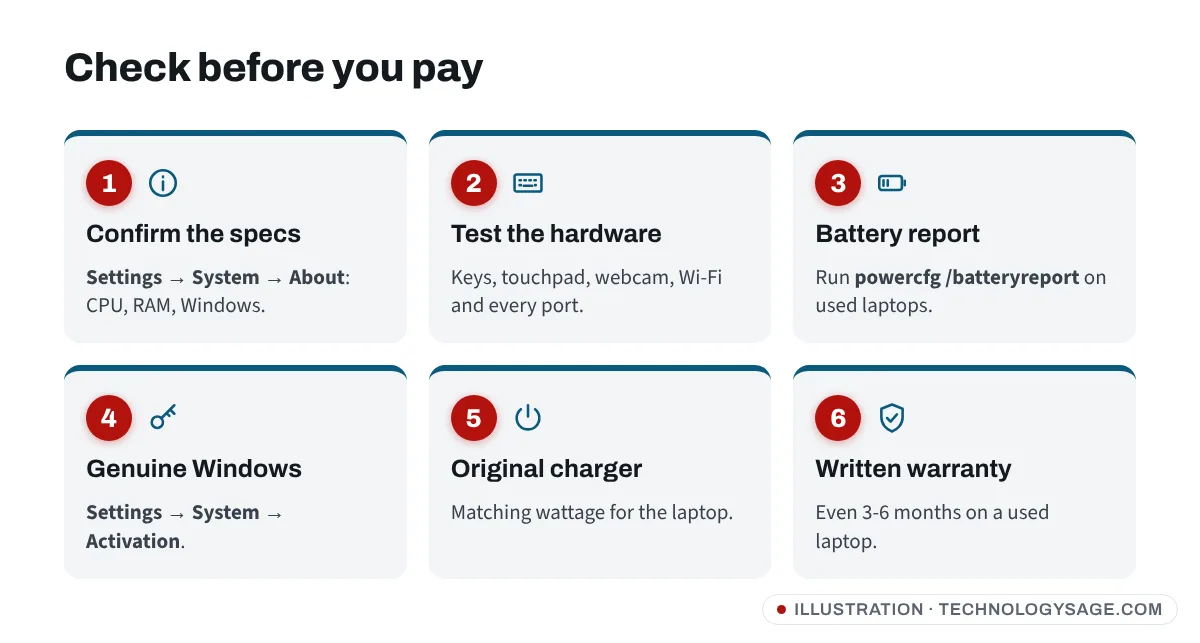
Whether new or used, check these in the shop:
- Open Settings → System → About and confirm the processor, RAM and Windows edition match what you were told.
- Test the keyboard, touchpad, webcam, speakers, Wi-Fi and every USB port.
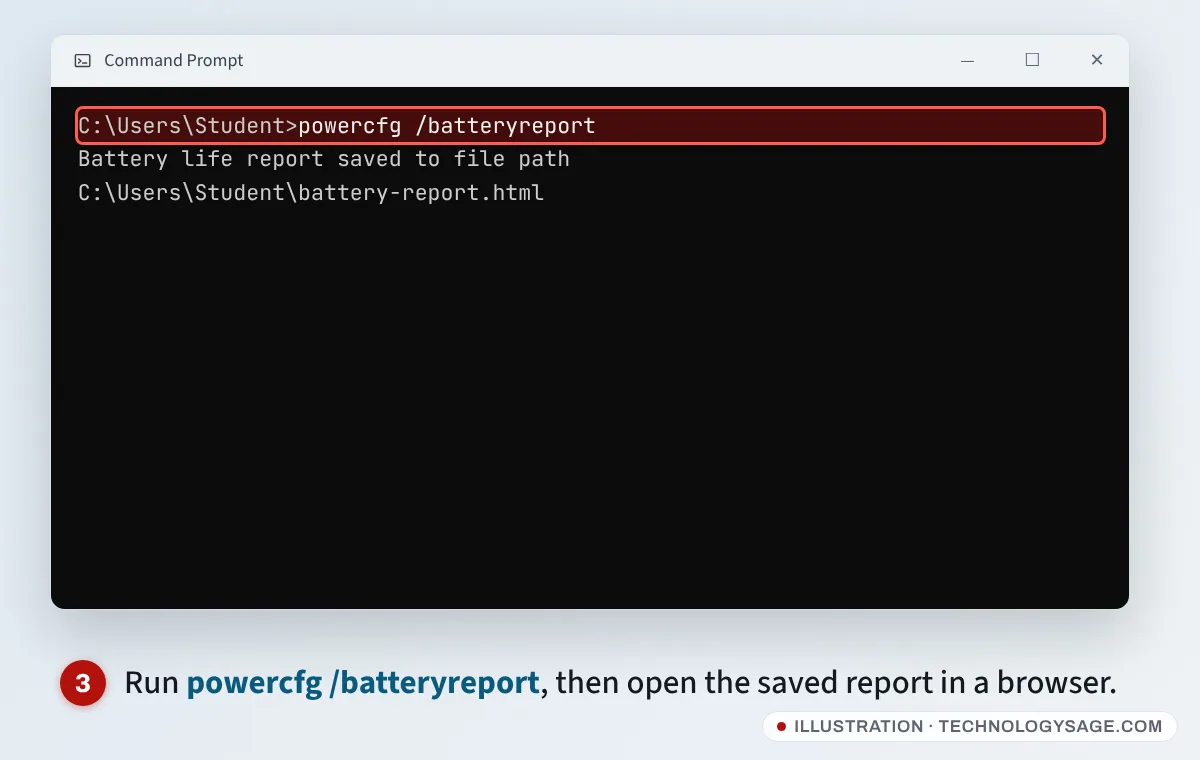
- On a used laptop, open Command Prompt and run
powercfg /batteryreport. It saves a file called battery-report.html. Open it and compare the battery’s design capacity with its full charge capacity. If the full-charge capacity is well below the design capacity, the battery is worn. - Check that the charger is original and matches the laptop’s wattage.
Free software for students: many universities give students Microsoft 365 (Office) and other software free through their student email. Ask your school’s IT office before you pay for Office.
Make a budget laptop last
- Keep at least 20% of the SSD free, and remove startup apps you don’t use.
- Clean the vents now and then. Dust causes fan noise and overheating shutdowns.
- Follow our tips to extend your laptop’s battery life.
Which should you buy?
- Lowest cost, new, US or UK: Acer Aspire Go 15 with at least 8GB of RAM.
- A laptop to last the whole degree: Lenovo IdeaPad Slim 3 with 16GB of RAM.
- You use an iPhone, or prefer macOS: MacBook Neo with education pricing.
- Google Classroom school, tight budget: a Chromebook with 8GB of RAM and a recent update expiry date.
- Nigeria, Kenya, India, Philippines: a refurbished ThinkPad, EliteBook or Latitude with 8th-gen Intel or newer, 8GB+ and an SSD.
On a tight budget overall? Pair it with a phone from our best phones under $200 guide, and keep your devices charged with a 20,000mAh power bank.
FAQ
How much RAM does a student laptop need?
8GB is the minimum for Windows 11 in 2026. 16GB is better and keeps the laptop fast for longer.
Is a Chromebook or a Windows laptop better for students?
A Chromebook is cheaper and simpler if your school uses Google Workspace. A Windows laptop is better if you need desktop software such as Microsoft Office, AutoCAD or SPSS.
Is the MacBook Neo good for students?
It’s a strong choice for writing, research and light creative work, with long battery life and $499 education pricing in the US. Its 8GB of memory can’t be upgraded, so it’s less suited to heavy software.
Is it safe to buy a used laptop?
Yes, if you check the processor generation, SSD, battery health and Windows activation, and get a written warranty. Avoid laptops older than Intel 8th gen or AMD Ryzen 2000, which don’t support Windows 11.
Can I use a laptop with Windows 10 in 2026?
It still works, but Windows 10 support ended in October 2025, and the one-year Extended Security Updates option for home users ended in October 2026, so it no longer gets security fixes. For a laptop you’ll use online every day, choose one that supports Windows 11.