In this guide
Instagram now lets you edit a Story after you have shared it, as long as you do it within 15 minutes. Instagram head Adam Mosseri announced the change on Wednesday, 18 November 2026, in a post on Instagram: “You can now edit text, music, stickers and drawings for up to 15 minutes after sharing, without losing your views, likes or replies,” as quoted by Business Today.
What it means for you: if you post a Story with a typo, the wrong price, the wrong date or the wrong song, you no longer have to delete it and start again. That matters most if you sell on Instagram or post event details, because deleting a Story also deletes the views and replies it had already collected.
What’s changing
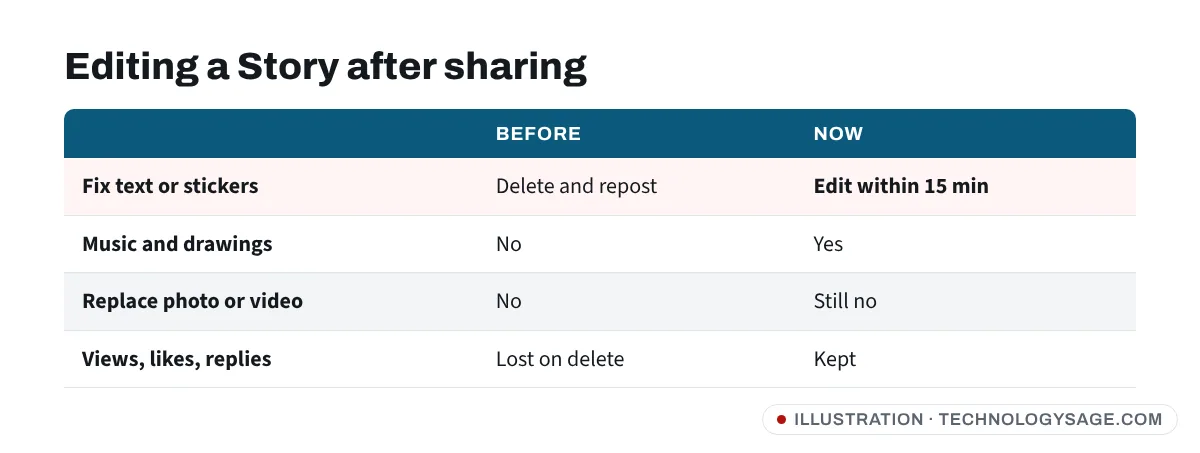
| Before | Now | |
|---|---|---|
| Fix a typo or sticker after sharing | Delete and repost | Edit within 15 minutes |
| What you can edit | Nothing | Text, music, stickers, drawings |
| Replace the photo or video | No | Still no: delete and repost |
| Views, likes and replies | Lost when you delete | Kept after an edit |
| Time limit | — | 15 minutes from sharing |
The 15-minute window matches the time Instagram already gives you to edit a direct message. Instagram tested a similar “Edit Story” button with some iPhone users in May 2026, but that version warned that likes, reactions and comments would be reset; the version announced this week keeps them.
The rollout is gradual, so not every account has it yet. Reports have not said whether it reaches Android and iPhone at the same time, or whether viewers see an “Edited” label: Business Today reports there is one, while Memeburn says it could not confirm that.
How to edit a Story after posting
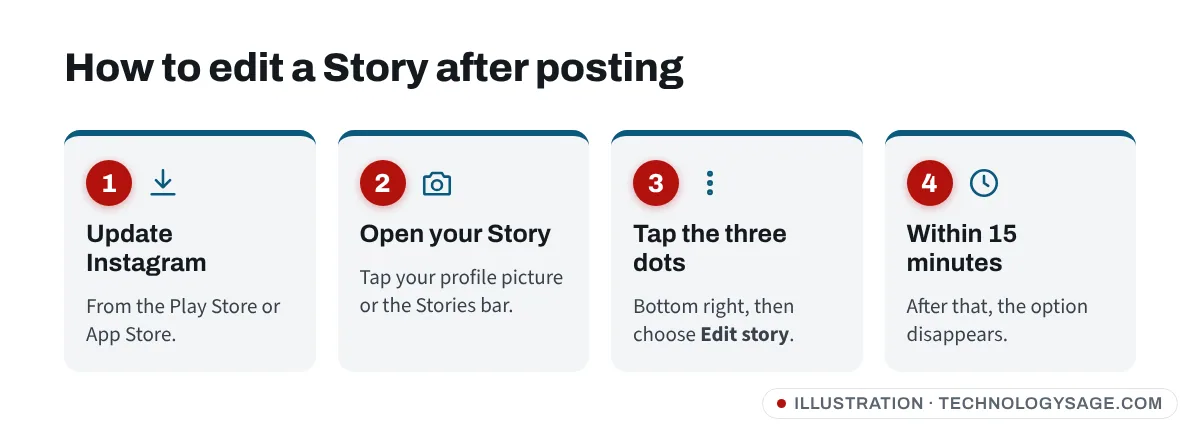
- Update Instagram from the Google Play Store or App Store.
- Open the Story you just shared, from your profile picture or the Stories bar.
- Tap the three-dot menu (bottom right) and choose Edit story.
- Change the text, music, stickers or drawings, then save.
If you don’t see Edit story, either the 15 minutes have passed or the feature hasn’t reached your account yet. Check again after the next app update.
What to keep in mind
- Check before you post anyway. Fifteen minutes goes quickly, and you can’t swap the photo or video itself.
- Highlights: it isn’t yet clear whether an edit carries over to a Story you already added to a Highlight. Check the Highlight after editing.
- Be wary of edited offers. Someone can now change a price, phone number or link sticker on a Story after you first saw it. If you’re buying from an Instagram seller, screenshot the offer and confirm the details in a DM before paying. Our Instagram safety tips cover the common scams.
- If you can’t get into your account at all, see how to recover a hacked Instagram account.
FAQ
Can I change the photo or video in my Story?
No. The edit covers text, music, stickers and drawings. To use a different photo or video, delete the Story and post a new one.
Will I lose my views if I edit?
No. Mosseri said views, likes and replies are kept when you edit.
Why can’t I see the Edit option?
Either more than 15 minutes have passed since you shared the Story, or the feature hasn’t reached your account yet. It is rolling out gradually.
Sources: Adam Mosseri’s announcement on Instagram, 18 November 2026, as reported by Business Today, 20 November 2026, and Memeburn, 22 November 2026.